Networking
You can connect your DataMan device via a simple Ethernet connection. You can either set the IP address and subnet
mask of your DataMan device manually or let them be configured automatically using DHCP.
Connecting Your DataMan to the Network
Connecting Your Fixed-Mount DataMan Reader to the Network
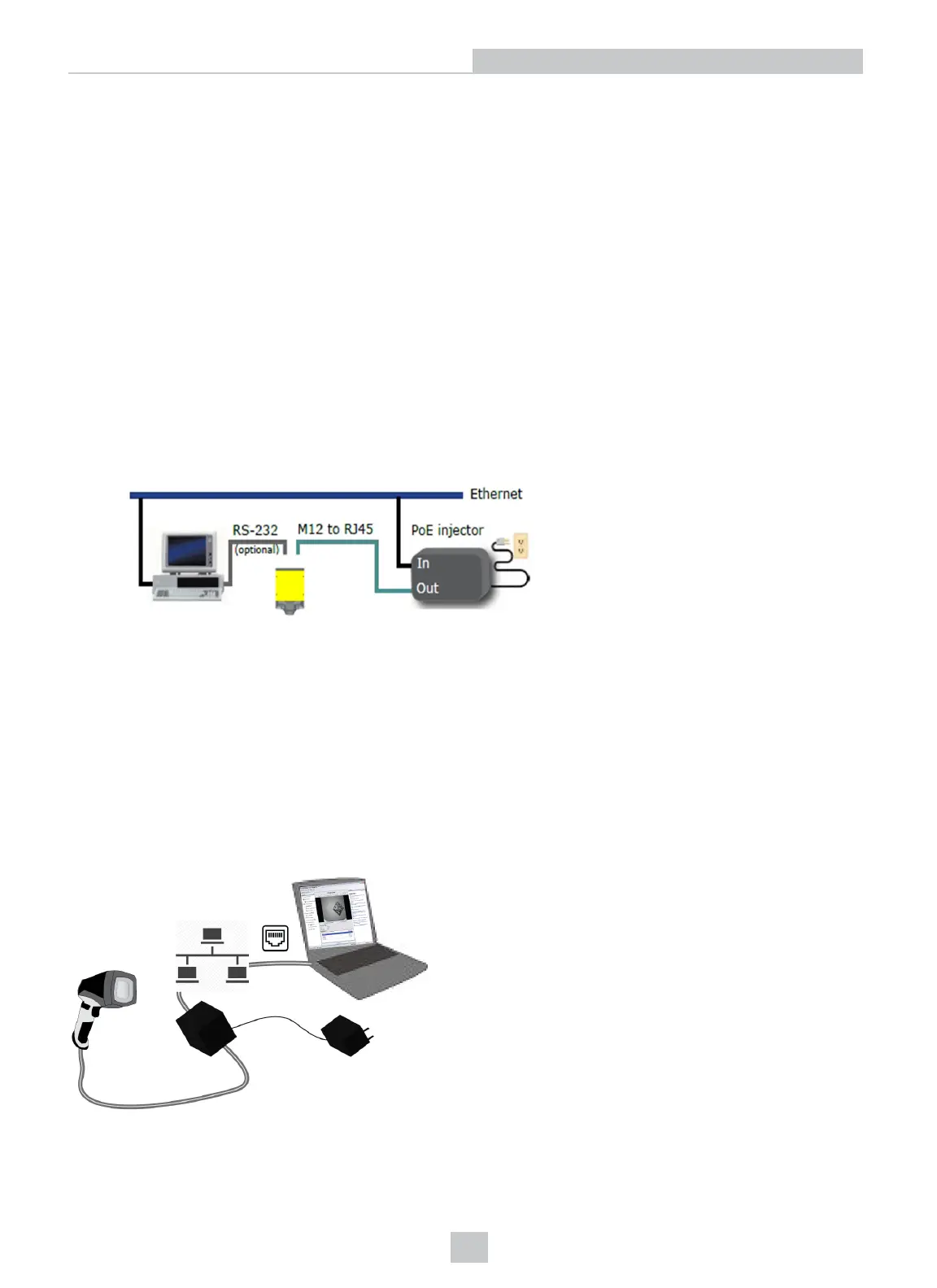
Supply power to the reader using either a Power over Ethernet (PoE) injector (DataMan 260 series readers) or the
Power and I/O breakout cable (CCB-PWRIO-xx).
Cognex recommends the following connection sequence in case of using a PoE injector:
1. Connect the PoE injector to the Ethernet network (both ends of the patch cable).
2. Connect the power cord (AC 230V/110V) to the PoE injector.
3. Connect the reader to the PoE injector.
To disconnect the reader:
1. Disconnect the reader from the PoE injector.
2. Disconnect the power cord from the PoE injector.
3. Disconnect the PoE injector from the Ethernet network.
Connecting Your Handheld DataMan Reader to the Network
If you are using an Ethernet slide-in with your handheld DataMan reader, power your reader through Power over
Ethernet (PoE) and connect the Ethernet cable of the PoE to the network.
6
Networking











 To Next Page