SYMBOLS USED ON THE CONTROL PANEL
9 1
8 2
7 3
6 4
5
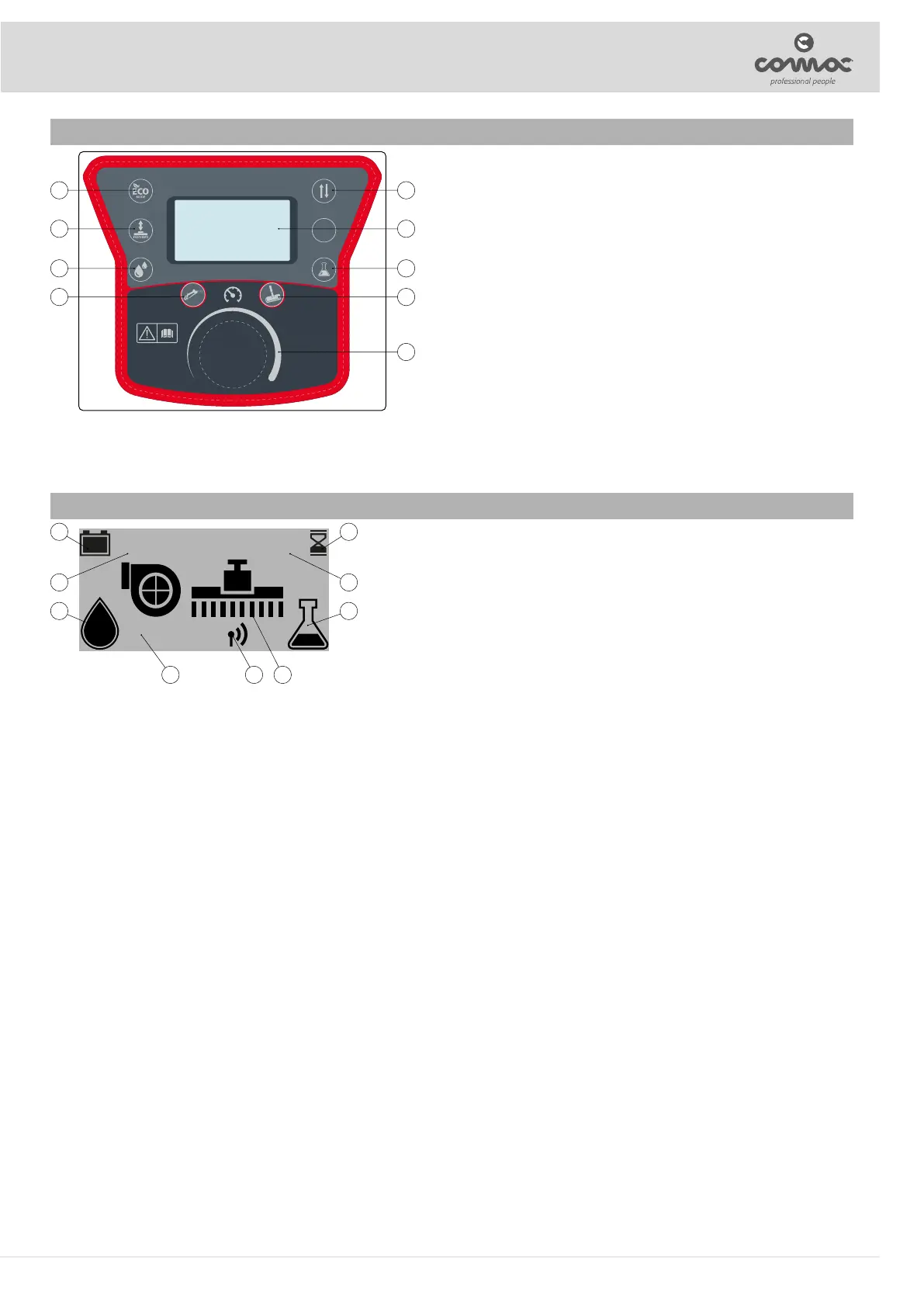
The control screen is divided as follows:
1. Symbol of the reverse movement selector: indicates the switch that
enables reverse gear to be activated.
2. Command display: this is a digital display that enables the parameters set
on the machine to be viewed during use.
3. Detergent percentage adjustment symbol (versions with CDS system):
indicates the switch that enables the percentage of detergent inside the
water circuit to be adjusted.
4. Liquid vacuum wand activation symbol (SST versions): indicates the
switch that enables the liquid vacuum wand function to be activated (see
"LIQUID VACUUM WAND FUNCTION").
5. Traction motor potentiometer symbol: indicates the knob that enables the
potentiometer associated with the traction motor to be adjusted.
6. Tank cleaning gun activation symbol (SST versions): indicates the switch
that enables the tank cleaning gun function to be activated (see “TANK
CLEANING GUN FUNCTION”).
7. Water level adjustment symbol (versions with CDS system): indicates the
switch that enables the percentage of water inside the water circuit to be
adjusted.
8. Brush head control symbol (versions with PM system): indicates the button that controls the jack used for lifting the brush head.
9. Symbol for ECO-MODE program: indicates the switch that enables ECO-MODE to be activated.
SYMBOLS USED ON THE CONTROL PANEL
100% 0000.00
ECO
19
28
37
456
The control screen is divided as follows:
1. Graphic symbol that identies the machine's hour meter (see "MACHINE HOUR
METER").
2. Numerical value that indicates the machine's total working time; this value is
expressed in hours and minutes (see "MACHINE HOUR METER").
3. Graphic symbol that identies the percentage of detergent present in the machine's
water system (see “ADJUSTMENT OF THE DETERGENT SOLUTION”).
4. Graphic symbol that identies the type of working programme in use (see
"WORKING").
5. Graphic symbol that indicates that the CFC system is active.
6. Graphic symbol that indicates that the ECO-MODE work mode is active (see "ECO-
MODE").
7. Graphic symbol which identies the quantity of water present in the machine's water system (see “ADJUSTMENT OF THE DETERGENT
SOLUTION”).
8. Numerical value that identies the percentage of charge of the batteries in the machine (see "BATTERY CHARGE LEVEL").
9. Graphic symbol that identies the percentage of charge of the batteries in the machine (see "BATTERY CHARGE LEVEL").
11


 To Next Page