Operation Instructions
5-13
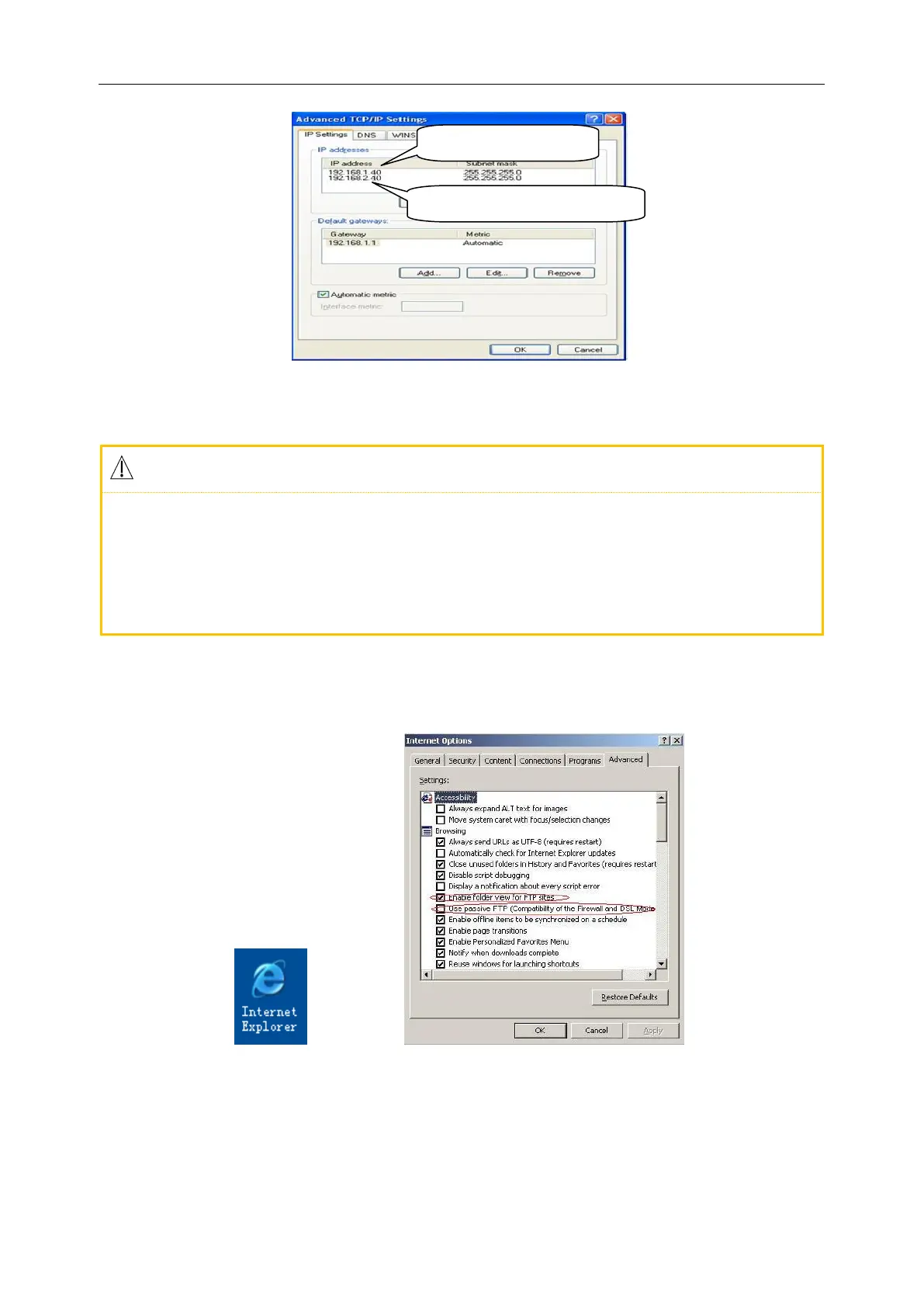
Figure 5-10 Computer IP Setup
If your computer is connected to WAN or LAN, please set the IP address as shown in Fig. 5-10.
Either IP number should not conflict with that of any other computer. If the ECG machine is
connected to an off-line computer, they can share the same IP number. Follow the steps in above
(3) → Internet Protocol (TCP/IP) → Use the IP Address Below (S) → input the remote IP
number of the ECG machine.
4) Set the FTP view protocol: Internet Explorer (double click, Figure 5-11) → Tools → Internet Options →
Advanced → Browse → uncheck „Use Passive FTP (Compatibility of the Firewall and DSL
Modem)‟→ check „Enable Folder View for FTP Websites‟ (Figure 5-12 in red) → Save.
Figure 5-11 IE Browser Figure 5-12 FTP protocol option
5) Double click „My Computer‟, input ftp://root:comen@192.168.2.217 as the IP address, and press [Enter]
to view the case data displayed on the window “Data Management” of the ECG machine.
ECG machine remote Address



 To Next Page