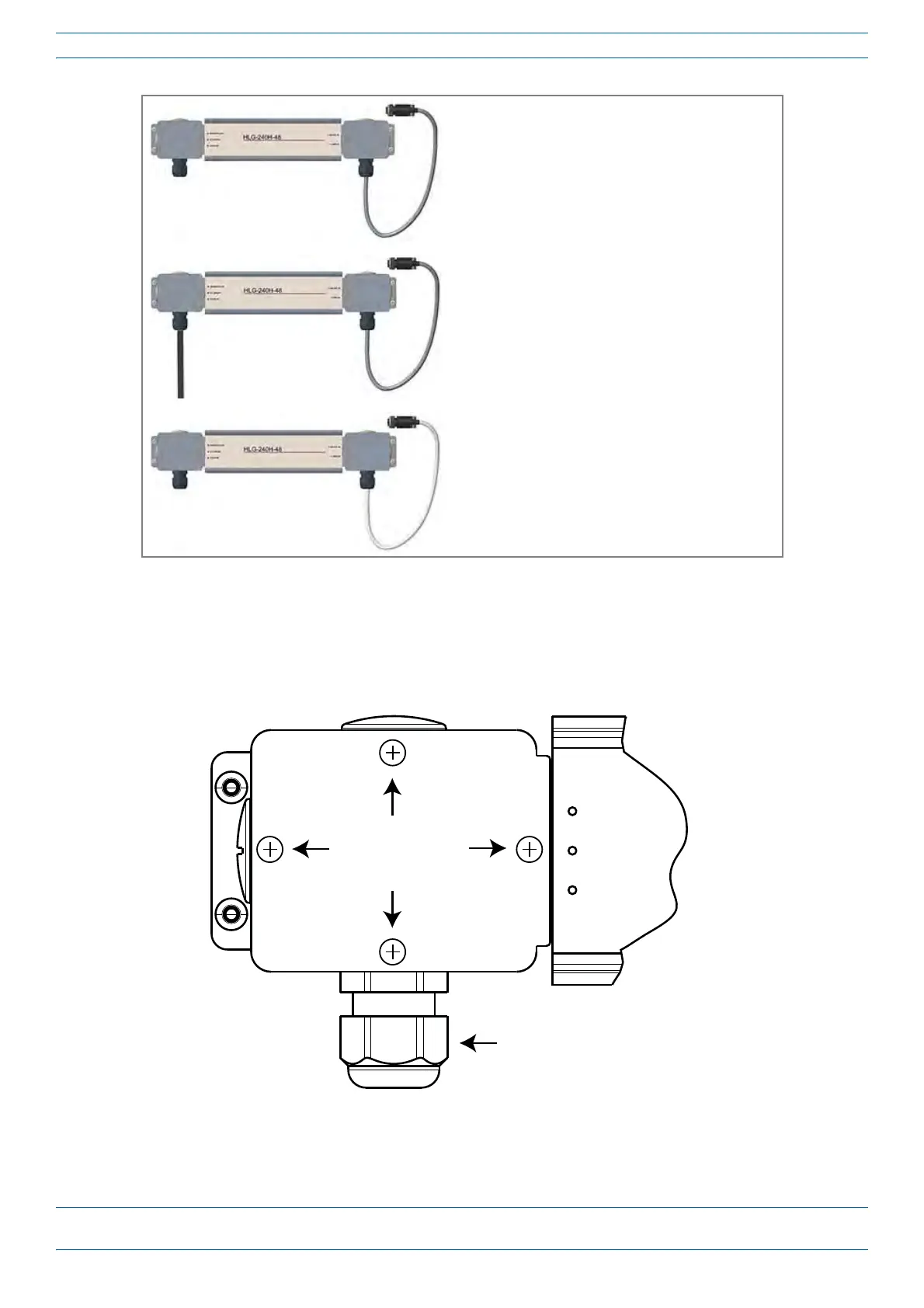
240W Local AC Power Supply Kit, No AC Cord
(CommScope PN 7775087-xx)
AC Input power cord to be supplied by the installer.
240W Local AC Power Supply Kit with AC Input Cord
(CommScope PN 7809798-xx)
3m AC input cord is connected internally to PSU
but unterminated at customer end.
240W Local AC Power Supply Kit for Plenum Space
(CommScope PN 7809823-xx)
Not for outdoor use!
M0201ANC_uc CommScope Era
™
Fiber Low Power Carrier Access Point Installation Guide
© June 2019 CommScope, Inc. Page 39
Mount the Fiber CAP L
Figure 14. CommScope Local AC/DC Power Supply Kits
To insert and connect the AC input cord for kit number 7775087-xx and kit num
ber 7809823-xx, do the
following:
1 Remove the four Phillip
s head screws from the left junction box cover of the kit and then remove the
junction box cover.
Cable Gland
ACN BLUE
ACL BROWN
GREEN/YELLOW
Figure 15. AC/DC Supply Junction Box Cover Screws










 To Next Page