ComNav G3 GPS Compass Installation & Operation
Document PN 29010092 V2.3 - 9 -
cable can plug into a standard NMEA 2000 micro Tee-shape connector. Be sure to secure the
connection by screwing in the cable connector completely.
If you are starting your NMEA 2000 experience from G3 Display and ComNav GPS, you need to
plan and build your network before connecting your G3 Display into it.
First make sure you have all network necessaries:
Termination resistors – at each end of the linear network backbone, a 120ohm termination
resistor is required. You can order termination units from ComNav that can directly plug into a
standard NMEA 2000 backbone cable.
Backbone cables – your G3 Display and G2 GPS Compass must connect to a backbone to
communicate with each other. When planning for your backbone wiring, please keep in mind that
you may expand the network sometime in future. To ease the future installation, it is good idea
that you place some Tee-shapes as the drop point taps along your backbone bus.
Power supply and cable – NMEA 2000 network requires a dedicated power supply. The source
is connected to the network bus at any drop point, just like the G3 Display and G2 GPS. You can
purchase an NMEA 2000 power cable from ComNav.
Connecting to GPS with NMEA 2000 interface
If your GPS has the NMEA 2000 interface, the connecting between the GPS and G3 is automatic
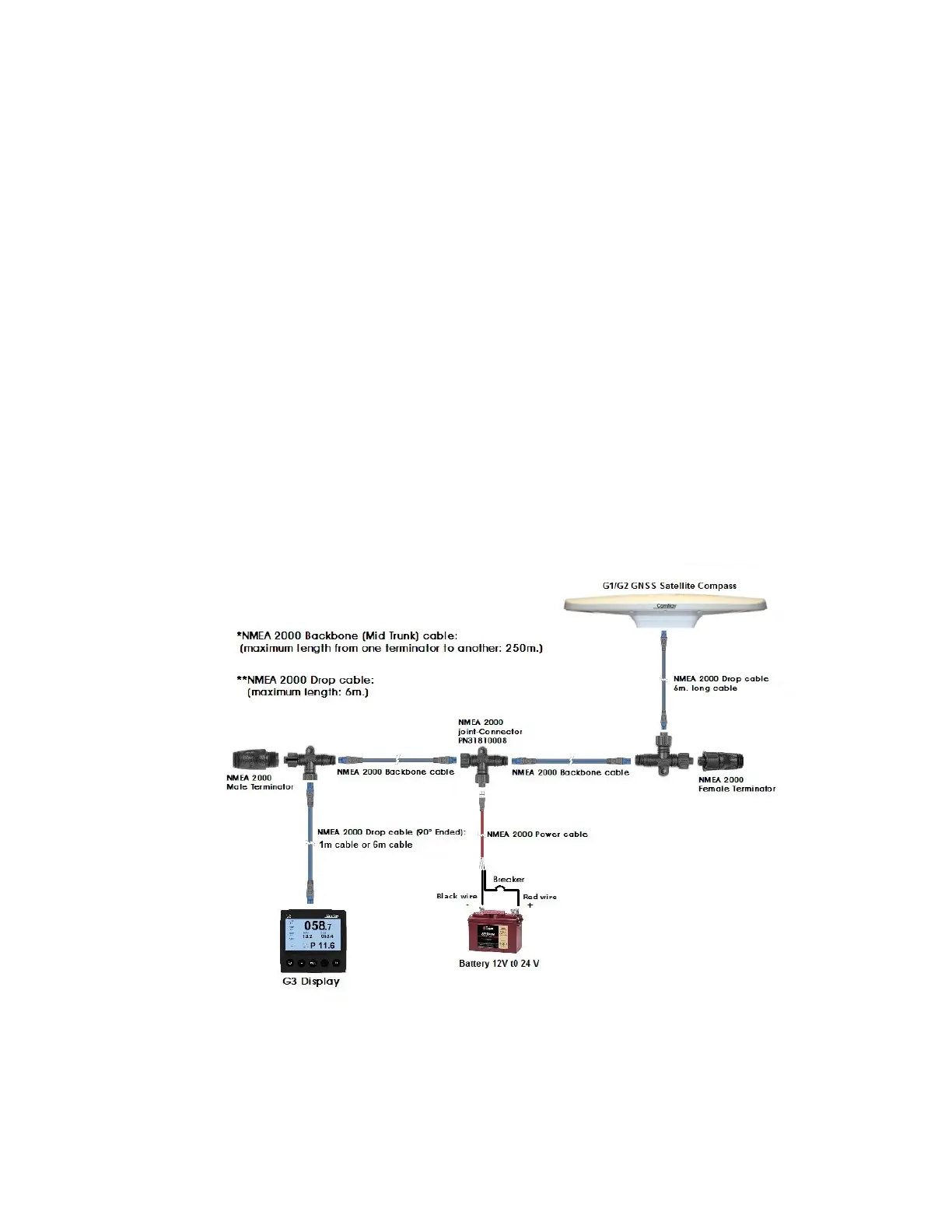
done through the network connection. Figure 3 shows a minimum NMEA 2000 network with G3
Display and G2 GPS.
Figure 3 – G3 connection to NMEA 2000 GPS compass


 To Next Page