ComNav G3 GPS Compass Installation & Operation
Document PN 29010092 V2.3 - 22 -
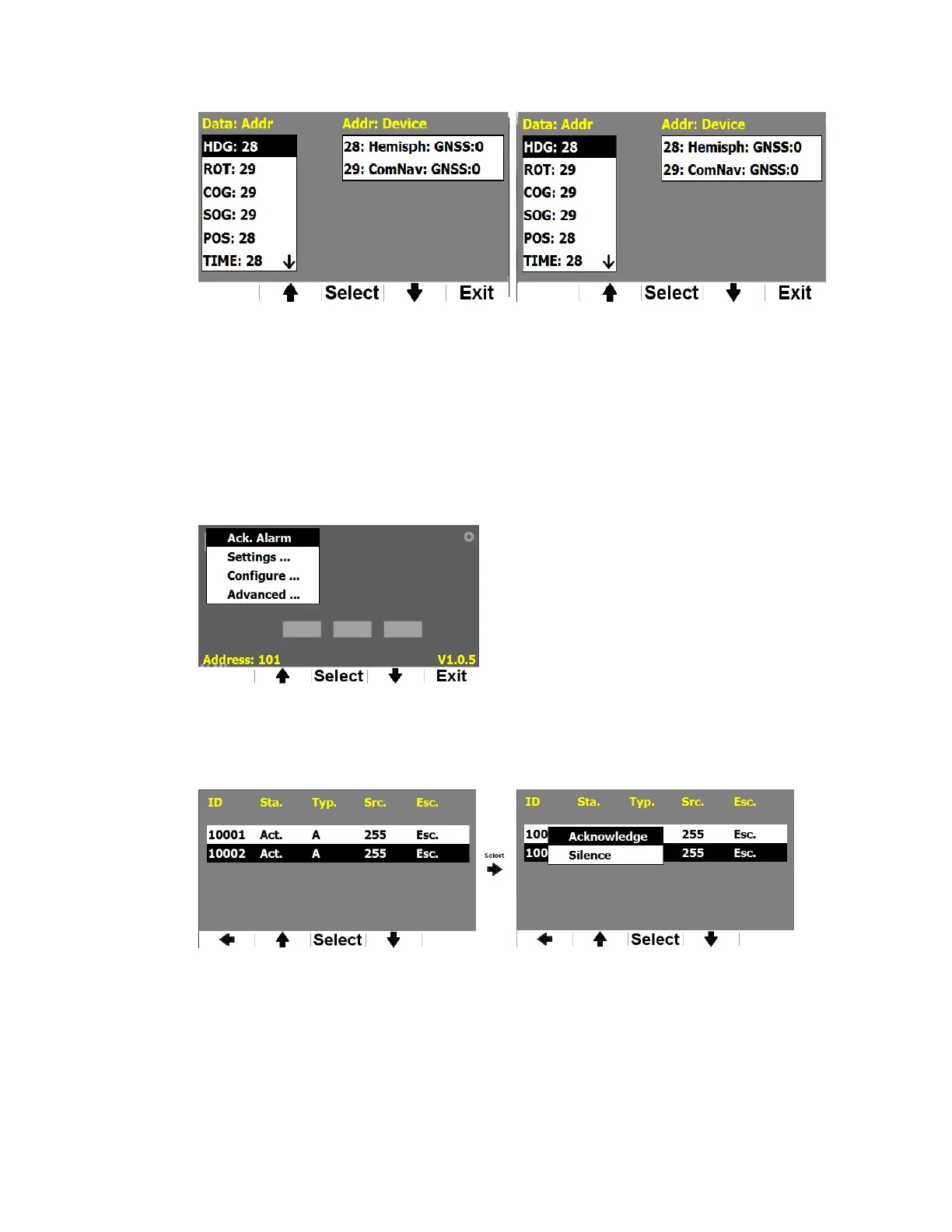
Figure 22 – Assign a device for a PGN
Reset to factory default
Factory default menu allows you to set all configurable parameters to the values as you first
bought it.
Acknowledge an alarm
When an alert condition is triggered, and the alert view shows up on the screen, you can see
“Ack. Alarm” at the top of the Main Menu whenever you press Fn (Figure 23). You can enter the
alarm menu by pressing Select.
Figure 23 – Main menu when there is an alarm
The alarm menu will list all alert conditions. Scroll up and down to select an alert condition,
you will be able to acknowledge or silence the selected alert condition. Figure 24 shows an
example.
Figure 24 - Acknowledge an alert condition from Alarm menu
You will not see Ack Alarm in the menu when there is no alert condition.


 To Next Page