ComNav G3 GPS Compass Installation & Operation
Document PN 29010092 V2.3 - 14 -
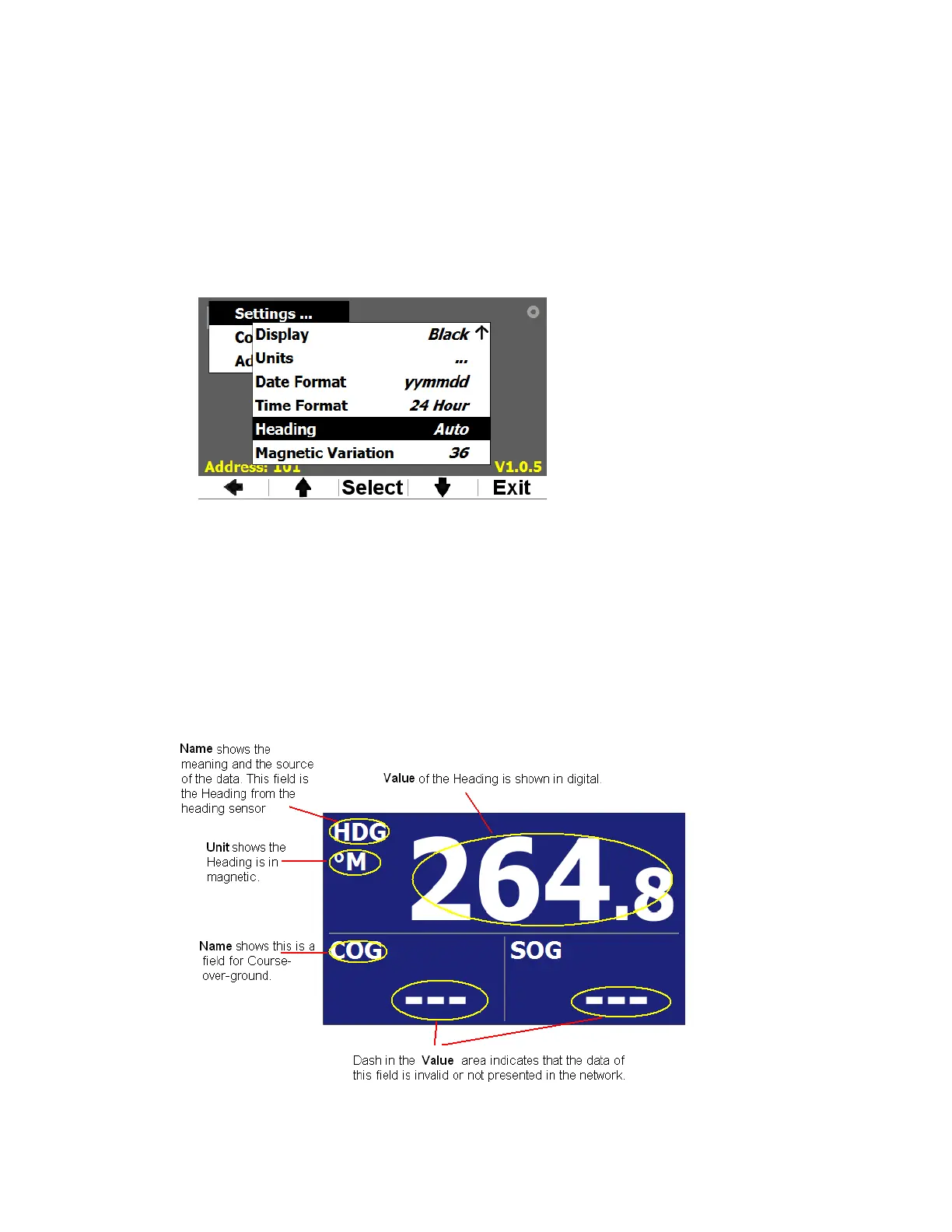
The following Soft keys are used in G3.
Select – Select key is used to select the current menu item. When a menu item is selected, if the
item is a subsequent menu, this submenu will be brought up; otherwise the selected data will be
used in current operation.
<- - <- key is used to bring the menu to a level up.
↓
Down – Down arrow key is used to scroll down the items in current menu
↑
Up – Up arrow key is used to scroll up the items in current menu
Exit – Exit key is used to exit the menu operation and go back to display mode
Figure 7 – Example of keypad status bar
2.2 Display
Display screens
G3 is specifically designed to work with GPS compass. It has 15 predefined screens to show
many kinds of GPS data. Press PAGE button you can scroll over these screens.
A screen page is made up by several data fields. Typically, a data field has 3 visual components:
the Name as the description of the data field, the Unit of the data, and the Value of the data.
Figure 8 gives an example of a typical screen page.
Figure 8 – Visual components of a data field on a screen page


 To Next Page