ComNav G3 GPS Compass Installation & Operation
Document PN 29010092 V2.3 - 23 -
2.5 Advance Operations
Change PGN output rates
From Advance menu, you can change the PGN output rate for a NMEA 2000 transducer in the
network.
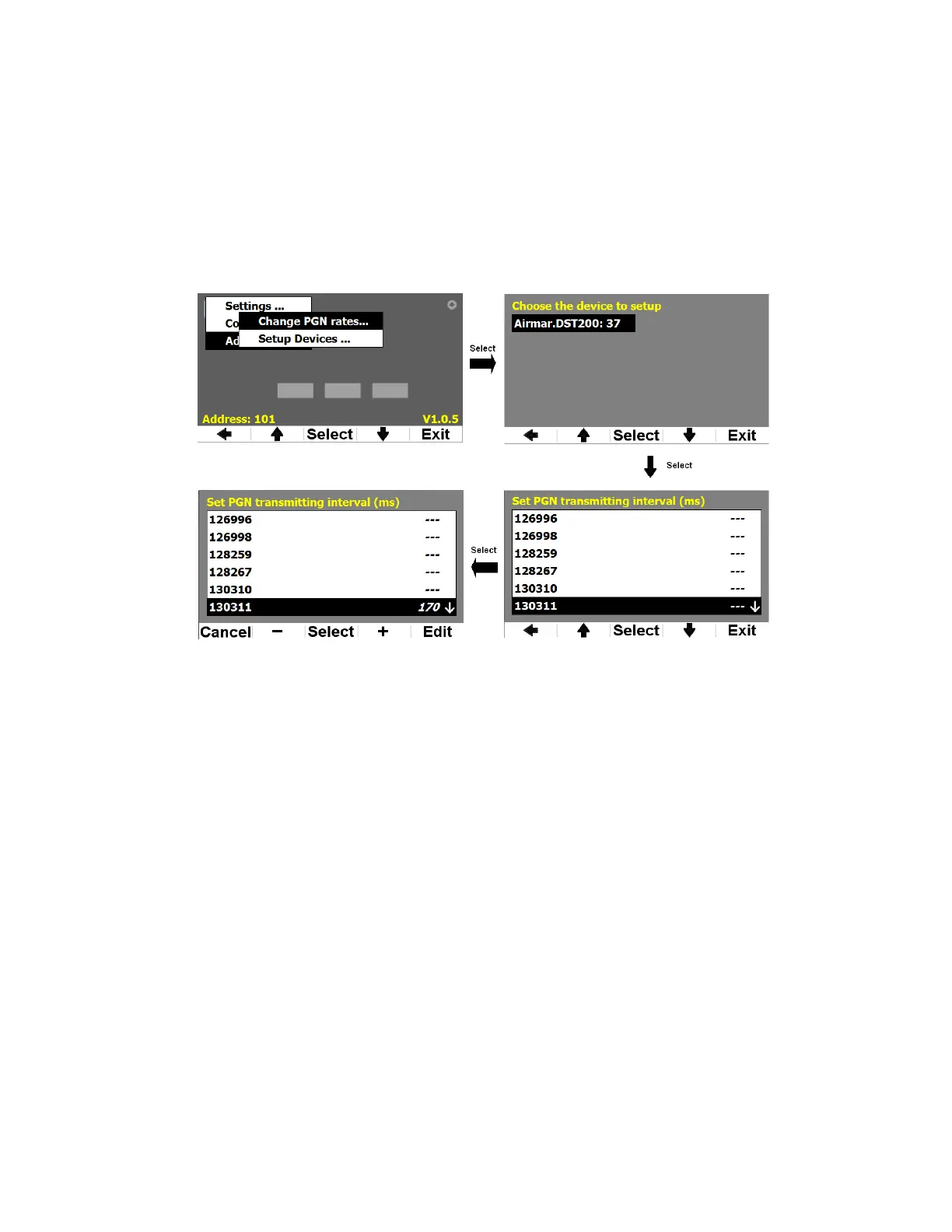
In Advance menu, when you Select Change PGN Rates, G3 will search for all devices in the
network and show them in a list. Highlight the device you are interesting on, and Select it, G3 will
request the transmitting PGN list from that device, and show it on the screen. This is illustrated in
Figure 25.
Figure 25 - Change PGN rates of an NMEA 2000 transducer
When you reach the left bottom screen in Figure 25, you can use
+
and
-
buttons to change the
transmitting interval in ms. Edit button allows you to bring up the virtual keypad as seen in Figure
8.
After you are satisfied to the interval value, you press Select to send the value to the transducer.
G3 will wait for the transducer’s response. According to NMEA 2000 protocol, if the transducer
does not response with an error, the rate is accepted; if the transducer responses with an error,
G3 resets the transmitting interval to its original value. This is illustrated in Figure 26.


 To Next Page