ComNav G3 GPS Compass Installation & Operation
Document PN 29010092 V2.3 - 15 -
Name as the Indicator of Data Source
The Name in Figure 8 not only tells the meaning of the data of the field; it is also the indicator of
the data source for this field. G3 uses the same data source for a data type across screens
(Pages). This way you can be sure that your heading always comes from the same heading
sensor, and your satellites information always comes from the same GPS.
Monitor Alert Conditions from a heading sensor
The G3 display will monitor the alert PGN 126983 from a HDG data source (refer to description
above). If alert conditions are seen, an alarm view will pop up to the left bottom corner of the
screen.
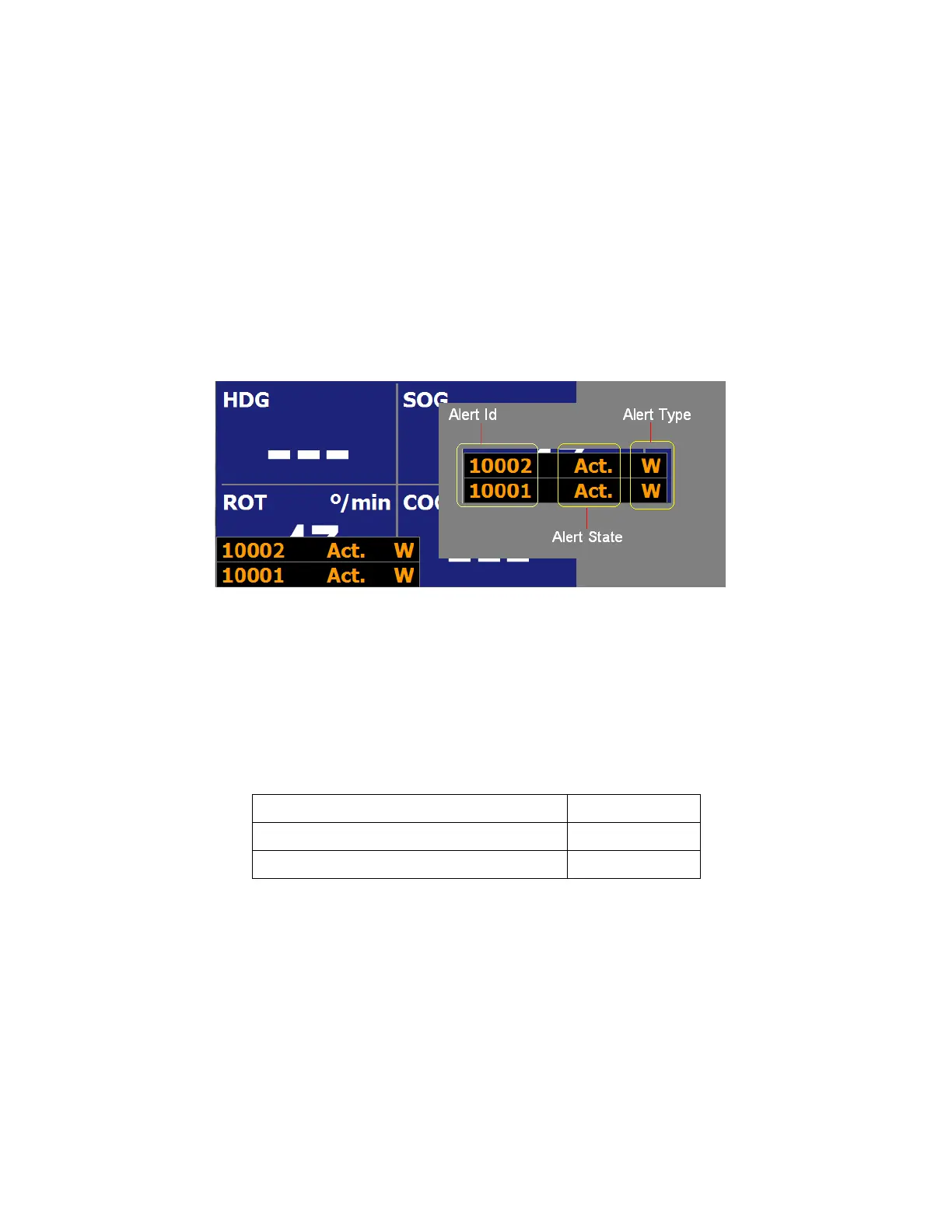
The alarm view has 3 columns, each is defined as show in Figure 9.
Figure 9 - Alarm View Explanation
The alert text will be Red when the alert type is an Alarm, and yellow orange when it is a warning.
The text will flash if the alert condition is active or silenced. It will be steady when the alert is
acknowledged.
For how to acknowledge or silence an alert, see Acknowledge an alarm in 2.4 Menu operation.
ComNav alert conditions
Table 2 is a list to ComNav alert conditions and their ID. These alerts are available in G Series
Compasses (G2 & G2B).
Alert Condition Alert Id
No position for more than 60 seconds 10001
No heading for more than 60 seconds 10002
Table 2 - Alert Conditions Reference


 To Next Page