A Introduction
WARNING !
READ HEALTH AND SAFETY PRECAUTIONS
BEFORE YOU START ANY SERVICE WORK.
Ensure genuine parts are available for fitment.
Frequency of service work will depend on:-
a) Time periods mentioned in introduction.
b) Climatic conditions.
c) Installation.
B - Checking Operation of the Compressor
Check the compressor operating temperature
Wait until air-end vent down cycle is complete.
Check that the air-end pressure gauge reads zero.
Pour a small amount of oil into the thermometer pocket of the oil filler
plug. Screw a temperature gauge or thermometer into the
thermometer pocket.
Assuming the compressor is serviced correctly the machine is
capable of operating in ambient temperatures up to a maximum of
40°C.At this ambient the bulk oil temperature measured at the filler
plug should be 70-90°C.
Check oil temperature. When the compressor is working the
temperature should be:-
Initial startup and warm-up period. < 70°C
Optimum working temperature. 70 - 95°C
High temperature. 95 -100°C
Stop ! See fault finding section. >100°C
Check pressure - air-line systems
Check the air-line system pressure by using the electronic control
panel.
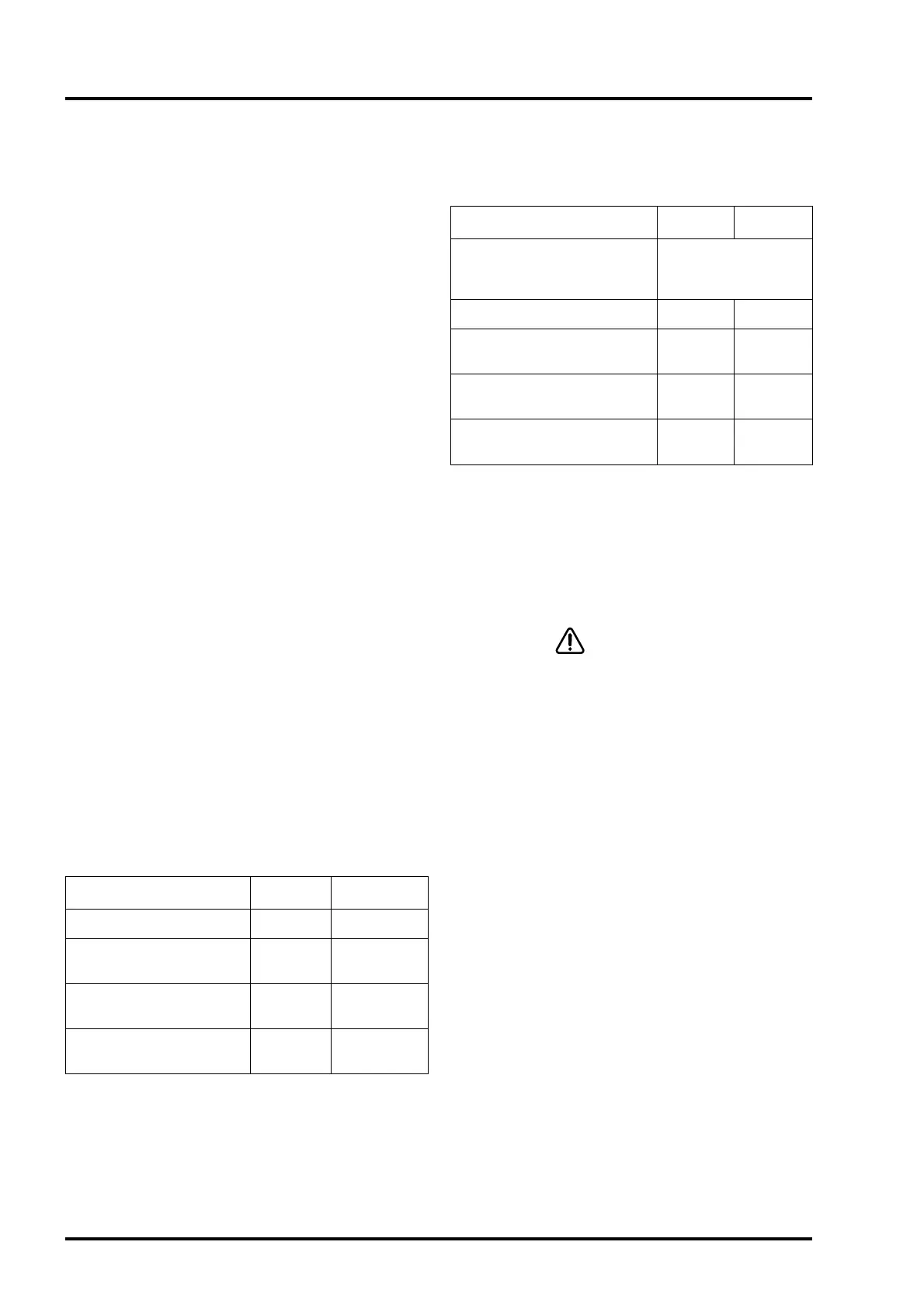
If the correct size of compressor has been installed the gauge
should read:
Check pressure in Compressor air-end
Check compressor air-end pressure using compressor pressure
gauge. If the correct size of compressor has been installed the
gauge should read:
Check oil level
Check oil level using the compressor oil-level sight glass. The
sight-glass is located in the oil chamber. When the compressor is
running, oil should be visible in the sight-glass. When stopped the
sight-glass should be full. If not top up.
C - Basic Service Procedures
WARNING !
STOP THE COMPRESSOR AND ISOLATE FROM
MAINS ELECTRICAL SUPPLY. LOCK THE
ISOLATOR IN THE OFF POSITION. FIT A SAFETY
NOTICE TO THE ISOLATOR ADVISING THAT
WORK IS BEING CARRIED OUT ON THE
COMPRESSOR.
CLOSE THE AIR OUTLET VALVE TO ISOLATE THE
COMPRESSOR FROM THE AIR-LINE SYSTEM. FIT
A SAFETY NOTICE TO THE VALVE ADVISING
THAT IT IS NOT TO BE OPENED.
DO NOT PROCEED UNTIL GAUGE READS ZERO!
WHEN CHANGING RECOMMENDED OIL TYPES IT
IS ADVISABLE TO FLUSH THE COMPRESSOR.
WHEN CHANGING TO FLUID FORCE CLEAR THE
COMPRESSOR MUST BE FLUSHED OUT WITH
FLUID FORCE PRIME.
Page 18
CompAir Hydrovane Limited
1 Routine Servicing
Condition 7 bar 10 bar
When compressor is stopped 0-7.7 barr 0-10.8 bar
Normal working pressure
(continuous run mode)
7.0-7.8 bar 10.0-10.8 bar
Sto compressor and see fault
finding if
>7.8 bar >10.8 bar
Normal working pressure
(auto mode)
6.0-7.4 bar 6.0-10.4 bar
Condition 7 bar 10 bar
Pressure when stopped
After vent down air-end
pressure should read
0 bar
Initial start up (3 seconds approx.) 0-53.5 bar 0-5.5 bar
When charging the air-line 5.5-7.8 bar
5.5-10.8
bar
Normal working pressure
(continuous run)
7.0-7.8
10.0-10.8
bar
Stop compressor and see fault
finding if
>7.8 bar >10.8 bar



 To Next Page