JHT01 Service Manual
2-23
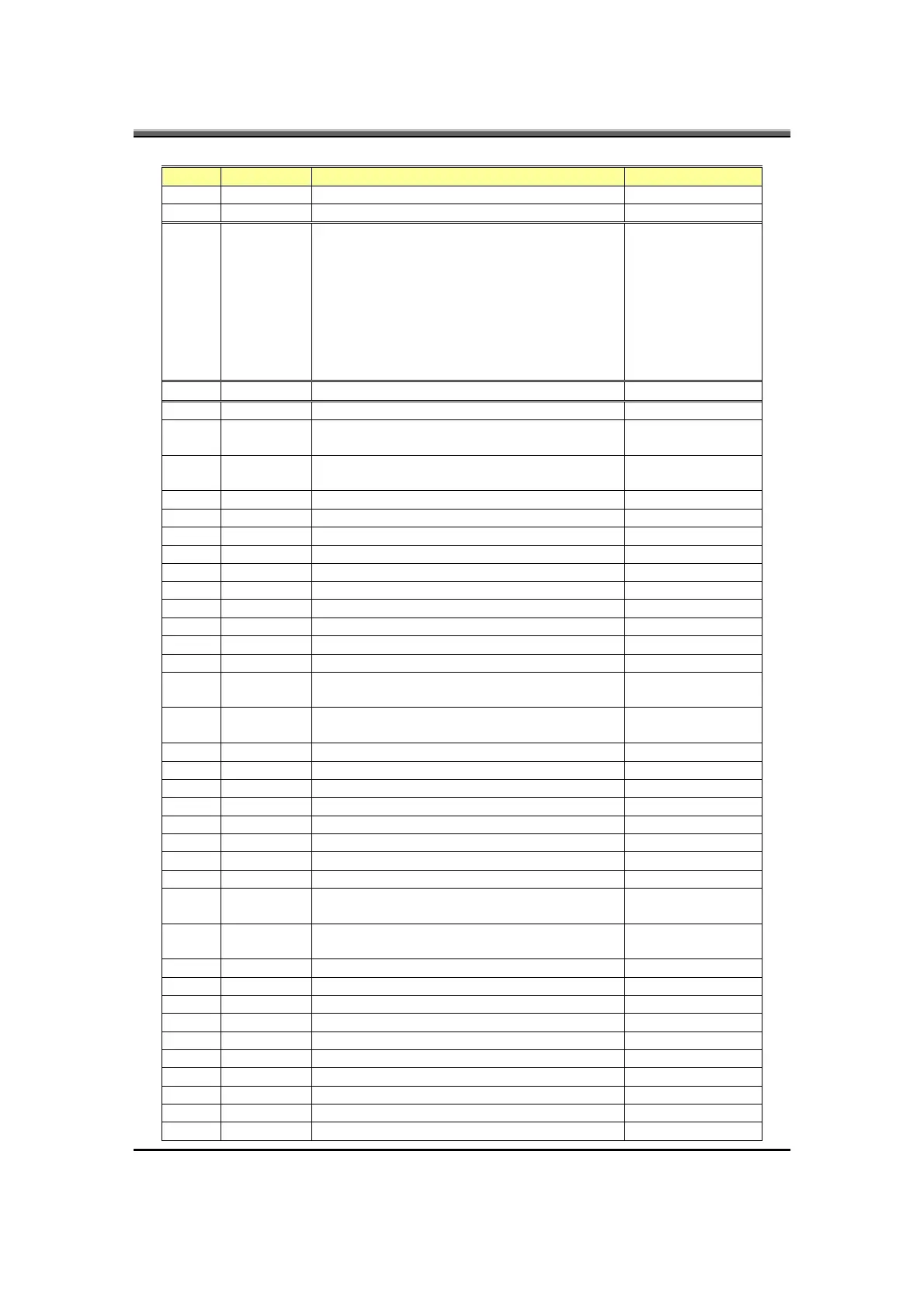
CMD DATA Description return
PME signal active CEh
Sleep button event D1h
57h None Module identification
Bit0: Main HDD exist
Bit1: Int. FDD exist
Bit2: CD_ROM exist
Bit3: 2nd HDD exist
Bit4: LS120 exist
Bit5: External FDD
Bit6: CRT plug In/Out:0=Out, 1=In
Bit7: ODD power on/off
One byte
58h 0x00-0xFF Set flat panel type None
59h System state notification None
60h Enable FnKey of sticky key function (Support by
ToshibaPowerSaver)
None
61h Disable FnKey of sticky key function (Support by
ToshibaPowerSaver)
None
62h Fn key down (Support by ToshibaPowerSaver) None
63h Fn Key Up (Support by ToshibaPowerSaver) None
64h Enable scancode for test button None
65h Disable scancode for test button None
70h Sticky key mode enable (for no AP support used) None
71h Sticky key mode disable (for no AP support used) None
76h Enable FAN speed full on None
77h Disable Fan speed full on None
78h Disable FAN fine tune function None
79h Enable FAN fine tune function None
90h One touch button application allow to send scan
code (user button) if user pressed
None
91h One touch button application don’t allow to send
scan code (user button) if user pressed
None
94h Mute on None
95h Mute off None
9Ah Disable AC power source None
9Bh Enable AC power source None
9Ch Enable LID switch resume function None
9Dh Disable LID switch resume function None
9Eh Disable Internal keyboard. None
A2h System shutdown None
A3h System enter beep mode for battery LB state in
CMOS setup
None
A4h System enter quiet mode for battery LB state in
CMOS setup
None
A5h Fan control by EC None
A8h Fan control by OS None
ADh Wireless LAN wakeup enable None
AEh Wireless LAN wakeup disable None
B1h System into standby None
B2h Resume from standby None
B3h LLB resume from S3 (enable) None
B4h LLB resume from S3 (disable) None
B5h VGA suspend enable None
B6h VGA suspend disable None



 To Next Page