Start
Escape
Stop Up or Increment Value
Reset Down or Decrement Value
Enter
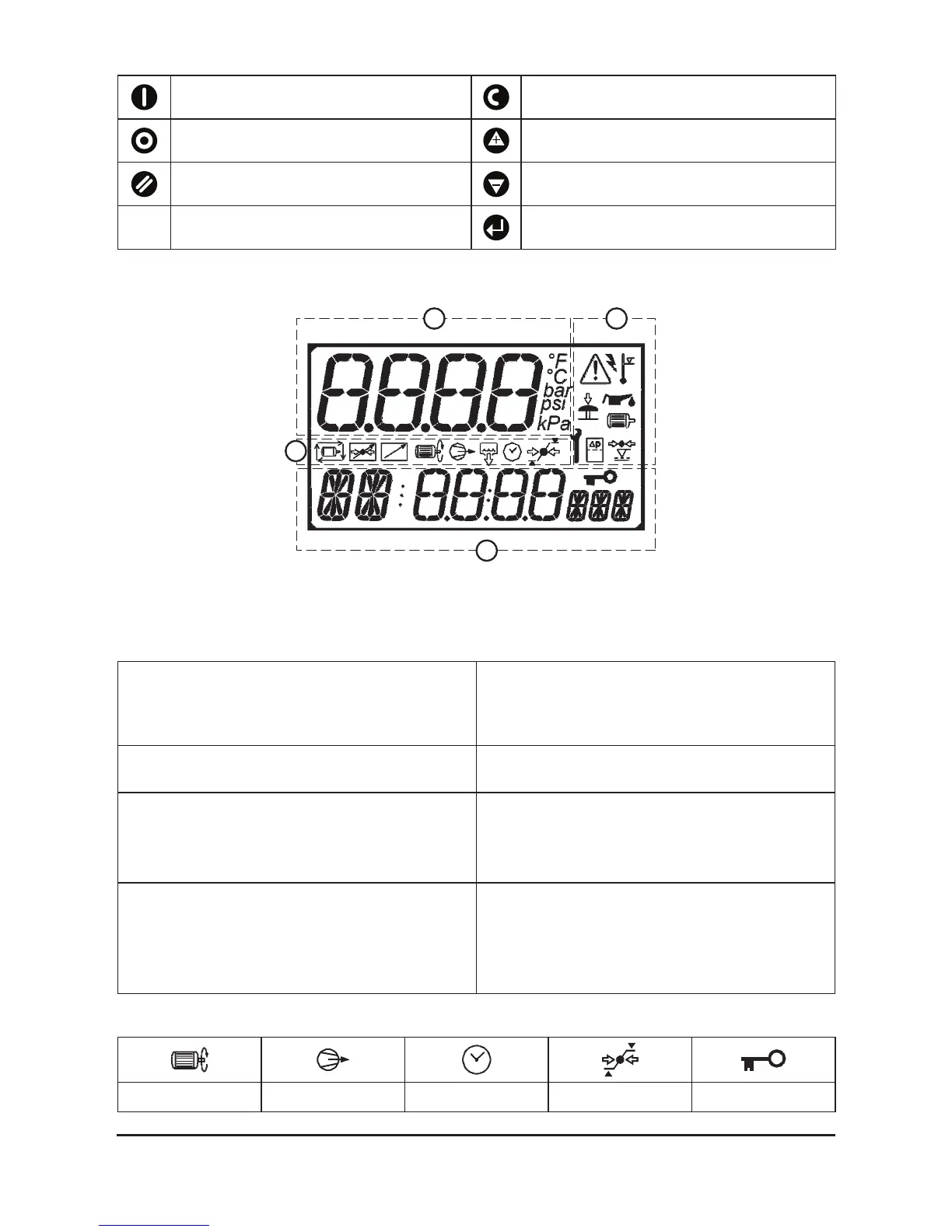
Information displayed on the LCD display.
Fig. 4.2 LCD display
The display is divided in to 4 areas.
Top, Left: Display Field: 4 character numeric display, with unit symbols,
used to continuously show delivery pressure in
normal operating mode or menu page number in
menu mode
Top, Right: Fault Symbol Field: Symbolic displays used to indicate common
general fault conditions
Middle: Symbolic displays used to reinforce meaning of
selected item, fault condition.
Symbolic status information in normal
operational mode ‘Information Screen’ item
Bottom: Item and Value Field: Item identication: 2 character alphanumeric, 14
segment
Item Value: 4 character numeric, 7 segment
Item Unit: 3 character alphanumeric, 14
segment
Operational Display Symbols:
Unloading Loading Timer Pressure indicator Locked
2
3
4
1



 To Next Page