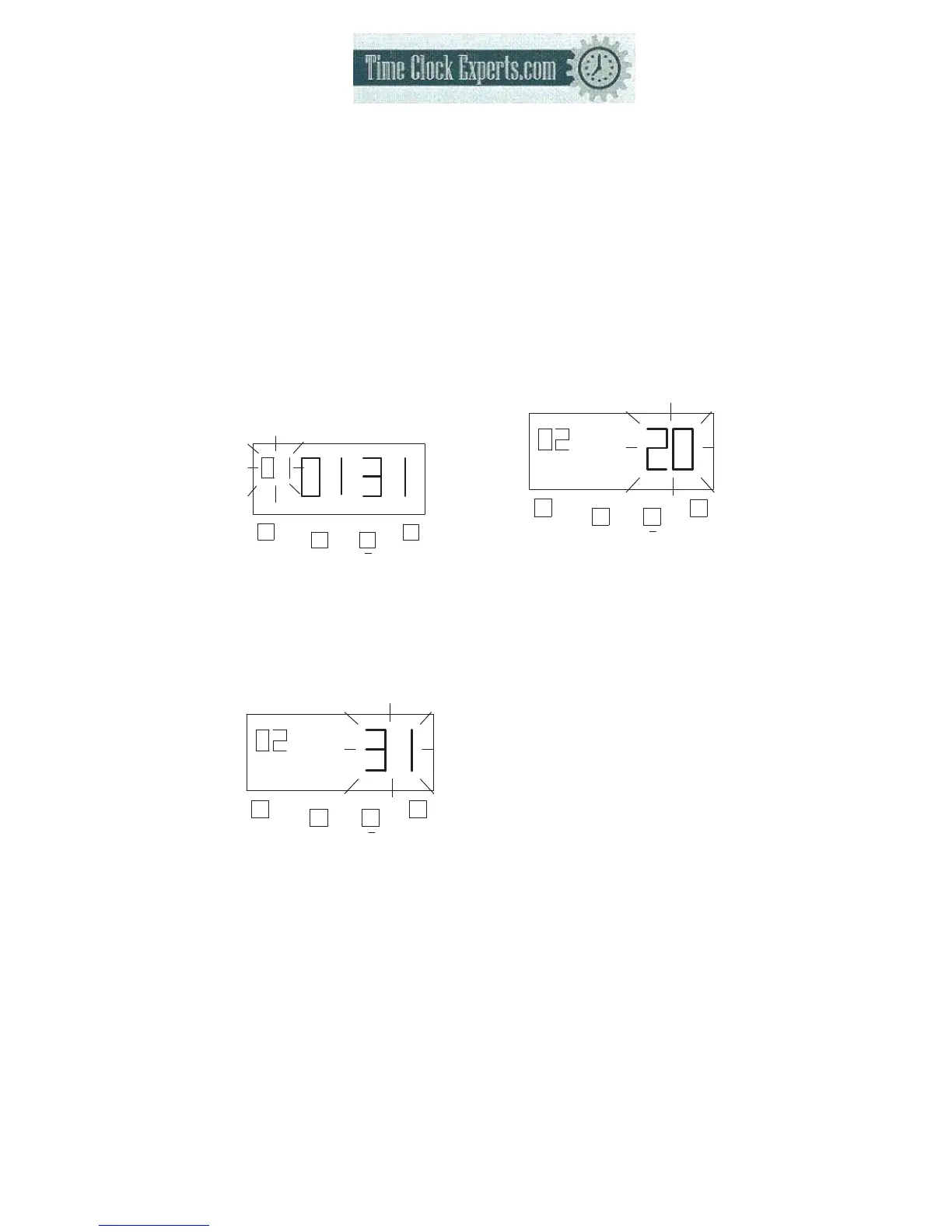
(4) Example: Setting Type of Work is part-time, Pay ending day is 20.
*Pay ending day will printed on time card’s32’th row. After the Pay ending day,
the first day imprint will be on the time card’s 2’nd row.
14
a. Setting “Type of Work”
Press the [F] button, and position
the “▲” under the “PRINT
FORMAT” mark. The “Type of
work” flashes (The flashing
means it can be changed).
F
+
E
PRINT
FORMAT
Press the [+] or [-] button to
Set at “2” and press [E] button.
At the same time, the flashing
changes from “Type of Work” to
“Pay ending day”.
F
+
E
PRINT
FORMAT
b. Setting the “Pay ending
day”
Press the [+] or [-] button to
Set at “20” and press [E] button
F
+
E
PRINT
FORMAT
At the same time, the LCD
screen only display “▲” under
the “PRINT FORMAT” mark.
c. If you want to set another
function, press the [F] button to
continue setting.
If you finished setting the
functions, replace the cover and
lock it.
TO PLACE AN ORDER CALL: 866-487-4751
OR VISIT: WWW.TIMECLOCKEXPERTS.COM


 To Next Page