Power ON/OFF 15
Turning Power ON/OFF – Wake/Sleep Modes
Scanners: HD5450, HD4250, HD4230, HD3650,
HD3630, HD2530
Main Power ON/OFF
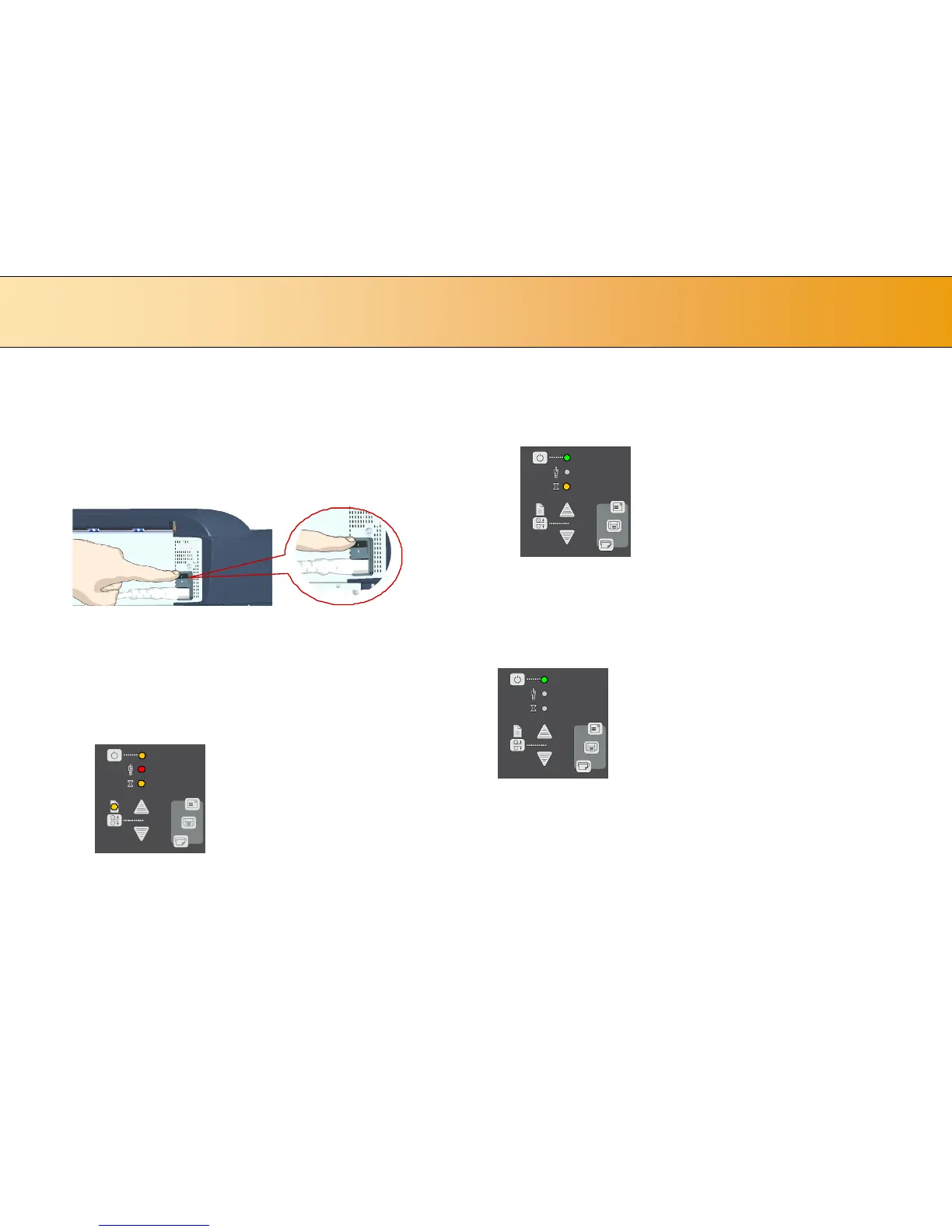
The main power switch is at the back of the scanner. Press the upper half
of the switch (marked “I”) to turn the main power to ON. Press the lower
half of the switch (marked “0”) to turn the main power to OFF.
Main power switch is at the back of the scanner. Press “I” for ON and “0” for OFF.
The scanner’s Self Test Procedure
When you connect the scanner to the power outlet and turn on the outlet
switch at the back of the scanner, it starts up with a self-test procedure.
The scanner’s self-test procedure consists of two main steps –
1. Init (Initialization) Sequence – the scanner loads and tests internal
parameters. Only initiated when you turn the main power ON. The
panel’s LEDs will be lit as shown in the next illustration:
Panel LEDs during the Init Sequence.
2. Self-Adjustment - Adjustment of light profiles, stitching and
black/white points. Starts after the Init Sequence when the scanner’s
main power switch is turned ON or right away when the scanner goes
from sleep to wake mode. The panel’s LEDs will be lit as shown
below:
Panel LEDs during Self-Adjustment
Scanner ready to scan
You will know that the self-test procedures have completed and the
scanner is Ready when the Power LED is lighted green and the other LEDs
are off as shown below:













 To Next Page