Installation 7
Connect interface cable to the scanner
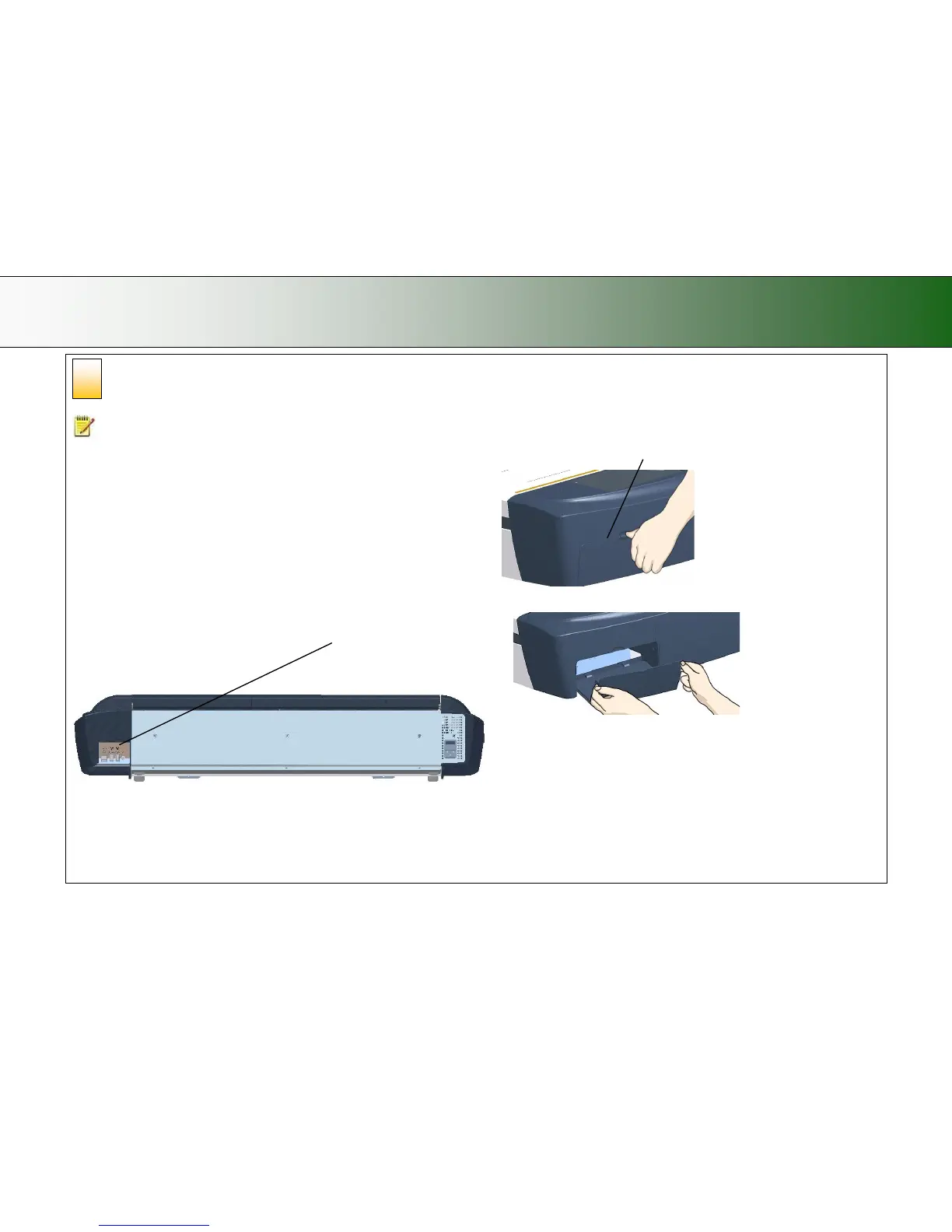
The interface cable connectors are grouped in a Cable-Connector-Panel.
Regulatory Notice: Your scanner product has been tested to comply with the EMC
Standards EN55022 and FCC, Part 15. To maintain compliance, only use the interface
cables supplied with the scanner.
Accessing the interface connectors on scanner models: HD2530:
The cable-connector-panel is found on the underside of the scanner and
accessed from the scanner’s back. The HD2530 (25”) scanner model supports
both FireWire and USB connections.
USB connection: Connect the B-connector end (square shaped) end to a USB
port on your computer.
Firewire connection: Connect the cable to a firewire port on your computer. Do
not use the end marked “Scanner End” if such is specified on your cable.
Cable-connector-panel is accessed from the scanner’ s backside.
Accessing the interface connectors on scanner models: HD5450,
HD4250, HD4230, HD3650, HD3630:
The cable connector panel is behind the cover at scanner’s right side. You
have to remove the cover to connect the cable.
Insert your thumb in the slot at the top of the cable connector panel
Remove the cover with both hands.
Continues on next page…
Feed the interface cable’s B-connector (square shaped) end through the opening in
the back of the scanner until it emerges in front of the cable-connector-panel. Then
8













 To Next Page