28
CONVAID USER’S GUIDE
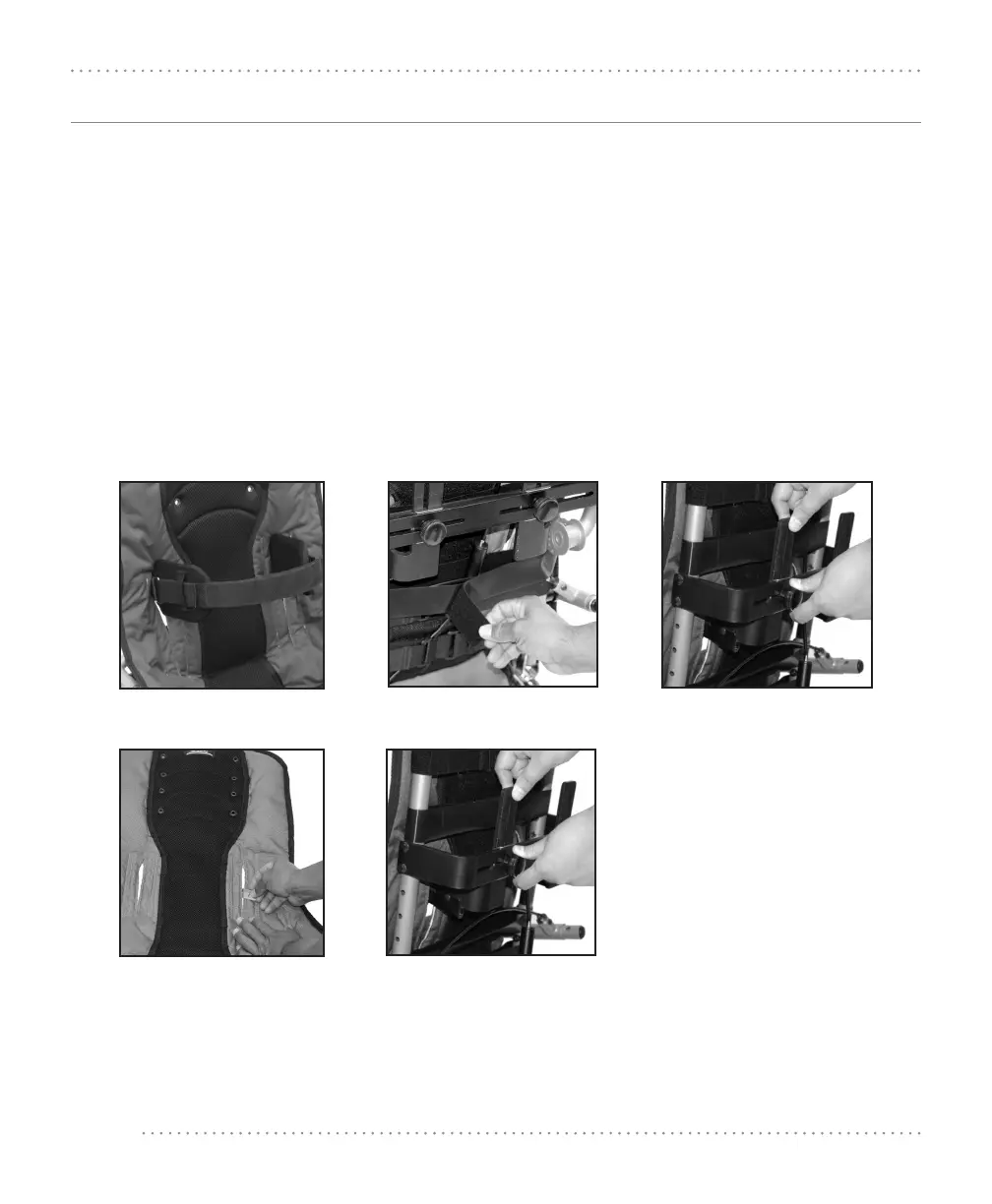
Fig. 93
Fig. 94 Fig. 95
Fig. 96 Fig. 97
Adjustable Firm Trunk Supports
The lateral thoracic supports help maintain midline positioning of the trunk. To adjust the lateral
thoracic supports Fig. 93:
1. Release the double-sided Velcro
®
support straps on the back of the chair to allow for vertical
height adjustment of the lateral trunk support. Fig. 94
2. Loosen the knobs on the lateral mounting bracket to adjust the lateral supports vertically and
horizontally. Fig. 95
3. Reposition laterals to the desired location. If the thoracic supports have to be opened wider to
accommodate the user’s chest width, a new opening must be created in upholstery. Remove
the back upholstery, and with a razor blade, slit open the second upholstery slot. Reinstall the
back upholstery onto the frame. Fig. 96
4. Tighten the knobs and reposition the double-sided Velcro
®
support straps on the back of the
chair. Fig. 97


 To Next Page