Plato Complete Guide V1.3.0
Convert Technologies 35
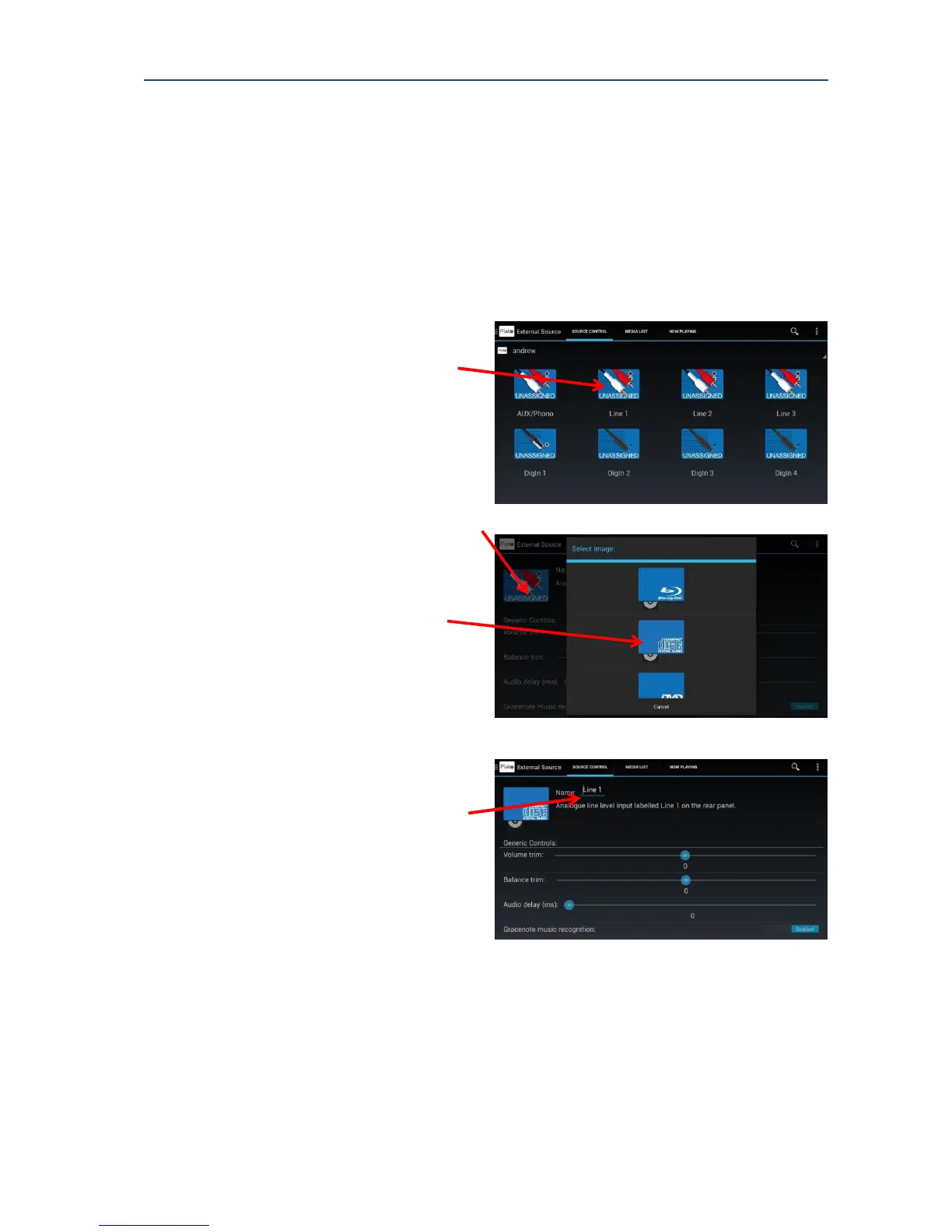
4.2. Adding a CD Player
A CD player with analogue outputs can be connected to the Line 1, Line 2 or Line 3 input.
A CD player with digital outputs can be connected to either the coaxial or optical digital
input. Example below shows CD player connected to the Line 1 analogue input.
To assign a CD player
1. From the Main Drawer Feature
Menu, select External Source.
2. Long Press the UNASSIGNED icon
above the Line 1 text.
The configuration option screen for
this input is displayed.
3. To change image icon:
touch the image in the top right hand
corner of the configuration screen.
The Select Image dialog screen is
displayed.
4. Select the Compact Disc image.
5. To change the name:
Press on the text area after ‘Name’.
(Note: screen image of keyboard may
vary depending on type of Android
device.)



 To Next Page