Plato Complete Guide V1.3.0
Convert Technologies 66
The first time you plug in your supplied CD drive you will have to grant access on the Plato
device. Simply follow on-screen instructions on the Plato touchscreen to complete the
operation. Once this has been done once, it should not be necessary again.
Once an audio CD has been detected in the drive, Plato will read the data and search online
for appropriate META data information based on information read off the CD.
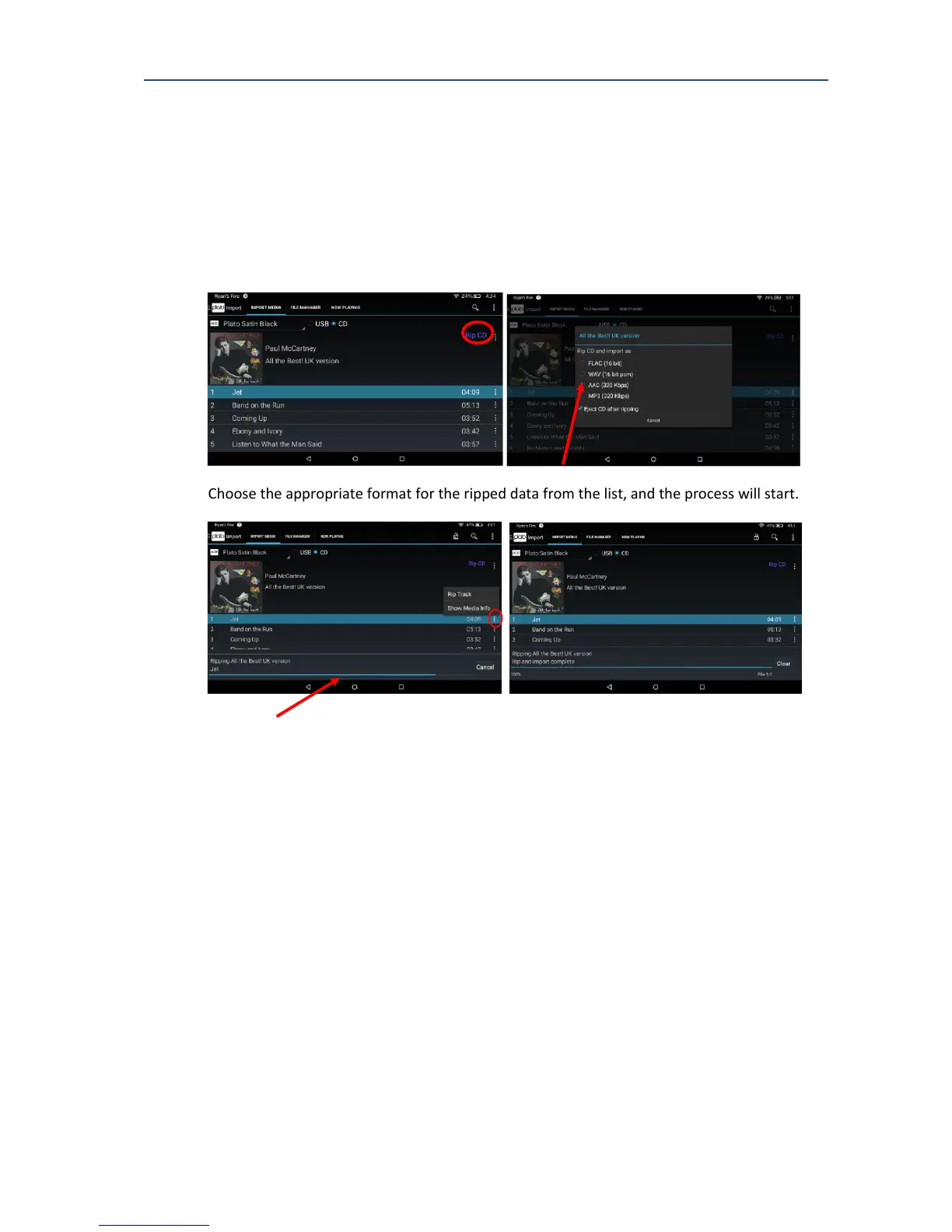
If the supplied META data information is correct, and you would like to rip the whole CD,
click on Rip CD to begin the high speed ripping process
Choose the appropriate format for the ripped data from the list, and the process will start.
A progress bar at the bottom of the screen indicates progress through the ripping process,
and it is possible to abort the process at any time using the Cancel button. The rip process
progresses in 3 steps: read the data from the drive, prepare final tracks, import data into
Plato.
The control of the CD drive has been optimised to obtain the best possible audio data, in the
shortest time. Normally this will mean the drive is not spinning at maximum speed, and a CD
will typically be imported in around 10 minutes.



 To Next Page