23
DC-ITD-PS7MAN01.A www.dodtec.com
JAN 2019 815-788-5200
6. Begin self-diagnosis after the front lamp and the LCD screen have been on for over one second.
7. When “Good” is displayed at the bottom right of the LCD screen, it will go into initial power delay mode
(POWER lamp blinks) for 30 seconds. It will then return to normal operation state, and the POWER
lamp will come on. The detected gas concentration will be displayed in the middle of the screen.
POWER lamp (Green)
Blinks (30 Secs) - ON
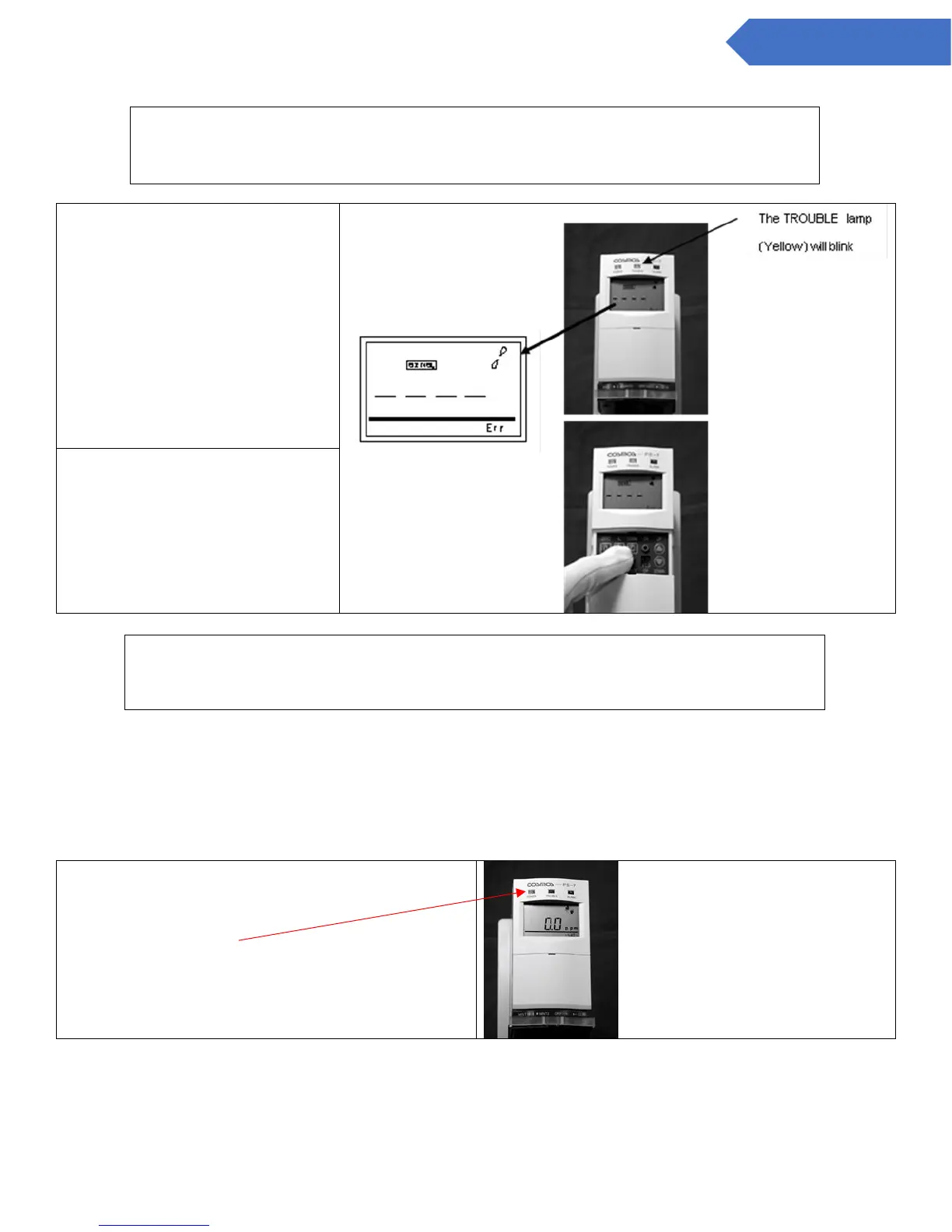
The TROUBLE lamp (Yellow) will
blink.
Also [SENS] will be displayed at
the top of the LCD screen and Err
on the bottom right
Open the cover on the operation
section of the main body and hold
down the key switch “COMM” for
over one second
When using the main detector for the first time, or when a new sensor unit with
different settings (sensor units for which the target gases and full-scale values, etc.,
are different) has been attached:
When the sensor unit has been replaced, or when a sensor unit with the same settings
(sensor units for which the target gases and full-scale values etc. are the same) has
been attached:


 To Next Page