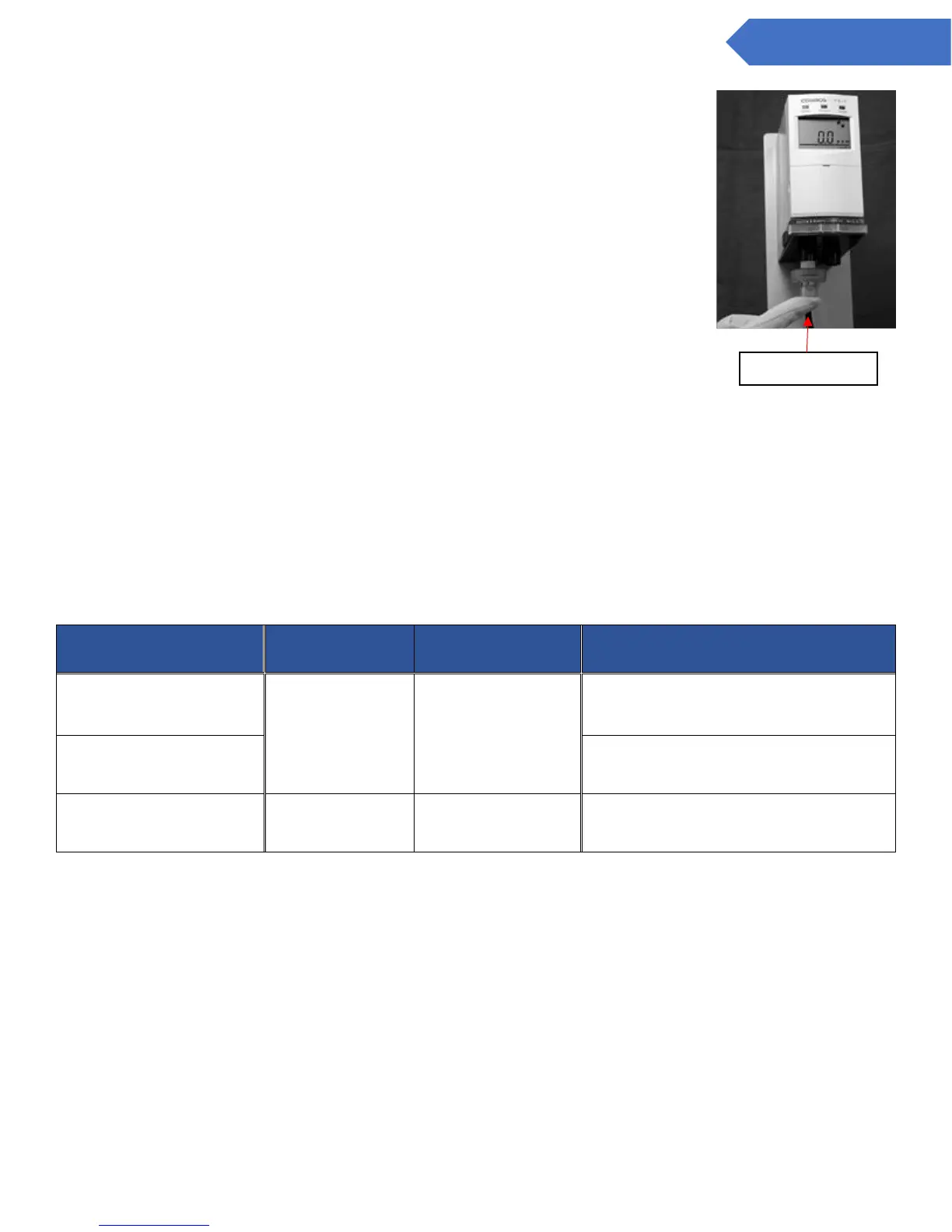
10. Verifying airtight seal
Disconnect the gas sampling pipe from the gas inlet and block the inlet with
a finger completely.
The flow rotation rate will then slow. By keeping the inlet blocked, it will
eventually stop. Then, check to make sure the TROUBLE lamp (Yellow) is
blinking.
(The warning that the flow rate is decreasing is generally set to a delay time
of 10 seconds)
FLOW will be displayed on the LCD screen.
If the flow rate rotation stops and the TROUBLE lamp (Yellow) does not come
on – please check to ensure the sensor unit is properly attached to the main
unit (Refer to 9.2 Attach / Replacing the Sensor Unit) Also check to ensure
that the latches at the bottom of the base unit are correctly locked back
behind the locked / unlocked line.
When the pipes have been returned to normal, recheck to see that the flow rotation rate is high.
11. Adjusting the Zero/21 vol% setting (Zeroing for the CDS-7, CHS-7, and 21vol% adjustment for the
COS-7)
After power is applied to the main unit, and the appropriate time has passed (depending on the type of
sensor unit), press the appropriate key switch from the below table. Then, be sure to do a
readjustment to increase precision.


 To Next Page