EasyManua.ls Logo

Cosmos PS-7 - Page 42

Cosmos PS-7
60 pages
Print Icon
To Next Page IconTo Next Page
To Previous Page IconTo Previous Page
Loading...
42
DC-ITD-PS7MAN01.A www.dodtec.com
JAN 2019 815-788-5200
PS-7 Manual
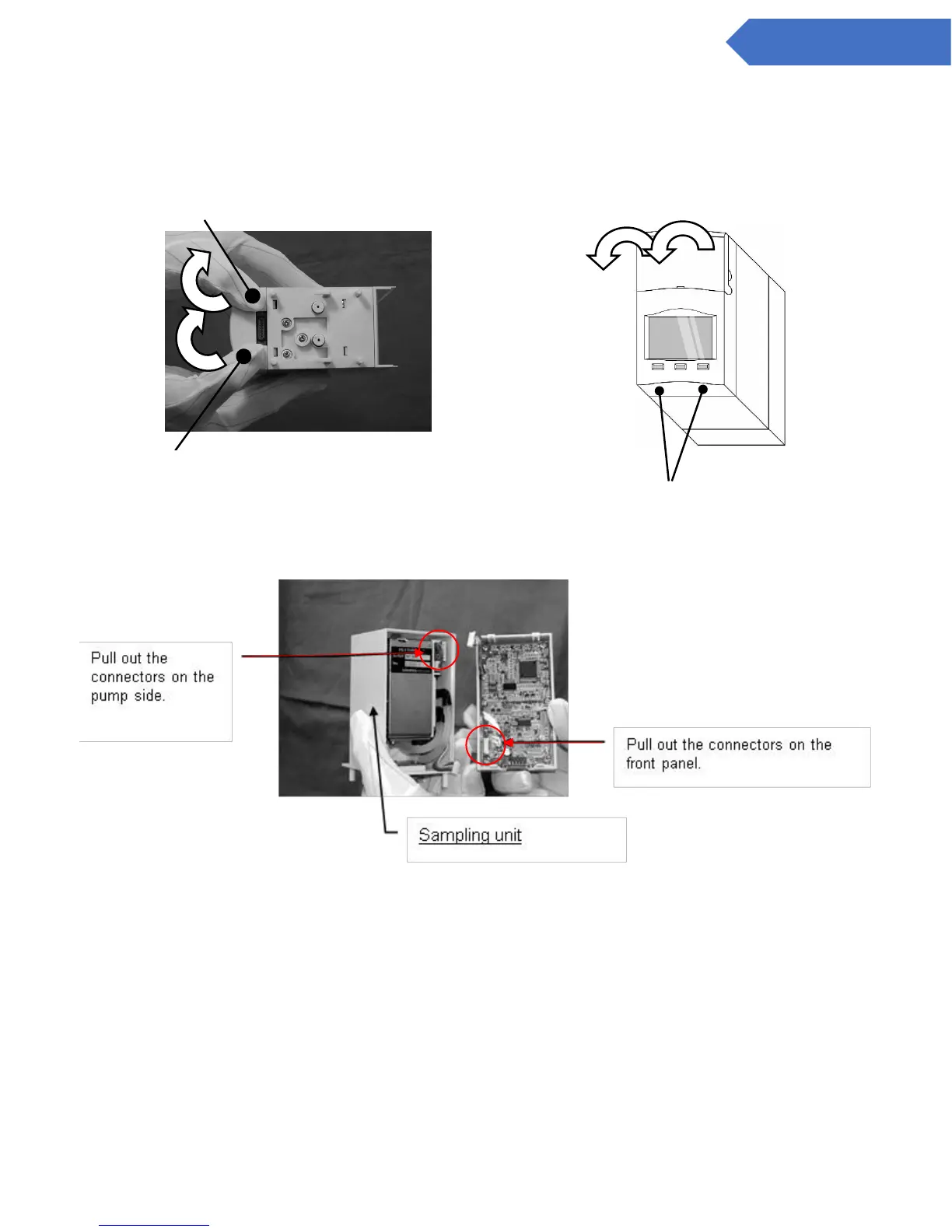
1. Remove the sensor unit as described in 9.2 Attach/Replacing the Sensor Unit.
2. Press back while pushing on the lower section of the main body cover with both thumbs and remove
the front panel.
3. Remove the two connectors on the back of the front panel
4. Connect the two front panel connectors to the new sampling unit and reattach the front panel. After
inserting the sensor unit, reattach the main body cover.

The axis is here (fulcrum)
Direction to push with thumb
The position to push from. Push the
lower section of the front panel with
both thumbs and remove.
The position to push from.

Other manuals for Cosmos PS-7

Related product manuals