11
2. Unboxing
1 2
4
3
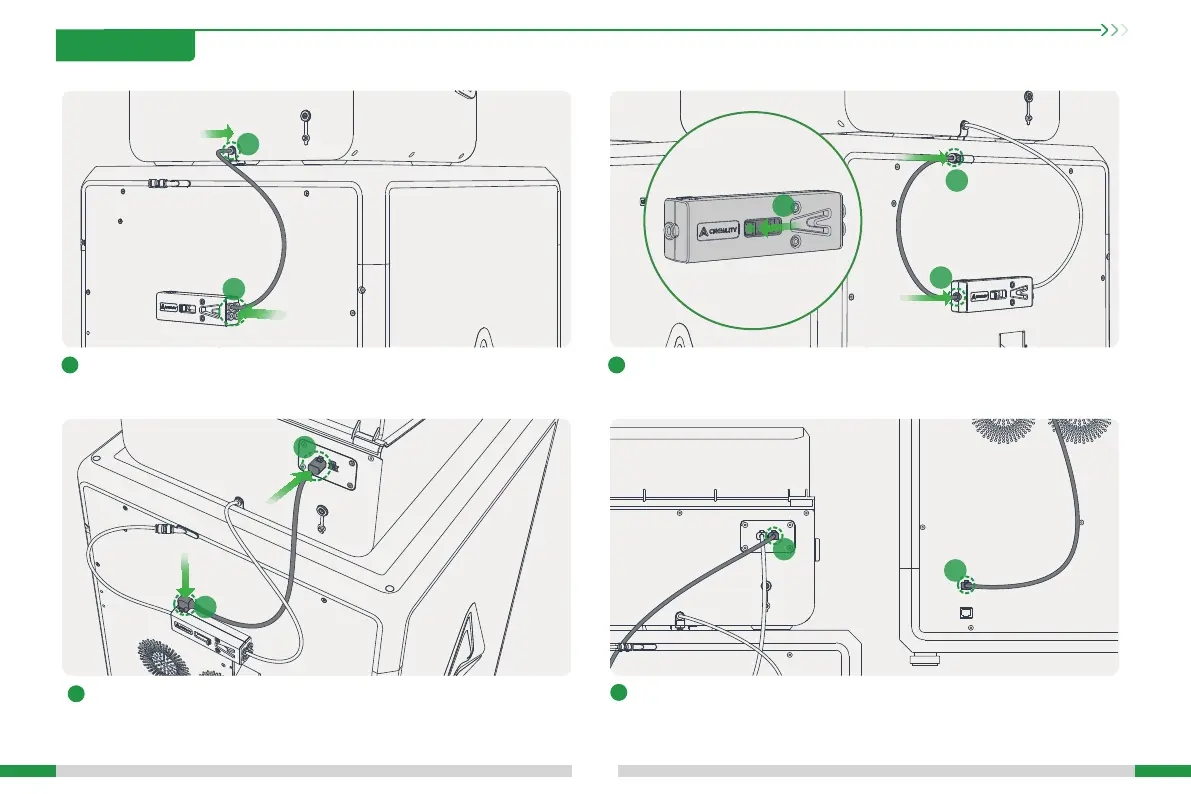
Connect the buer and K2 Plus according to steps A, B, and C;Connect CFS hub outlet and buer: inse one end of the longer PTFE tube
into the CFS hub outlet (position a); inse the other end into the buer
(position b, any of the four holes);
Connect CFS and buer Creality 485 cable: Note that the elbow is
inseed into the buer position c, and the straight head is inseed into
the CFS position d (either of the two 485 sockets of CFS);
Connect CFS and K2 Plus Creality 485 cable: Both ends of this line are 6-pin
straight heads, one end is inseed into the CFS position e, and the other
end is inseed into the machine inteace position f.
a
b
c
d
A
C
B
f
e








 To Next Page