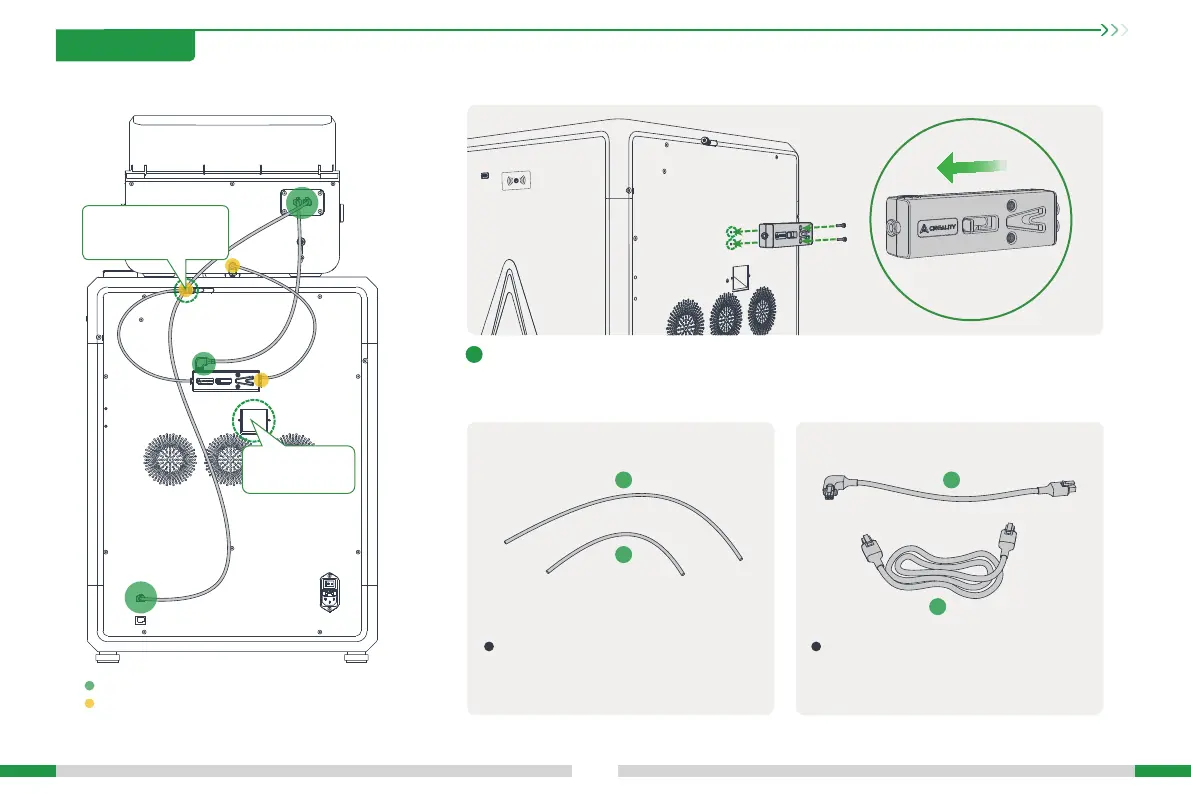
2.3 Connecting CFS
10
2. Unboxing
2.3.1 Install the lament buer
Install the lament buer on the back of the printer and tighten it with two buer screws; pay
attention to the direction of the buer, do not install it in a wrong direction;
The yellow circle is the connection point of the PTFE tube.
The green circle is the connection point of the 485 cable;
The longer PTFE tube a is used to connect the
CFS and the buer;
The shoer PTFE tube b is used to connect the
buer and the printer.
The shoer 485 cable c is used to connect the
CFS and the buer;
The longer 485 cable d is used to connect the
CFS and the printer.
2.3.2 Connect the PTFE tube and 485 cable
1
a
c
d
b
Note: the 485 cable needs to
be clamped at the Teon
tube joint.
Please do not block
the waste chute!








 To Next Page