4.2 Print
19
1
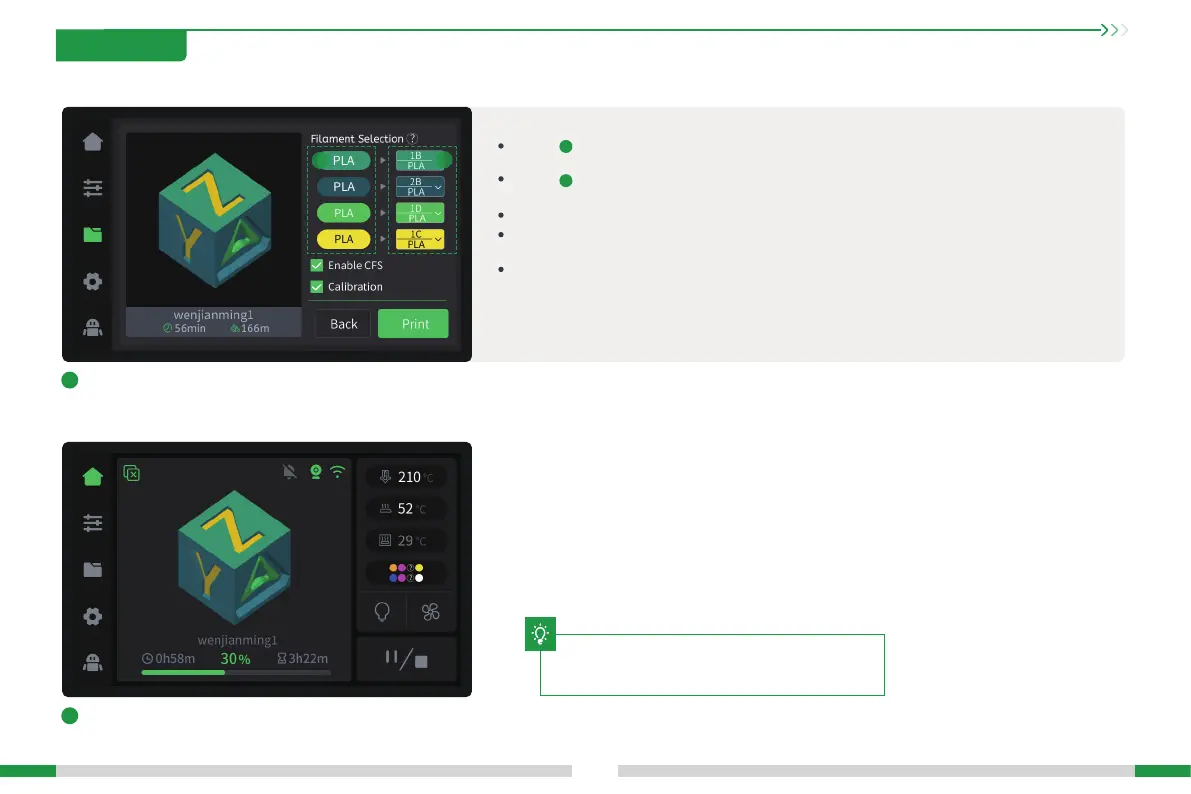
Click the le on the screen, conrm the lament mapping
status, and click Print;
2
Printing...
The area is the color and type of the material contained in the print le. For example, the green
background PLA in the gure indicates that green PLA is required;
The area is the state after the mapping of the print le to the lament bin is completed. For example,
there is no green PLA in the lament bin, and the blue PLA is automatically selected;
When the mapping fails, '--' will be displayed, and the user needs to manually select the material;
Enabling CFS means printing with CFS lament, otherwise the material rack lament will be used for
printing, and the multi-color le will be regarded as a single-color le;
Checking print calibration will peorm automatic leveling, AI calibration and other functions.
a
b
a
b
4. First Use
The current inteace is for reference only. Please refer to
the latest software/rmware UI on the ocial website for
updates.
T







 To Next Page