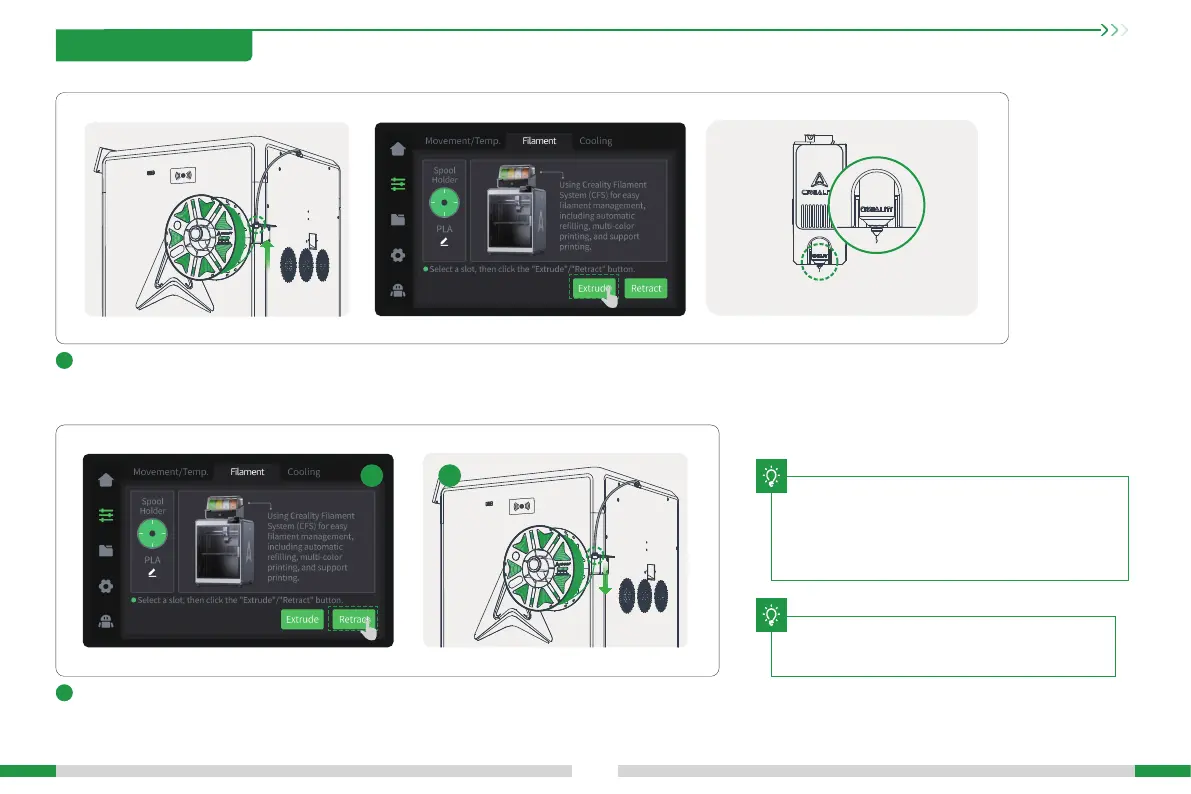
Retract: A. Click Retract on the lament management page, and the extruder will automatically
move to the left front to cut o the lament for retraction;
B. Wait for the retraction to end, and extract the lament from the Teon tube behind the machine.
16
T
5
Extrude: Push the lament gently by hand, and click “Extrude” on the lament inteace. The machine will automatically set the current lament
temperature, and will automatically extrude the lament after the heating is completed;
During extruding, you can obsee whether there is
lament owing out of the nozzle. If no ow-out is
obseed, you can gently push the lament toward the
extruder at the Teon tube behind the machine, and then
click “Extrude” again.
During the extruding process, you can obsee
that the laments are owing out of the nozzle
6
A
B
B
3. Product Usage
The current inteace is for reference only. Please refer to
the latest software/rmware UI on the ocial website for
updates.
T







 To Next Page