APPENDIX 1
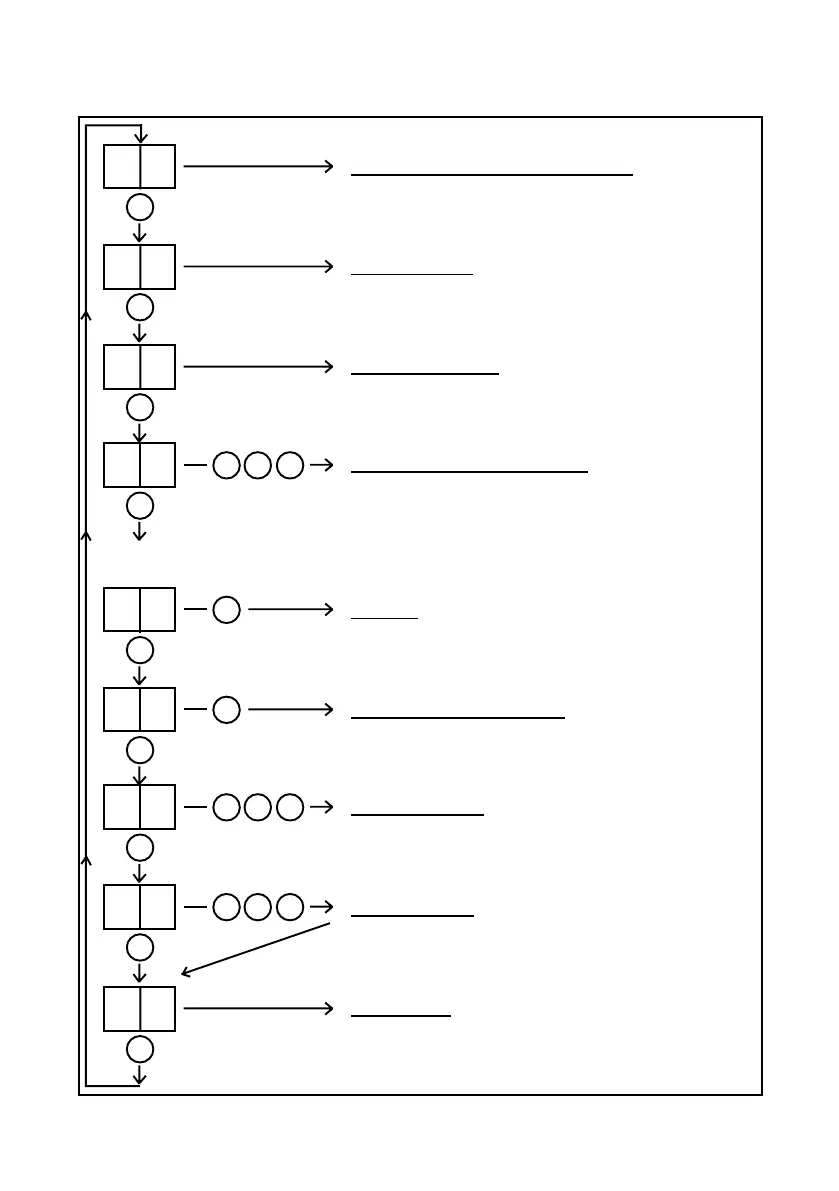
The 7 Segment Display - Normal Mode
Table 30
52
Received Signal Strength % - FSSI
Leave F displayed for 1 second = Display Signal
Strength as a number between 00 and 99.
PSTN Line Voltage
Leave n displayed for 1 second = Display PSTN
voltage. E.g. 51 = 51 volts.
LED test
Press B button once = Switch on all LEDs and all
display segments for 1 second.
Call Downloader
Press B button 3 times = Call the Download Server.
Only select this option when instructed by CSL
Technical Support staff.
t
B B B
A
d
B B B
A
P
B B B
A
Error Codes
Leave E displayed for 2 seconds = Display the highest
priority Error Code. E.g. E 22 = Error number 22.
See Table 36.
L
B
A
u
B
A
b
A
n
A
E
A
F
A
Program Menu
Press B button 3 times = Select the Program menu.
See Table 31.
Software Version Number
Press B button once = Display the software version
number.
Supply Voltage
Leave b displayed for 1 second = Display supply
voltage. E.g. 13. .8 = 13.8 volts.
TEST call & Test path failures
Press B button 2 times = Display Eng then tE.
‘tE’ = Speed-up the PSTN path failure detection and
the radio path failure detection for 10 minutes.
Press B button once = Display CSL (& end ‘tE’ mode)
Press B button 3 times = Start the Test Call sequence.


 To Next Page