EasyManua.ls Logo

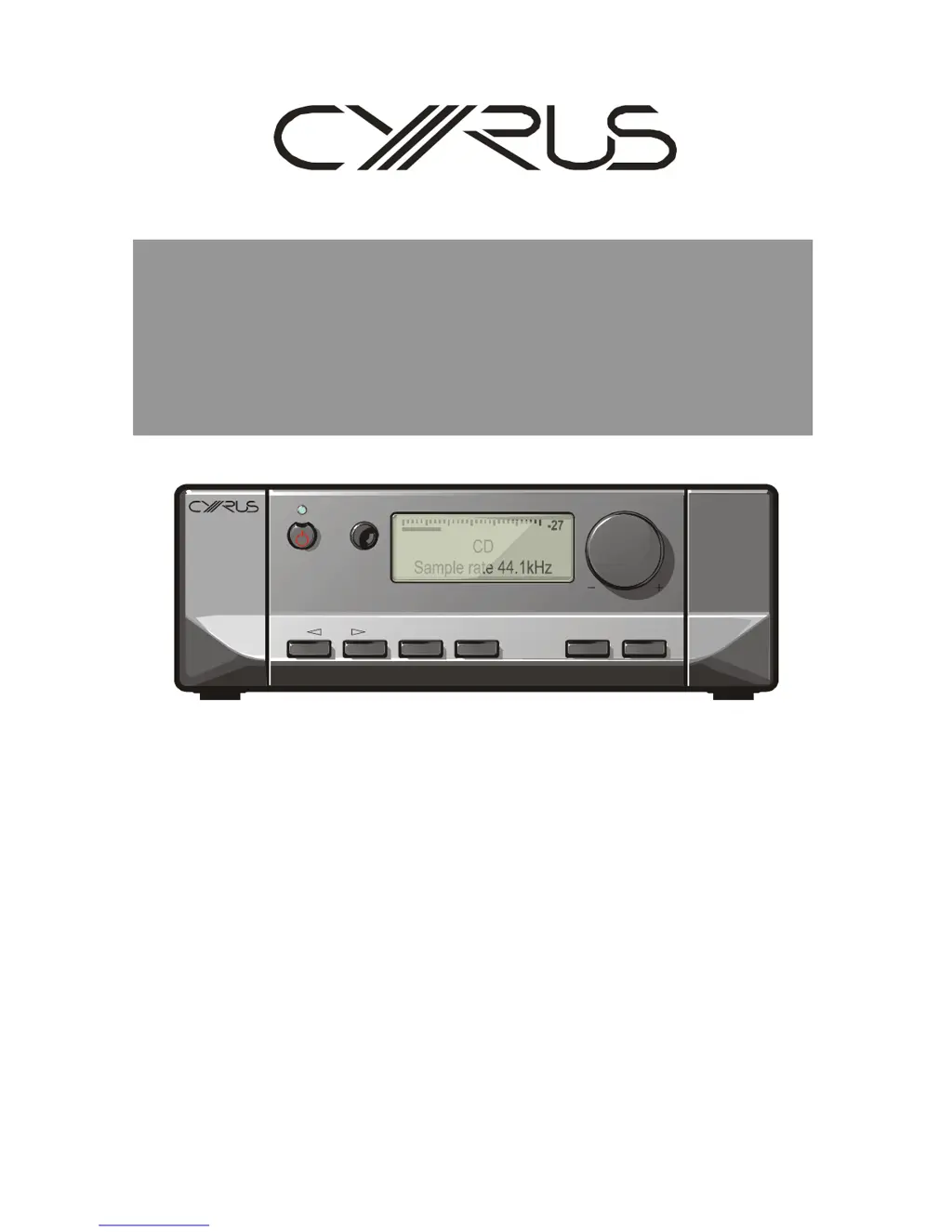
Cyrus 8 DAC - User Manual

Cyrus 8 DAC
50 pages
Print Icon
To Next Page IconTo Next Page
Loading...
ENGINEERED TO ENTERTAIN
v
Cyrus6DAC,Cyrus8DAC,
Cyrus8QxDAC
Digitalamplifiers
-27
CD
Sample rate 44.1kHz
MUTE PHONES SETUPZONE 2INPUT

Other manuals for Cyrus 8 DAC

Questions and Answers

Summary

SERVICE CAUTIONS

STATIC PRECAUTIONS

General precautions for handling and storing SMD components to prevent static damage during servicing.

LEAD-FREE COMPLIANCE

Technical requirement for using lead-free components and solder during repair processes.

SOUND QUALITY

Emphasizes the importance of using original specification components for maintaining sound quality.

MODEL DIFFERENCES

Digital amplifier models

Compares Cyrus 6 DAC, 8 DAC, and 8 Qx DAC models based on power output and features.

Model upgrades

Information on factory upgrade opportunities for owners to higher specification models.

TECHNICAL SPECIFICATIONS

Cyrus 6 DAC analogue specification

Detailed technical specifications for the Cyrus 6 DAC analogue section.

Cyrus 8 DAC analogue specification

Detailed technical specifications for the Cyrus 8 DAC analogue section.

Cyrus 6 DAC, Cyrus 8 DAC digital specification

Digital specifications for Cyrus 6 DAC and Cyrus 8 DAC models.

Cyrus 8 Qx DAC digital specification

Digital specifications for the Cyrus 8 Qx DAC model.

TYPE IDENTIFICATION

Rating label

Information found on the amplifier's rating label, including model and voltage details.

Serial number

Details and importance of the amplifier's unique serial number for service.

PCB Identification

Details on PCB revision markings and their importance for technical advice.

SMD COMPONENT REPLACEMENT

Handling SMD components

General handling precautions for SMD components like resistors, capacitors, and ICs.

Static precautions

Emphasizes static protection measures for SMD components to prevent damage.

Soldering;desoldering SMD components

Techniques and recommendations for soldering and desoldering SMD components.

SMD COMPONENT REPLACEMENT

Removing SMD resistors and capacitors

Procedure for removing SMD resistors and capacitors from the PCB using a soldering iron.

Fitting replacement SMD resistors and capacitors

Procedure for fitting replacement SMD resistors and capacitors to the PCB.

Removing SMD ICs from the PCB

Procedure for removing SMD ICs from the PCB using cutters or hot air tools.

Fitting replacement ICs to the PCB

Procedure for fitting replacement ICs to the PCB using a soldering iron.

BLOCK DIAGRAM

DIGITAL INPUT AND DAC STAGE

Block diagram illustrating the digital input and D/A converter stage.

PREAMP (LH CHANNEL)

Block diagram illustrating the preamplifier section for the left channel.

POWER AMP

Block diagram illustrating the power amplifier section.

TECHNICAL DESCRIPTION

Analogue input selection and Tape Monitor

Describes the analogue input switching and tape monitor selection circuitry.

Digital inputs

Explains the digital input circuitry, formats, and operation including SPDIF and USB.

TECHNICAL DESCRIPTION

Volume control

Describes the digitally controlled volume circuitry and its signal path.

Power amplifier stage

Details the discrete voltage feedback power amplifier design and its components.

DC offset at the output

Explains the DC offset adjustment and stabilization within the power amplifier.

Power supply

Details the various power supply circuits, regulators, and their components.

TECHNICAL DESCRIPTION

The protection circuits

Describes over-current, thermal, and power supply protection mechanisms.

The control system

Explains the front panel control system, microcontroller, and connections.

FRONT PANEL CONTROL PCB

Front panel control PCBs without push control

Software programming procedures for older PCBs lacking a push function on the rotary control.

Front panel control PCBs with push control

Software programming procedures for newer PCBs featuring a push function on the rotary control.

FAULT FINDING

Layout of the amplifier

Describes the physical layout of amplifier components for servicing purposes.

Dismantling the amplifier

Procedure for dismantling the unit, including removal of the sub PCB.

Initial precautions and first tests

Safety precautions and initial steps before performing tests on the amplifier.

FAULT FINDING

Power amplifier faults

Troubleshooting procedures for common power amplifier issues and component checks.

Power supply voltage check

Procedure for checking power supply voltages to identify potential faults.

Semiconductor faults

General advice and methods for finding semiconductor faults within the amplifier.

FAULT FINDING

Preamplifier faults

Troubleshooting procedures for preamplifier circuit issues and signal tracing.

Control system faults

Troubleshooting procedures for issues related to the control system and its PCBs.

Digital audio faults

Troubleshooting procedures for digital audio inputs, including SPDIF and USB.

USE WITH A PSX-R

Use with a PSX-R

Explains how to connect the Cyrus PSX-R external power supply to the amplifier.

QUIESCENT CURRENT SETTING

Quiescent current setting (no signal condition)

Procedure for setting the quiescent current correctly after power amplifier repair.

DC OFFSET ADJUSTMENT

DC offset adjustment (no signal condition)

Procedure for setting the DC offset voltage at the speaker output terminals.

MC-BUS OPERATION

MC-BUS system test

How to test the MC-BUS communication system by integrating into a known working system.

FLASH SOFTWARE

Reprogramming amplifiers without push rotary control

Procedure for software updates on older amplifiers lacking a push function on rotary control.

Reprogramming front panel control PCBs with push control

Procedure for software updates on newer front panel PCBs featuring a push function.

CHASSIS PARTS LIST

Chassis Components

Part numbers for chassis and related items like inlets, feet, and insulators.

Flexfoil Cables

Part numbers for flexfoil cables used in the amplifier assembly.

Fuses

Part numbers for various AC mains and DC fuses used in the amplifier.

Transformers

Part numbers for power transformers used in the amplifier.

FRONT PANEL PARTS LIST

Front Panel Components

Part numbers for front panel components like knobs, lenses, and fascia.

Display PCB

Part numbers for the display PCB, including versions with and without push control.

MAIN PCB PART LIST

Resistors

Lists resistors on the main PCB with their part numbers and specifications.

MAIN PCB PART LIST

Presets

Lists preset potentiometers used on the main PCB.

Capacitors

Lists capacitors on the main PCB with their part numbers and specifications.

MAIN PCB PART LIST

Diodes

Lists diodes on the main PCB with their part numbers and specifications.

MAIN PCB PART LIST

Transistors

Lists transistors on the main PCB with their part numbers and specifications.

MAIN PCB PART LIST

Integrated Circuits

Lists integrated circuits on the main PCB with their part numbers and specifications.

Voltage Regulators

Lists voltage regulators on the main PCB with their part numbers and specifications.

MAIN PCB PART LIST

Connectors and Sockets

Lists connectors and sockets on the main PCB with their part numbers.

SUB PCB PART LIST

Resistors (Sub PCB)

Lists resistors on the sub PCB with their part numbers and specifications.

SUB PCB PART LIST

Capacitors (Sub PCB)

Lists capacitors on the sub PCB with their part numbers and specifications.

SUB PCB PART LIST

Diodes (Sub PCB)

Lists diodes on the sub PCB with their part numbers and specifications.

SUB PCB PART LIST

Transistors (Sub PCB)

Lists transistors on the sub PCB with their part numbers and specifications.

SUB PCB PART LIST

Integrated Circuits (Sub PCB)

Lists integrated circuits on the sub PCB with their part numbers.

Voltage Regulators (Sub PCB)

Lists voltage regulators on the sub PCB with their part numbers.

Connectors and Sockets (Sub PCB)

Lists connectors and sockets on the sub PCB with their part numbers.

CIRCUIT DIAGRAMS

Main PCB Circuit Diagrams

Lists available circuit diagrams for the main PCB.

Sub PCB Circuit Diagrams

Lists available circuit diagrams for the sub PCB.

Main PCB schematic diagram

Input selector and volume control

Schematic of the input selector and volume control circuitry.

Power amplifier and DC servo

Schematic of the power amplifier stage and its DC servo control.

Main PCB schematic diagram

Power amp regulator and standby control

Schematic of the power amplifier regulator and standby control circuits.

Main PCB schematic diagram

Main PCB power supplies, protection logic

Schematic of main PCB power supplies and protection logic circuits.

Main PCB schematic diagram

MC-Bus, main PCB connectors

Schematic illustrating MC-Bus communication and main PCB connectors.

Sub PCB schematic diagram

USB decoder

Schematic of the USB decoder circuitry.

Sub PCB schematic diagram

Digital inputs

Schematic of the digital inputs, including SPDIF and optical connections.

Sub PCB schematic diagram

D;A Converter

Schematic of the D/A converter stage.

Sub PCB schematic diagram

Power supplies, connectors and headphone amp

Schematic of power supplies, connectors, and headphone amplifier circuits.

Cyrus 8 DAC Specifications

General IconGeneral
TypeIntegrated Amplifier with DAC
Digital InputsCoaxial, Optical, USB
Preamp OutputYes
Headphone OutputYes
DACBurr-Brown
Supported Sample RatesUp to 192 kHz
Power SupplyLinear Power Supply
Frequency Response20 Hz - 20 kHz
Signal-to-Noise Ratio>100dB

Related product manuals