4.2.2.1 DC Control and AC Control Circuits
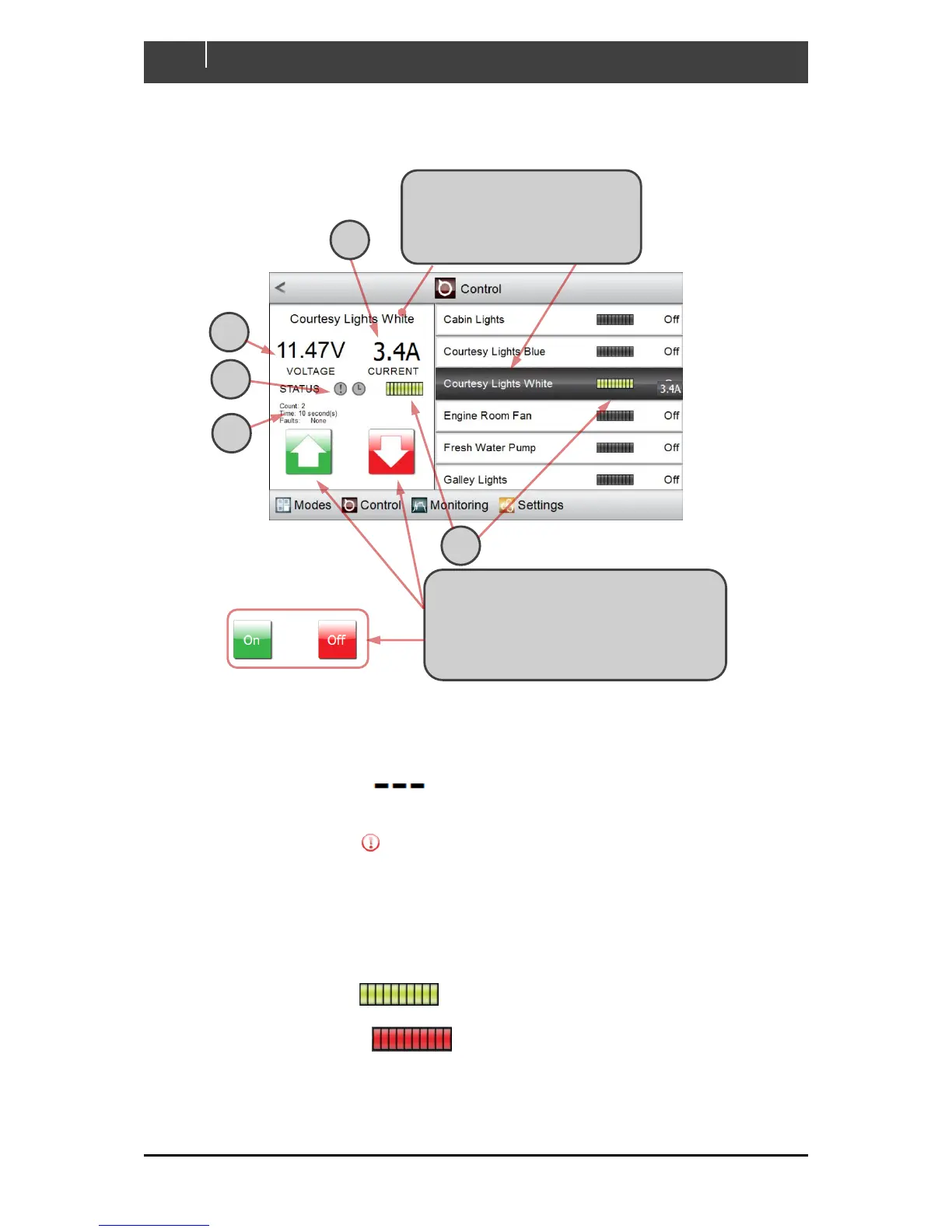
All DC Control and AC Control circuits behave in a similar way. An example is shown below:
A Current draw is tracked while the circuit is active, or shown as Off
B The voltage from the battery supplying the circuit (if configured) is tracked while the circuit
is active, or shown as
C The alarm status is grey while the circuit is operating correctly. If an alarm is raised this
indicator changes to .
D On Count tracks the number of times the circuit has been activated.
On Time displays the aggregate time for which the circuit has been active.
Faults reports the most recent fault raised by the circuit, or None if it is operating
correctly.
E The status bars are dark while the circuit is inactive. When an on/off circuit is active, these
indicators change to . The example circuit is dimmable, so the number of lit
segments in each status bar tracks the circuit’s setting. When an alarm is raised, the
status bars change to
.
1 Click on the circuit you wish to
control. Highlighting shifts to
Courtesy Lights White and the
display pane tracks its status
2 This circuit is dimmable, so you can
press and hold the up or down button
then release it at the desired brightness.
For an on/off circuit the up/down buttons
are replaced with On/Off buttons



 To Next Page