4.2.4 Settings
The Settings tab lets you query and change various parameters of the Touch 5, including:
measurement units (gallons, litres, etc.); the network configuration; date/time and others.
4.3 Updating Software
To keep the Touch 5 up to date with the latest software refer to www.czone.net . It is recommended
to update the entire CZone system when updating the Touch 5 to ensure the system operates
correctly. The Touch 5 can be updated via the microSD card slot, see process below:
4.3.1 Checking Current Software Version
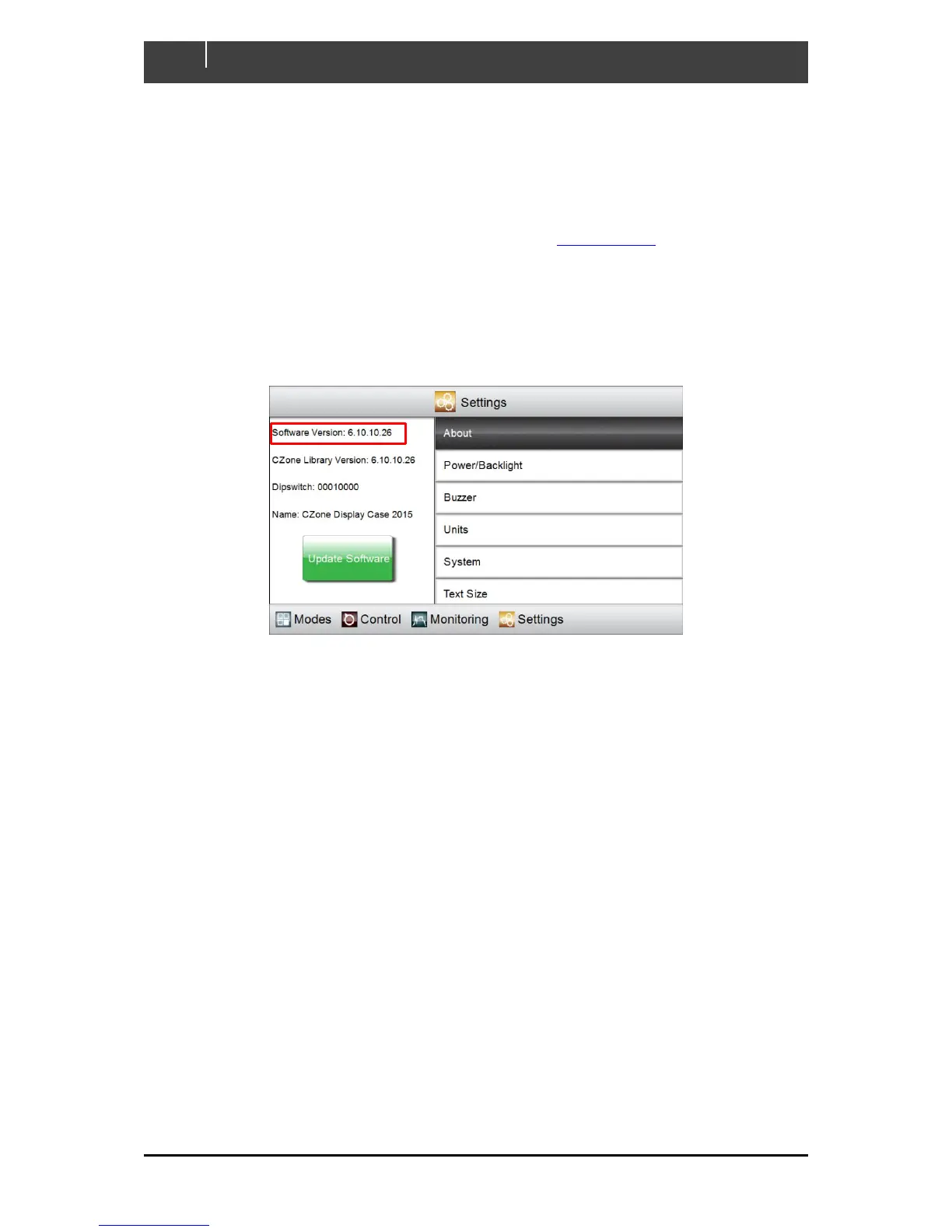
To check the current software version on the Touch 5 go to Settings > About
The current software version is listed at the top of the page. To install a newer version follow the
below steps
4.3.2 Updating Software via microSD
1. Copy the Touch 5 firmware file (extension .upd) on the root directory of a microSD card.
2. Insert the microSD card in the card reader slot of the Touch 5 (refer to chapter 1.2.4 for
process).
3. Press the ‘Update Software’ button on the Settings > About page and press ‘Yes’ when
prompted (Alternatively, the update will start if the power on the Touch 5 is cycled).
4. The display will reboot and start installing the new software, this process may take a few
minutes.
5. When complete the display will boot up to the main screen. Go to Settings > About to confirm
the new Software Version.



 To Next Page