4.2.3.4.2 Alarm History
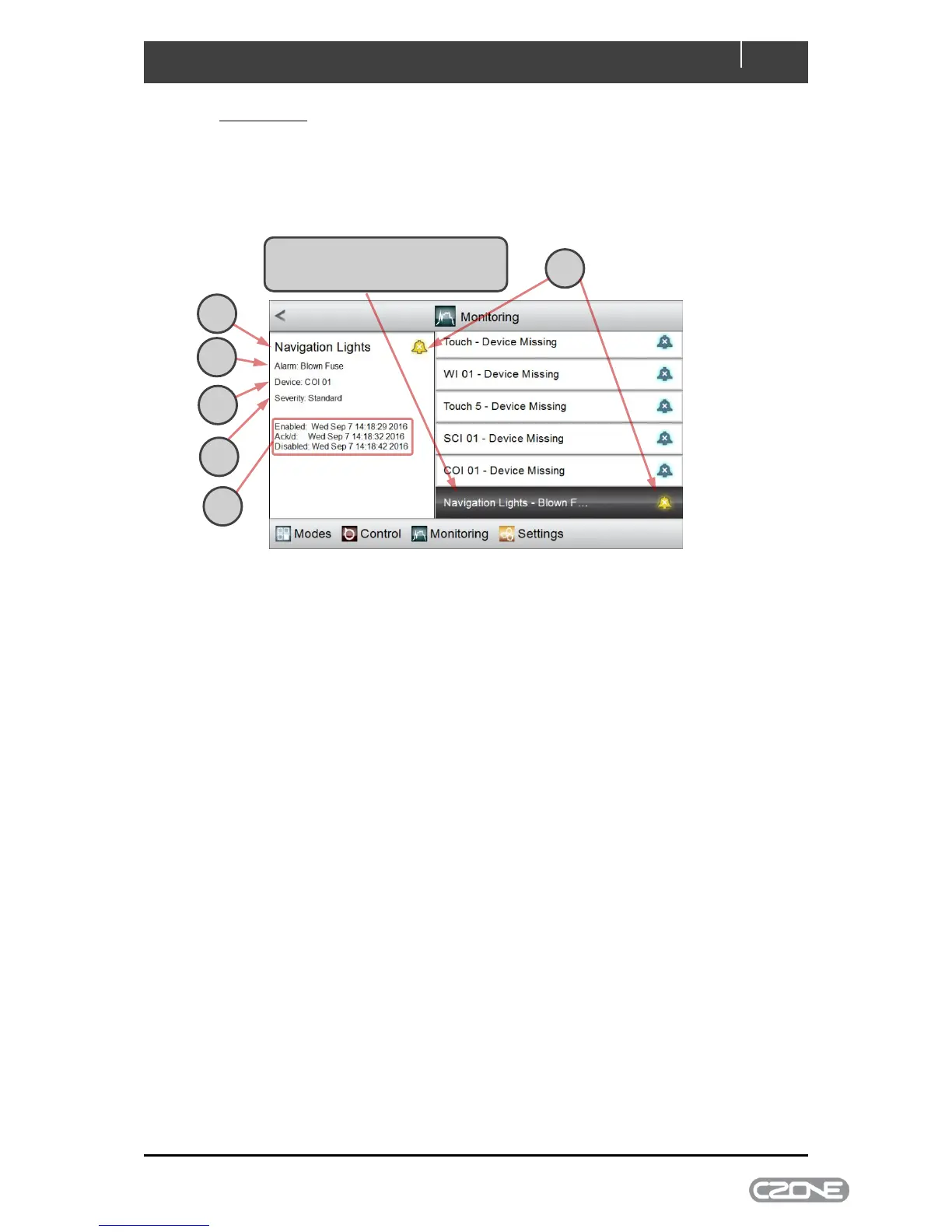
Selecting Alarm History from the Monitoring > Alarms page displays the most recent alarms (up to
100). Alarms are listed according to when they were raised, with the most recent first. Alarm history
includes all alarms above Warning severity by default. The minimum severity saved in history can be
changed from the Settings > System > Alarm Log Severity page.
A The alarm severity is indicated with a bell-shaped icon of the appropriate colour
B The name of the input that raised the alarm is displayed
C The name of the alarm is shown
D The CZone module that detected the alarm is shown
E The severity of the alarm is reported in words
F The date/time stamps for the alarm are:
when it was raised (i.e. enabled)
when it was acknowledged
when it was cancelled (i.e. disabled).
4.2.3.5 Systems in Operation
The Systems in Operation page lists all circuit categories that are configured for the vessel: for
example Pumps, Fans/Ventilation, and Lighting. Selecting any category displays all active circuits in
that category; alternatively, selecting All displays all active circuits regardless of their category.
Systems in operation behave exactly as DC or AC Control circuits: selecting a circuit displays its
status and allows the circuit to be controlled.



 To Next Page