DAP-1360U Wireless N300 Access Point & Router
User Manual
Configuring via Web-based Interface
WDS
This page is available for the Access point, Repeater, WDS, and Client modes.
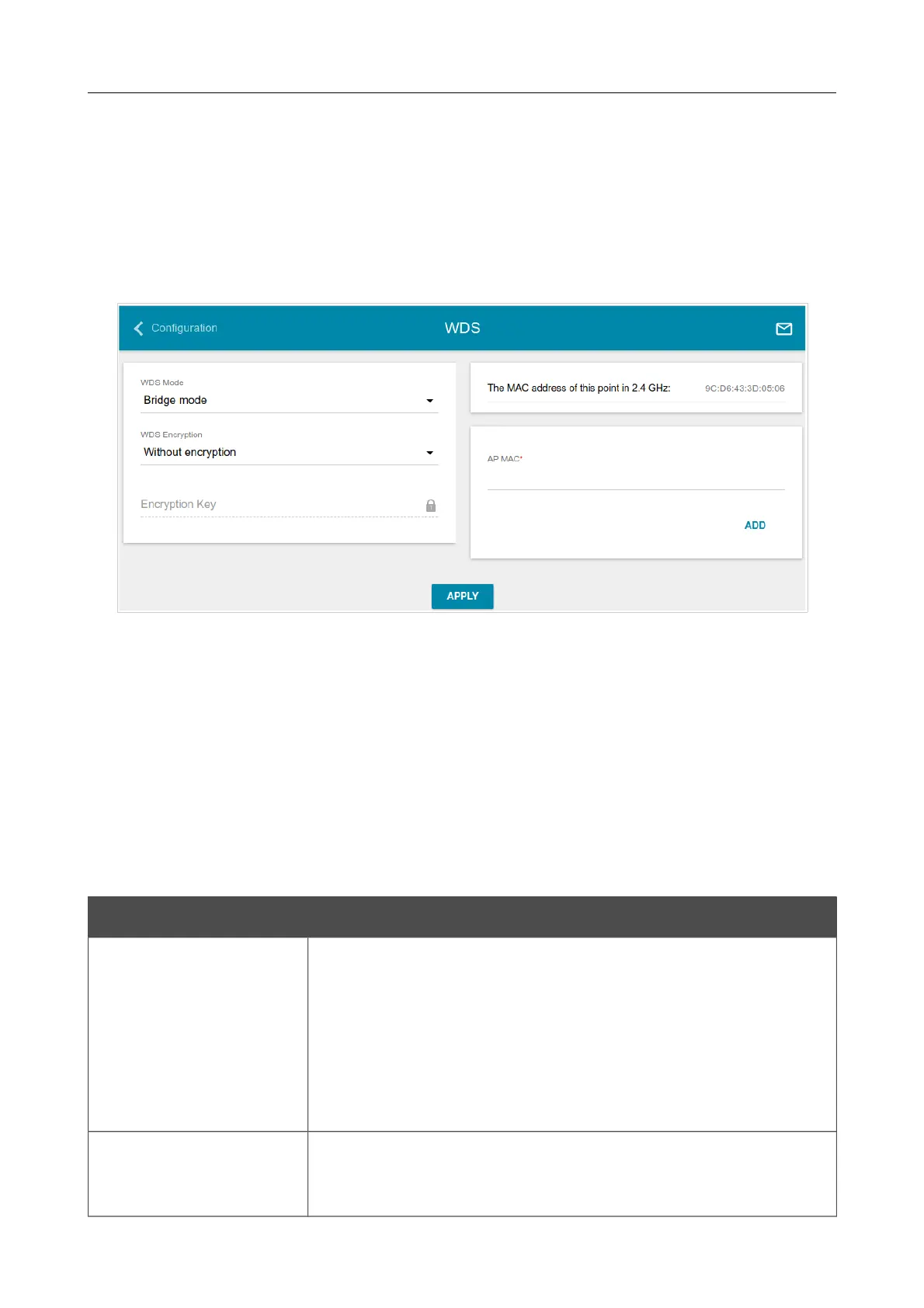
On the Wi-Fi / WDS page, you can enable the WDS function and select a mode of this function.
The WDS function allows joining local area networks together via a wireless connection of access
points.
Figure 76. The page for configuring the WDS function.
Select the needed action from the drop-down list in the WDS mode section to configure the WDS
function:
• Disable: The function is disabled.
• Bridge mode: Access points communicate to each other only, wireless devices cannot
connect to them.
• Repeater mode: Access points communicate to each other, wireless clients can connect to
the WLAN created by interconnected access points.
You can specify the following parameters:
Parameter Description
WDS Encryption
A type of encryption for data transfer between access points
interconnected via the WDS function.
Without encryption: No encryption.
WEP.
TKIP.
AES.
Encryption Key
A key for the specified type of encryption. If the Without
encryption value is selected from the WDS Encryption drop-
down list, the field is not editable.
Page 92 of 158


 To Next Page