D-Link DGS-3324SR Layer 3 Stackable Gigabit Ethernet Switch
85
This window allows you to initialize a port or group of ports. The Initialize Port Table in the bottom half of the
window displays the current status of the port(s) once you have clicked Apply.
This window displays the following information:
Parameter Description
Unit
Allows you to select a switch from a switch stack using that switch’s Unit ID.
From and To
Ports selected to be initialized.
Port
A read only field indicating a port on the switch.
Auth PAE State
The Authenticator PAE State will display one of the following: Initialize,
Disconnected, Connecting, Authenticating, Authenticated, Aborting, Held,
ForceAuth, ForceUnauth, and N/A.
Backend State
The Backend Authentication State will display one of the following: Request,
Response, Success, Fail, Timeout, Idle, Initialize, and N/A.
Port Status
The status of the controlled port can be authorized, unauthorized, or N/A.
Note: The user must first globally enable 802.1X in the Advanced
Settings window in the Configuration folder before initializing ports.
Information in the Initialize Ports Table cannot be viewed before enabling
802.1X.
Reauthenticate Port(s)
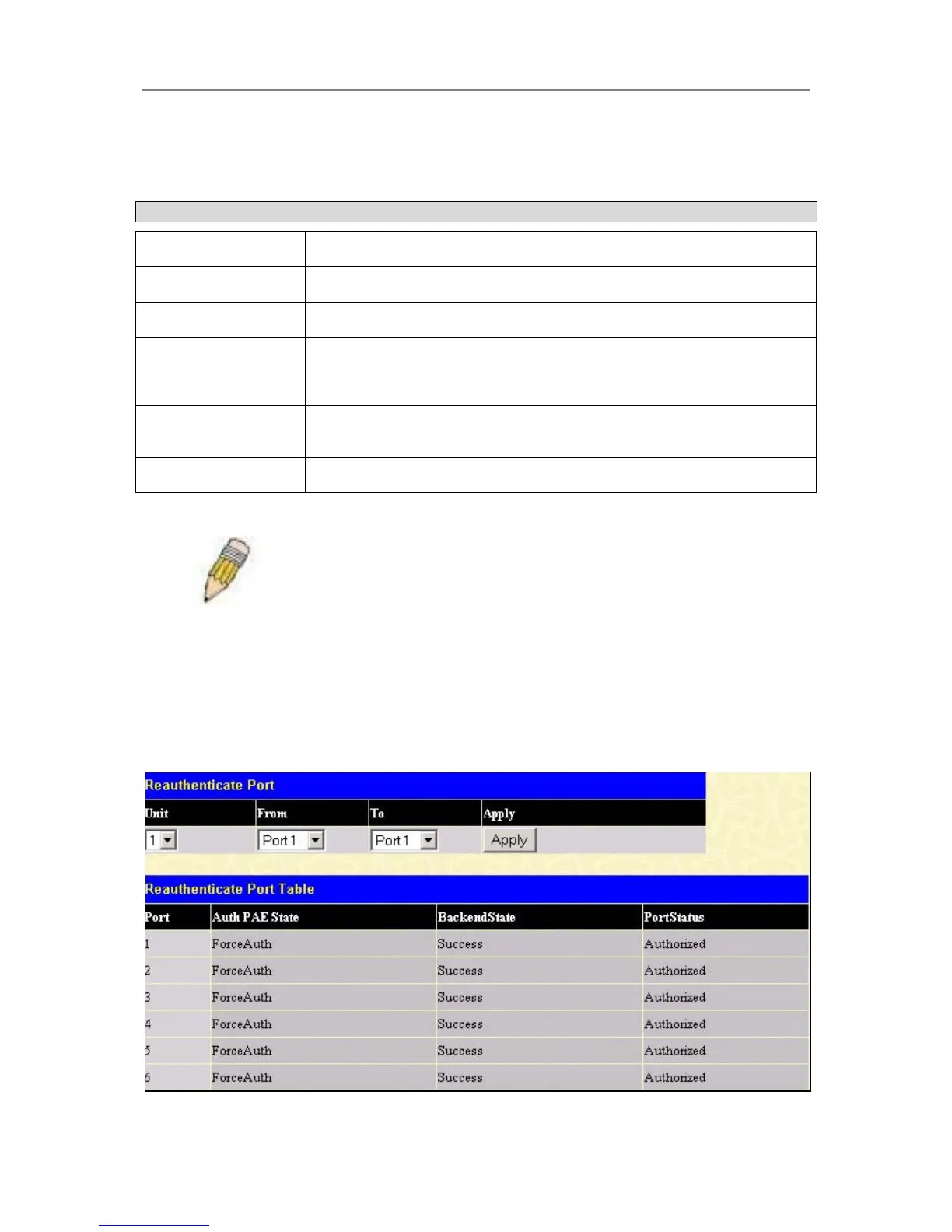
This window allows you to reauthenticate a port or group of ports by selecting the stacking Unit, choosing a port
or group of ports by using the pull down menus From and To and clicking Apply. The Reauthenticate Port
Table displays the current status of the reauthenticated port(s) once you have clicked Apply.
Click Reauthenticate Port(s) on the PAE Access Entity folder on the Configuration menu to open the
Reauthenticate Port(s) window:
Figure 4- 55. Reauthenticate Port and Reauthenticate Port Table window





 To Next Page