D-Link DGS-3324SR Layer 3 Stackable Gigabit Ethernet Switch
159
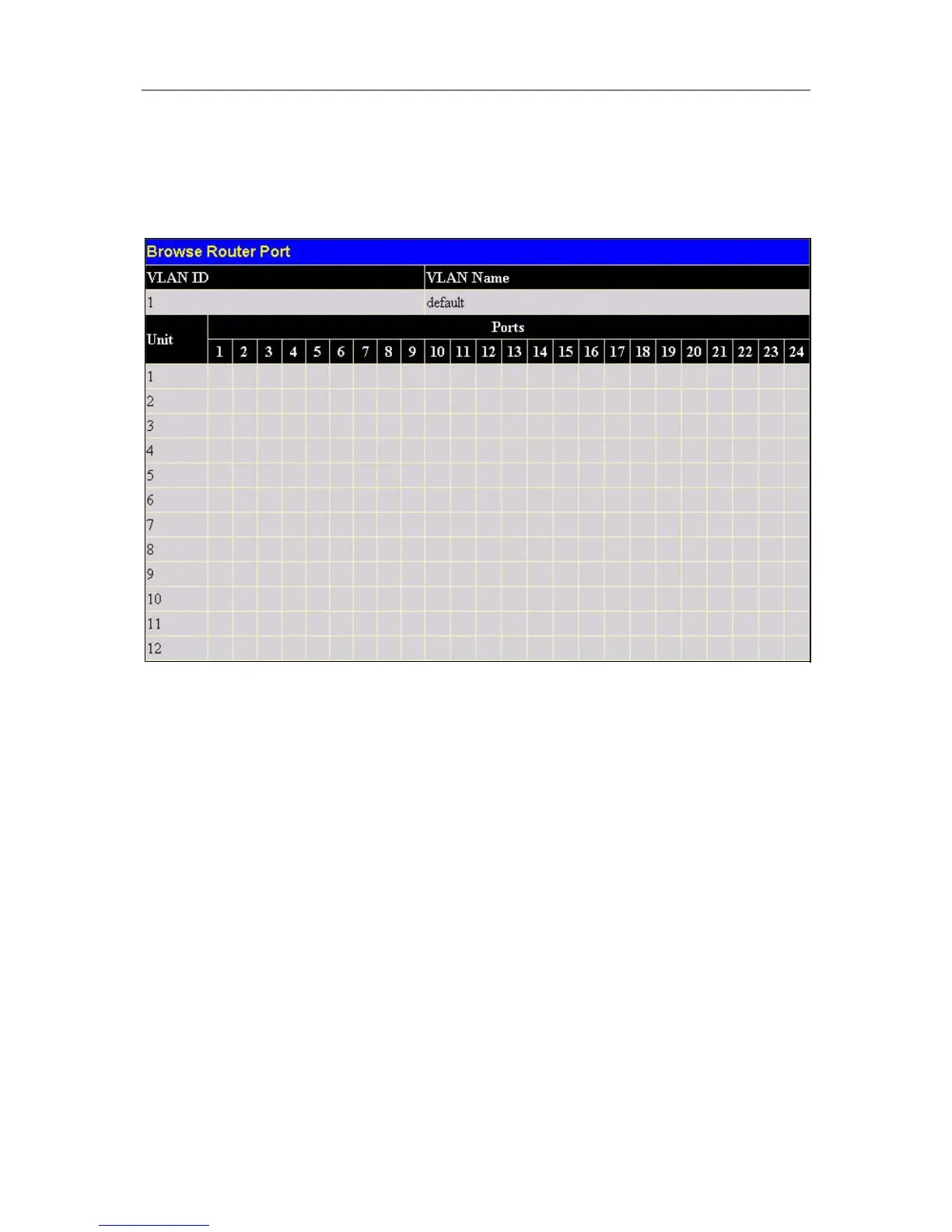
Browse Router Port
This displays which of the Switch’s ports are currently configured as router ports. A router port configured by a
user (using the console or Web-based management interfaces) is displayed as a static router port, designated by
S. A router port that is dynamically configured by the Switch is designated by D.
Figure 6- 19. Browse Router Port
Port Access Control
The following screens are used to monitor 802.1x statistics of the Switch, on a per port basis. To view the Port
Access Control screens, open the monitoring folder and click the Port Access Control folder. There are five
screens to monitor.
Authenticator Statistics
This table contains the statistics objects for the Authenticator PAE associated with each port. An entry appears
in this table for each port that supports the Authenticator function. To view the Authenticator Statistics, click
Monitoring > Port Access Control > Authenticator Statistics.





 To Next Page