D-Link DGS-3324SR Layer 3 Stackable Gigabit Ethernet Switch
134
To implement your new settings, click Apply. To return to the SNMP View Table, click the Show All SNMP
View Table Entries link.
SNMP Group Table
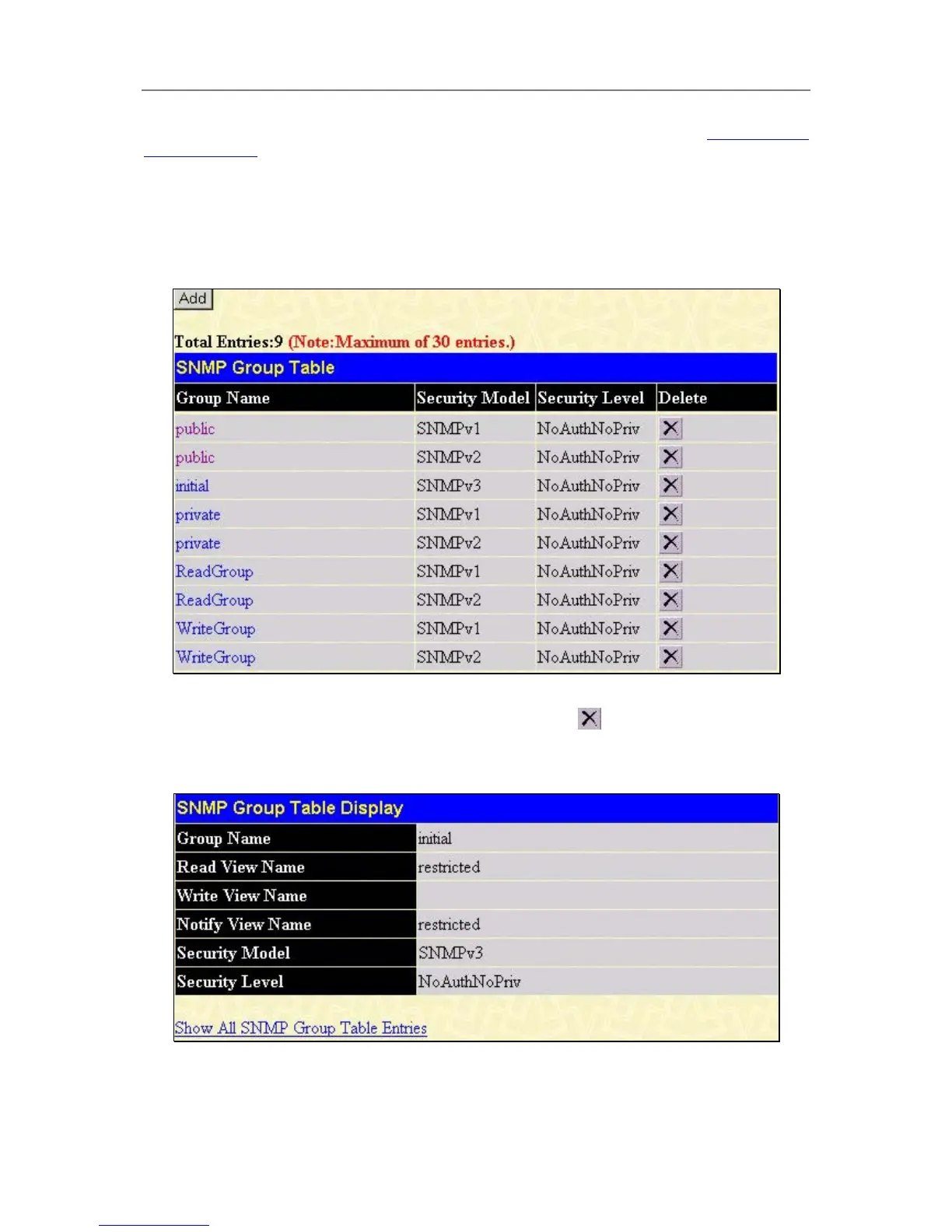
An SNMP Group created with this table maps SNMP users (identified in the SNMP User Table) to the views
created in the previous menu. To view the SNMP Group Table, open the SNMP Manager folder and click the
SNMP Group Table entry. The following screen should appear:
Figure 5- 6. SNMP Group Table
To delete an existing SNMP Group Table entry, click the corresponding
under the Delete heading.
To display the current settings for an existing SNMP Group Table entry, click the blue hyperlink for the entry
under the Group Name.
Figure 5- 7. SNMP Group Table Display
To add a new entry to the switch’s SNMP Group Table, click the Add button in the upper left-hand corner of the
SNMP Group Table page. This will open the SNMP Group Table Configuration page, as shown below.





 To Next Page