D-Link DGS-3324SR Layer 3 Stackable Gigabit Ethernet Switch
82
Max Req
Select the maximum number of times to retry sending packets to the
supplicant. The default is 2.
ReAuthPeriod
Select the time interval between successive re-authentications. The default is
3600 seconds.
ReAuth
Enable or disable reauthentication. The default is Disabled.
Click Apply to implement your changes. Click the Show Authenticators Settings for Unit to return to the 802.1X
Authenticator Settings window.
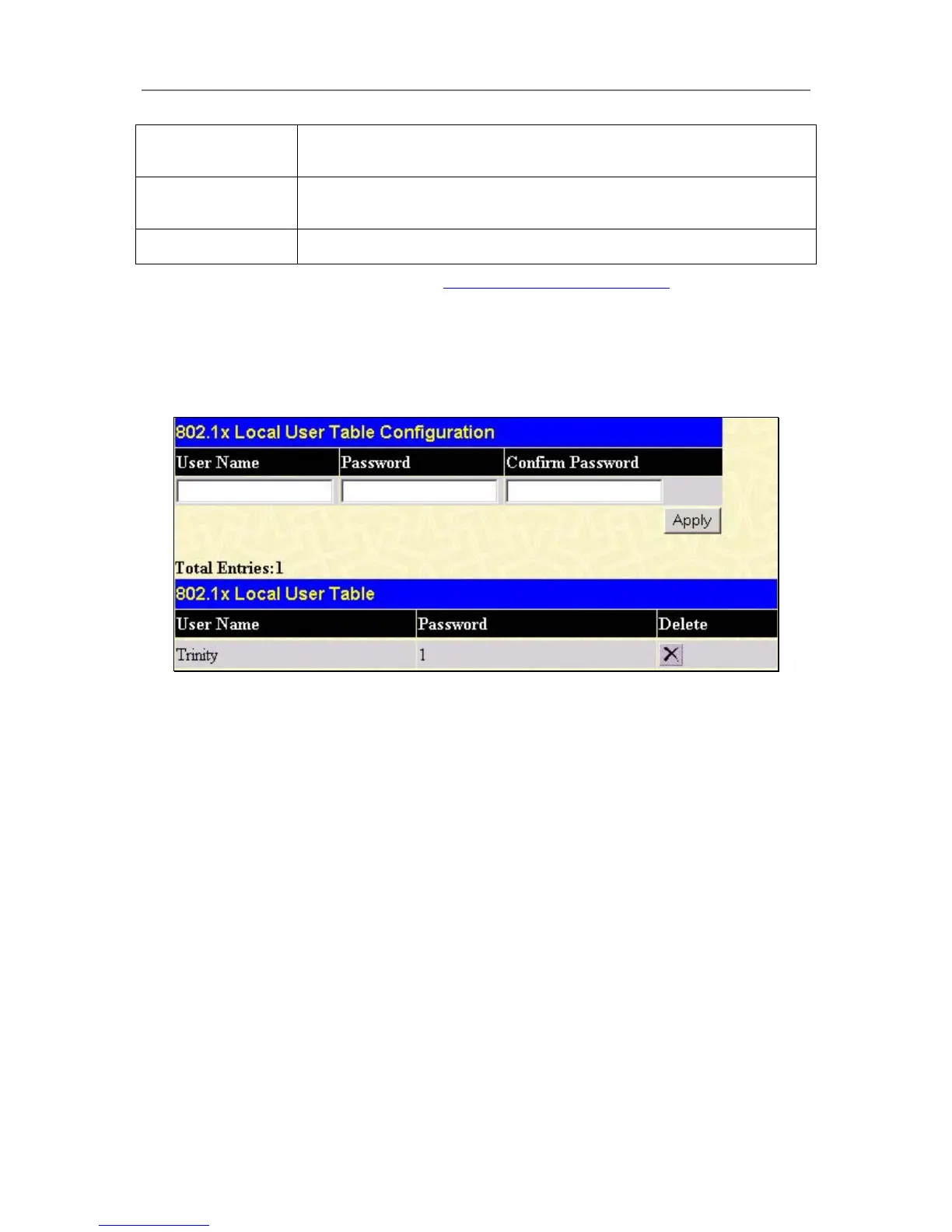
Configuring Local Users
In the configuration folder, open the Port Access Entity folder and click Local users to open the 802.1x Local
User Table Configuration window. This window will allow the user to set different local users on the Switch.
Figure 4- 52. 802.1x Local User Table Configuration window
Enter a User Name, Password and confirmation of that password. Properly configured local users will be
displayed in the 802.1x Local User Table in the same window.
PAE System Control
Port Capability Settings
Existing 802.1x port settings are displayed and can be configured using the window below.
Click Port Capability Settings on the PAE Access Entity folder on the Configuration menu to open the
802.1X Capability Settings window:





 To Next Page