D-Link DGS-3324SR Layer 3 Stackable Gigabit Ethernet Switch
33
the state of the link aggregation group. If two redundant link aggregation groups are configured on the switch,
STP will block one entire group, in the same way STP will block a single port that has a redundant link.
To configure port trunking, click on the Link Aggregation hyperlink in the Configuration folder to bring up the
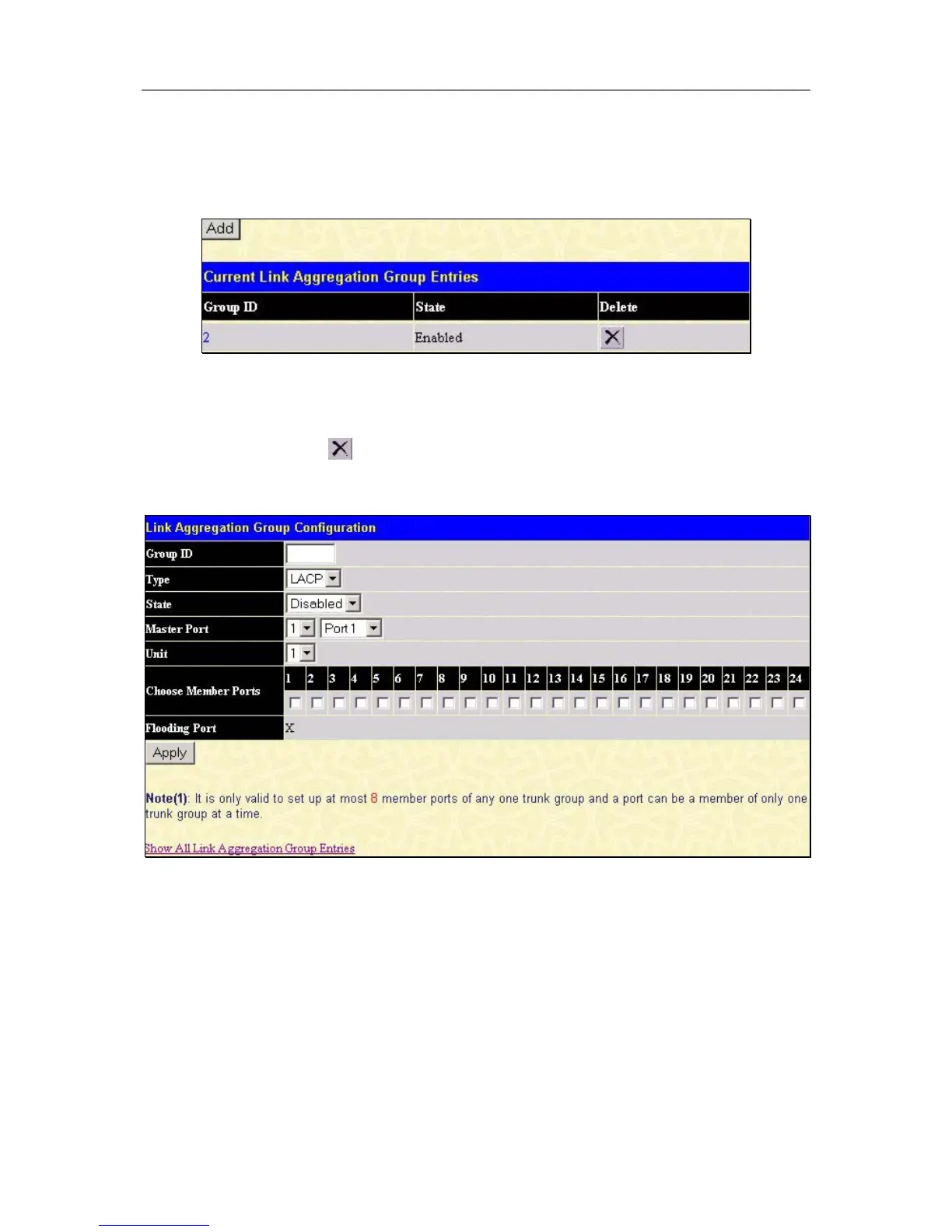
Current Link Aggregation Group Entries table:
Figure 4- 5. Current Link Aggregation Group Entries window
To configure port trunk groups, click the Add button to add a new trunk group and use the menu Link
Aggregation Group Configuration menu (see example below) to set up trunk groups. To modify a port trunk
group, double-click on it to bring up the Link Aggregation Group Configuration menu. To delete a port trunk
group, click the corresponding
under the Delete heading in the Current Link Aggregation Group Entries
table.
Figure 4- 6. Link Aggregation Group Configuration window – Add





 To Next Page