D-Link DGS-3324SR Layer 3 Stackable Gigabit Ethernet Switch
67
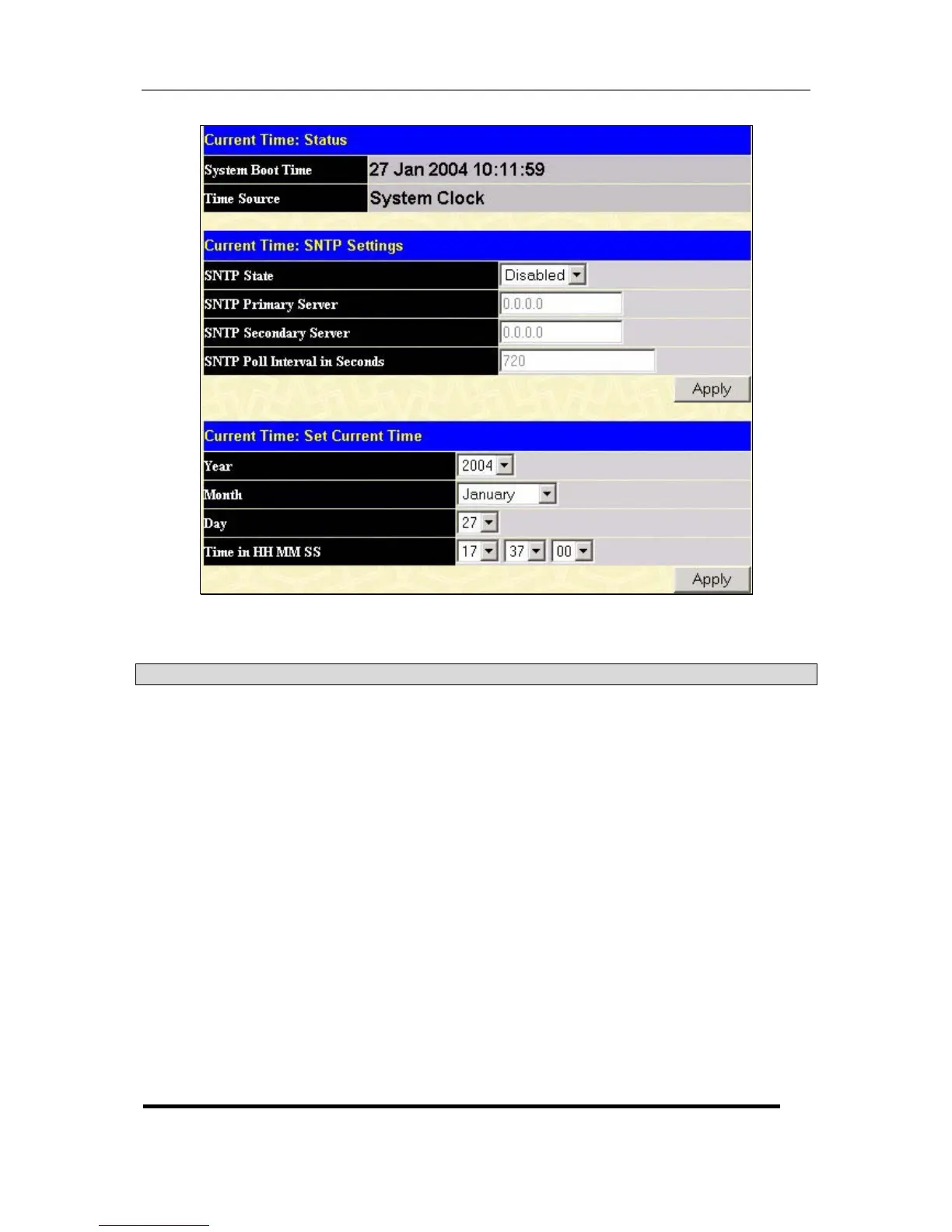
Figure 4- 36. Time Settings Page
The following parameters can set or are displayed:
Parameter Description
System Boot Time
Displays the time when the Switch was initially started for this session.
Time Source
Displays the time source for the system.
SNTP State
Use this pull-down menu to Enable or Disable SNTP.
SNTP Primary
Server
This is the primary server the SNTP information will be taken from.
SNTP Secondary
Server
This is the secondary server the SNTP information will be taken from.
SNTP Poll Interval in
Seconds
This is the interval, in seconds, between requests for updated SNTP
information.
Year
Enter the current year, if you want to update the system clock.
Month
Enter the current month, if you would like to update the system clock.
Day
Enter the current day, if you would like to update the system clock.
Time in HH MM SS
Enter the current time in hours, minutes and seconds if you would like
to update the system clock.





 To Next Page