EasyManua.ls Logo

Dahua ITC215-PW4I-IRLZF27135 - Device External Cable

Dahua ITC215-PW4I-IRLZF27135
109 pages
Print Icon
To Next Page IconTo Next Page
To Previous Page IconTo Previous Page
Loading...
Device Structure 6
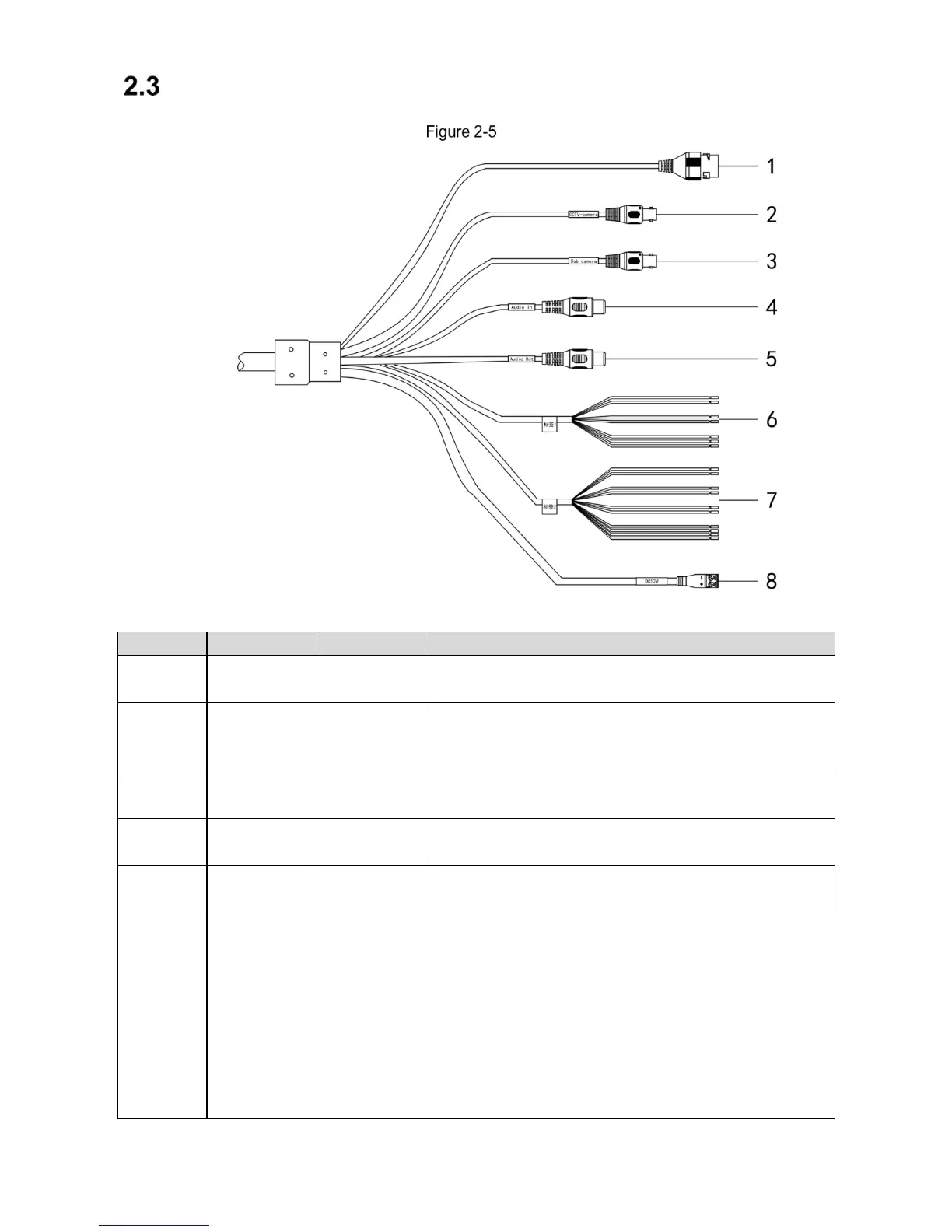
Device External Cable
Port diagram
Table 2-1 External cablefunction introduction
No.
Port
Function
Description
1
LAN
Network port
Connects to standard Ethernet, supports PoE power
supply.
2
CCTV-camera
Panoramic
camera input
port
Connects to panoramic camera, receives image input by
panoramic camera.
3
Sub-camera
Sub camera
input port
Function reserved.
4
AUDIO OUT
Audio output
port.
Audio output port.
5
AUDIO IN
Audio input
port.
Audio input port.
6
RS485
RS-485 port
RS-485
Light blue: RS-485_A1
Yellow black: RS-485_B1
Yellow green: RS-485_A2
White orange: RS-485_B2
RS-485/232
Blue white: RS-485_A/RS-232_R
Green white: RS-485_B/RS-232_T
Gray: GND

Related product manuals