6 x Parameter settings
Daikin RoCon HP
Daikin Controller
008.1420844_13 – 02/2016
Operating instructions
55
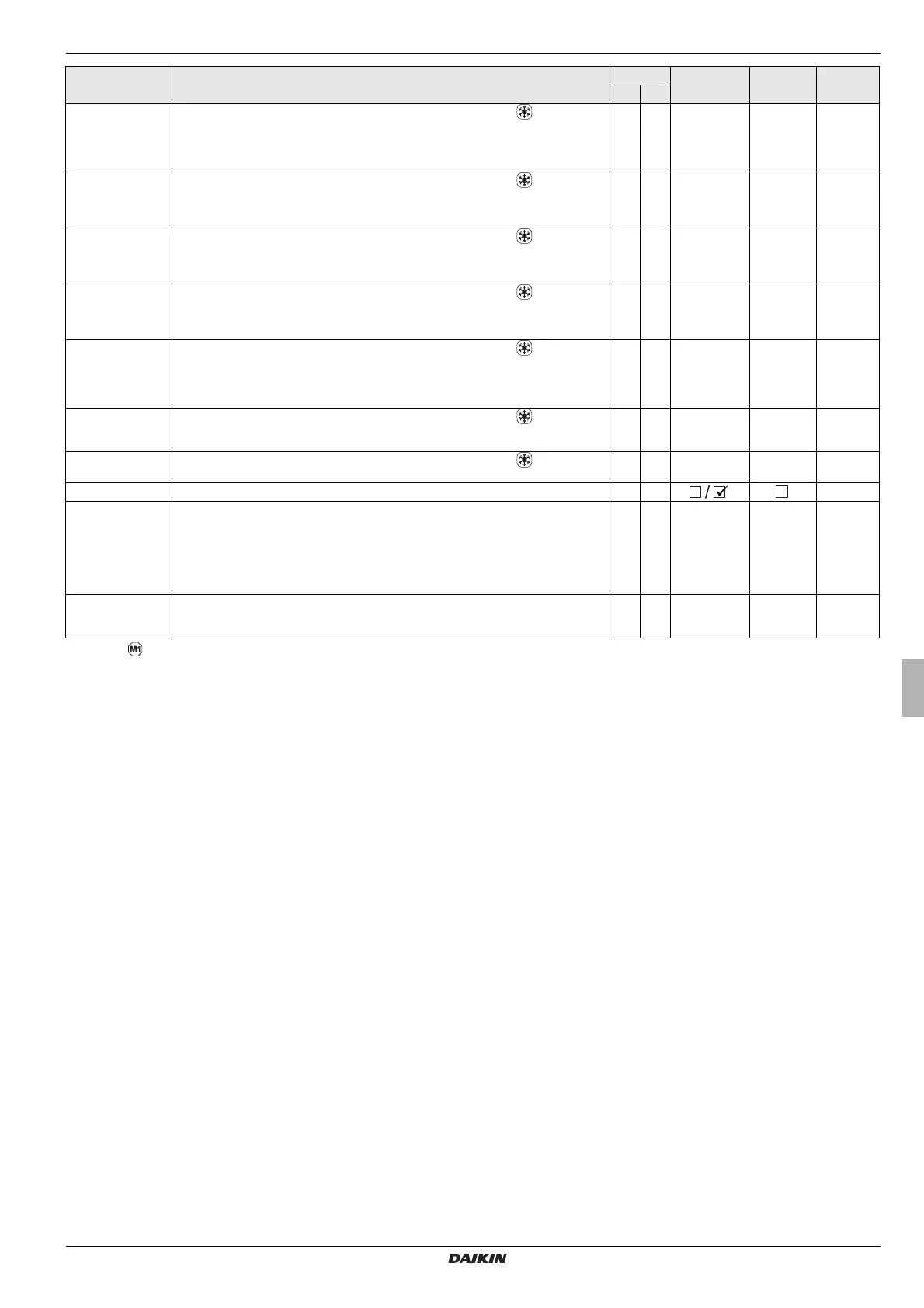
Start T-Out Cooling Can be used only if the assigned heat generator has a cooling function .
Only if parameter [HC Function] = 0:
Setting from which outside temperature the cooling operation with the highest cooling infeed
t
arget temperature [T-Flow Cooling start] starts (setting condition: operating mode "Cool-
ing").
E E 20 - 45 °C 24 °C 1 °C
Max T-Out Cooling Can be used only if the assigned heat gen
erator has a cooling function .
Only if parameter [HC Function] = 0:
Setting to determine from which outdoor temperature the lowest cooling flow temperature
[T-Flow Cooling max] is stipulated (set
ting condition: operating mode "Cooling").
E E 20 - 45 °C 35 °C 1 °C
T-Flow Cooling start Can be used only if the assigned heat gen
erator has a cooling function .
Only if parameter [HC Function] = 0:
Setting the cooling inflow target temperature at the start of cooling mode (outside tempera-
ture = parameter [Start T-Out Cooling]).
E E 5 - 25 °C 18 °C 1 °C
T-Flow Cooling max Can be used only if the assigned heat gen
erator has a cooling function .
Only if parameter [HC Function] = 0:
Setting the minimum cooling inflow target temperature. This is kept constant relative to the
o
utside temperature (parameter [Max T-Out Cooling]).
E E 5 - 25 °C 18 °C 1 °C
Min T-Flow Cooling Can be used only if the assigned heat gen
erator has a cooling function .
Only if parameter [HC Function] = 0:
Setting the absolute lower limit of the cooling inflow target temperature. The limitation is ef-
fective if a lower cooling inflow target temperature is determined based on other parameter
se
ttings.
N E 5 - 25 °C 18 °C 1 °C
T-Flow Cooling Can be used only if the assigned heat gen
erator has a cooling function .
Only if parameter [HC Function] = 1:
Setting the cooling inflow target temperature (f
ixed value) when cooling mode is active.
E E 8 - 30 °C 18 °C 1 °C
Cooling Setpoint adj Can be used only if the assigned heat gen
erator has a cooling function .
Parallel displacement of the cooling characteristic curve to match the set value.
N E -5.0 to +5.0 kW 0.0 K 1 K
Relay Test See Section 6.2.2, tab. 6-2. N E
-
Screed Function for screed drying
Off: Deactivated
On: The flow temperature is regulated according to the set screed programme. The day on
whi
ch the screed function is activated does not count towards the running time of the screed
programme. The first day starts as the day changes on the first day at 00:00. On the day of
activation we heat for the remaining time at the inflow temperature for the first day’s program
(see section 3.6.13).
N E Off
On
Off -
Screed Program Setting the procedural program for screed heating. An individual inflow temperature can be
set
for each day for a maximum period of 28 days. The end of the screed programme is de-
fined by the 1st. Day at target value setting "- - - -" (see chapter 3.6.13).
N E 10 - 70 °C per
heating day
See
tab. 3-11
1 °C
Tab. 6-16 Parameter in rotary switch setting "Configuration" level "Mixer Config"
Parameter Description Access Setting range
Min / Max
Factory
setting
Increment
BE HF



 To Next Page