3 Selection
3.1 Options and Accessories
3.1.1 Local Control Panel (LCP)
Ordering number Description
120Z0581 LCP for all IP20 units
Table 3.1 Ordering Number
Enclosure IP55 front
Maximum cable length to unit 3 m (10 ft)
Communication std. RS485
Table 3.2 Technical Data
3.1.2 Mounting of LCP in Panel Front
Ordering number Description
132B0201 LCP kit for remote mounting
Table 3.3 Ordering Number
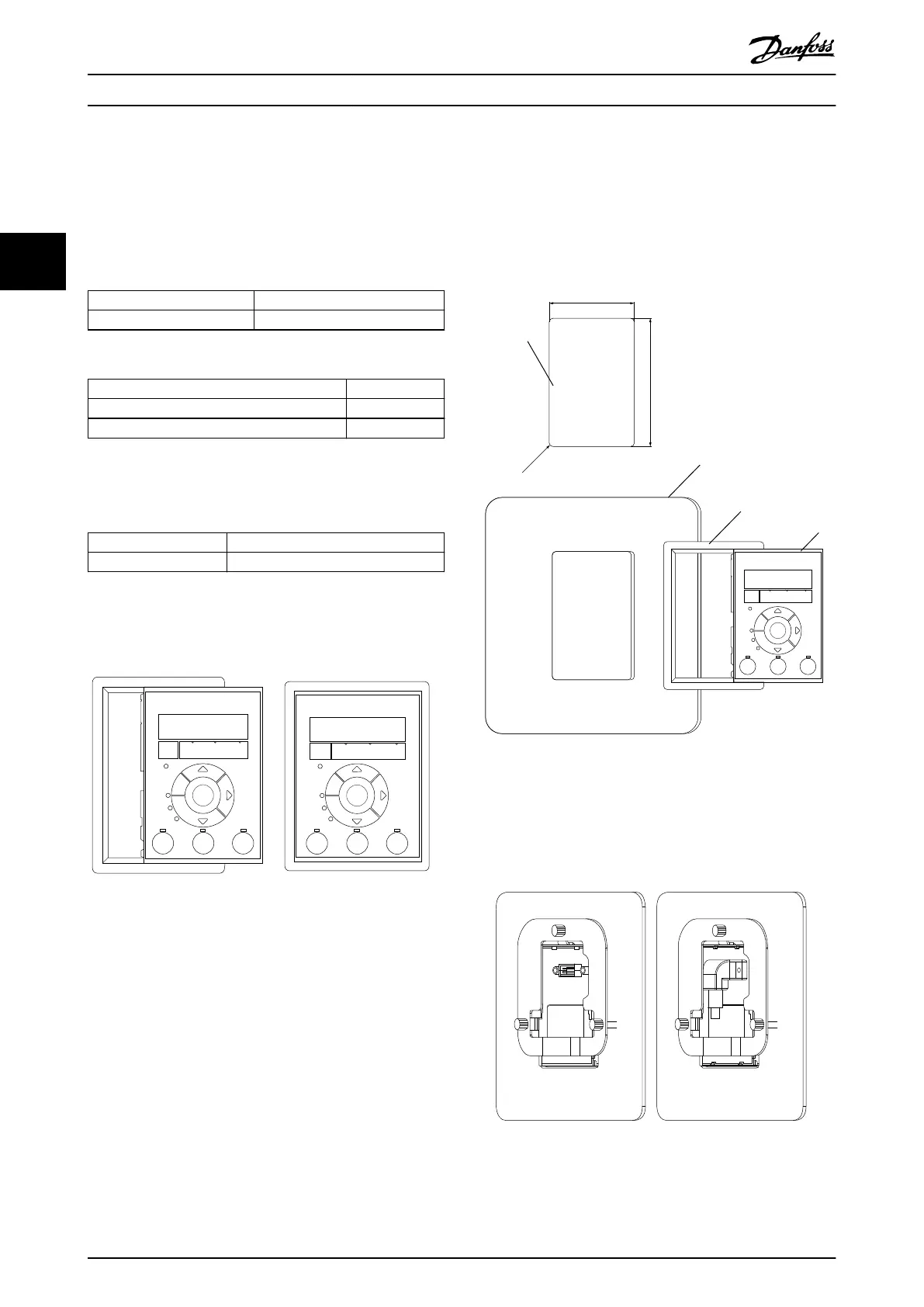
Step 1
Fit gasket on LCP.
130BB775.12
Status
Main
Menu
Quick
Menu
Menu
B
a
c
k
Com.
Status
Main
Menu
Quick
Menu
Hand
On
OK
Menu
O
Reset
Auto
On
Alarm
Warn.
On
Com.
Alarm
Warn.
On
B
a
c
k
Hand
OK
O
Reset
Auto
On On
Illustration 3.1 Fit Gasket
Step 2
Place LCP on panel, see dimensions of hole on
Illustration 3.2.
130BB776.11
R1.5 +_ 0.5
62.5 +_ 0.2
86 +_ 0.2
1
2
3
4
Status
Main
Menu
Quick
Menu
Menu
Com.
Alarm
Warn.
On
Hand
On
OK
O
Reset
Auto
On
B
a
c
k
Illustration 3.2 Place LCP on Panel
Step 3
Place bracket on back of the LCP, then slide down.
Tighten screws and connect cable female side to LCP.
Illustration 3.3 Place Bracket on LCP
Selection
VLT
®
Compressor Drive CDS 803
24 Danfoss A/S © 12/2015 All rights reserved. MG18N202
33





 To Next Page