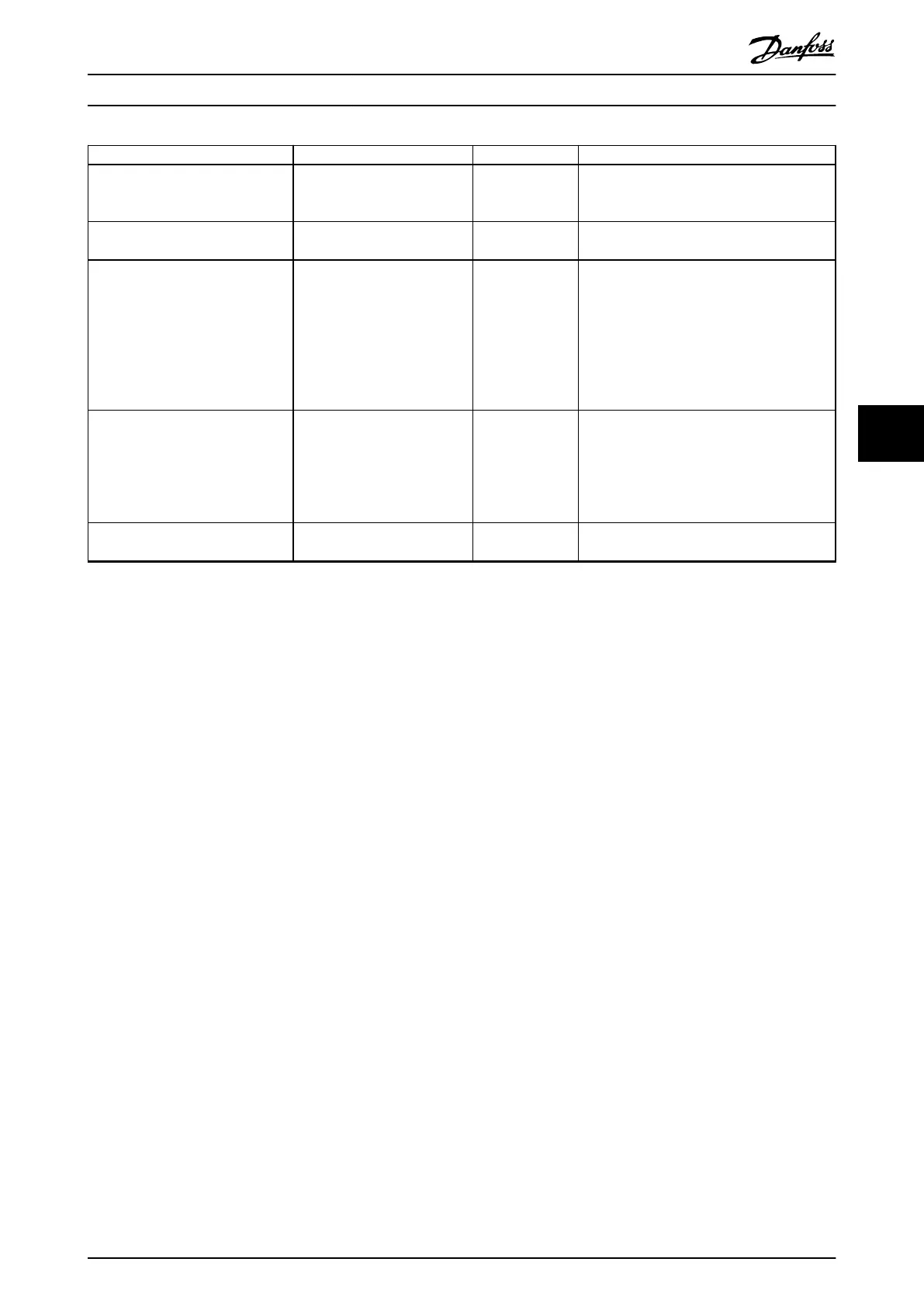
Parameter Option Default Function
Parameter 8-01 Control Site [0] Digital and ctrl.word
[1] Digital only
[2] Controlword only
[0] Digital and
ctrl.word
Select if digital, bus, or a combination of both
should control the frequency converter.
Parameter 8-30 Protocol [0] FC
[2] Modbus RTU
[0] FC Select the protocol for the integrated RS485
port.
Parameter 8-32 Baud Rate [0] 2400 Baud
[1] 4800 Baud
[2] 9600 Baud
[3] 19200 Baud
[4] 38400 Baud
[5] 57600 Baud
[6] 76800 Baud
[7] 115200 Baud
[2] 9600 Baud Select the baud rate for the RS485 port.
Parameter 20-00 Feedback 1 Source [0] No function
[1] Analog Input 53
[2] Analog Input 54
[3] Pulse input 29
[100] Bus Feedback 1
[101] Bus Feedback 2
[0] No function Select which input to use as the source of the
feedback signal.
Parameter 20-01 Feedback 1
Conversion
[0] Linear
[1] Square root
[0] Linear Select how to calculate the feedback.
Table 6.6 Closed-loop Applications Set-up
Changes made
Changes Made lists all parameters changed from default
settings.
•
The list shows only parameters which have been
changed in the current edit set-up.
•
Parameters which have been reset to default
values are not listed.
•
The message Empty indicates that no parameters
have been changed.
To change parameter settings
1. To enter the Quick Menu, press [Menu] until
indicator in display is placed above Quick Menu.
2.
Press [
▲
] [
▼
] to select quick guide, closed-loop
set-up, compressor set-up, or changes made, then
press [OK].
3.
Press [
▲
] [
▼
] to browse through the parameters in
the Quick Menu.
4. Press [OK] to select a parameter.
5.
Press [
▲
] [
▼
] to change the value of a parameter
setting.
6. Press [OK] to accept the change.
7. Press either [Back] twice to enter Status, or press
[Menu] once to enter Main Menu.
The Main Menu accesses all parameters
1. Press [Menu] until indicator in display is placed
above Main Menu.
2.
Press [
▲
] [
▼
] to browse through the parameter
groups.
3. Press [OK] to select a parameter group.
4.
Press [
▲
] [
▼
] to browse through the parameters in
the specic group.
5. Press [OK] to select the parameter.
6.
Press [
▲
] [
▼
] to set/change the parameter value.
6.3.3 Main Menu
Press [Main Menu] to access and program all parameters.
The main menu parameters can be accessed readily unless
a password has been created via parameter 0-60 Main
Menu Password.
For most applications, it is not necessary to access the
main menu parameters. The quick menu provides the
simplest and quickest access to the typical required
parameters.
How to Program Design Guide
MG18N202 Danfoss A/S © 12/2015 All rights reserved. 47
6
6





 To Next Page