English
OK
5
if
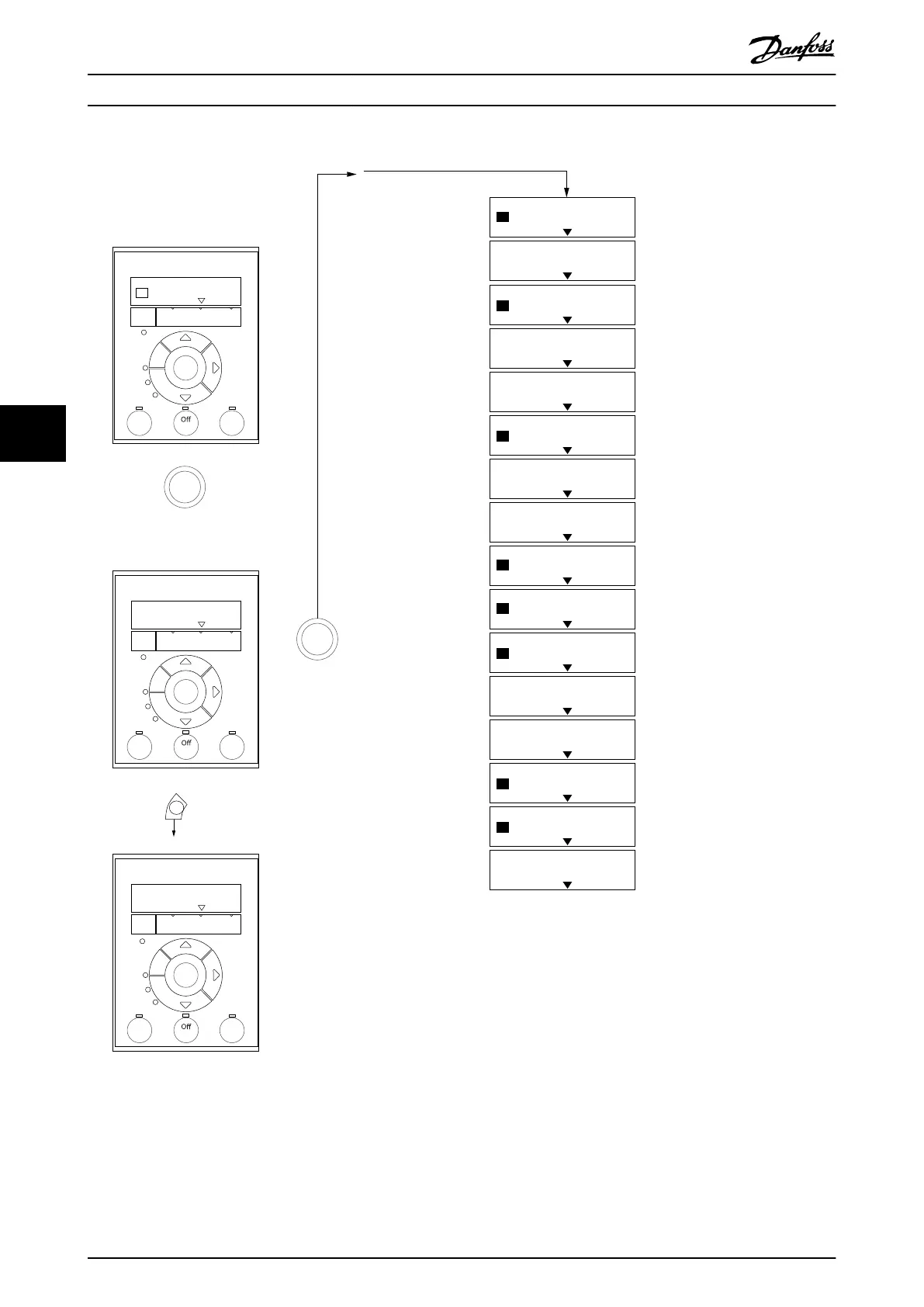
Select Language
... the CDS 803 Quick Menu starts
Size related
Select Grid Type
4
Select Main Menu Password
6
[0]
[0]
OK
B
a
c
k
Status
Main
Menu
Quick
Menu
Hand
On
OK
Menu
Reset
Auto
On
Alarm
Warn.
On
Status Screen
The quick guide can always be
entered via the Quick Menu!
Power-up screen
At power-up the user is
asked to choose the
prefered laguage.
Select language
[1] English
0.0 Hz
0.0 kW
Setup 1
Setup 1
Status
Main
Menu
Quick
Menu
Hand
On
OK
Menu
Reset
Auto
On
Alarm
Warn.
On
Press OK to start Quick Guide
Press Back to skip it
Setup 1
Status
Main
Menu
Quick
Menu
Hand
On
OK
Menu
Reset
Auto
On
Alarm
Warn.
On
The next screen will be
the quick guide screen.
Quick guide screen
1
2
if
3
B
a
c
k
B
a
c
k
B
a
c
k
Com.
Com.
Com.
130BD873.13
Size related
Select Compressor Selection
7
200 Hz
Select Max. reference
8
Analog in 53
Select Reference 1 Source
9
[1]
30 s
Select Ramp 1 Ramp Up Time
10
30 s
Select Ramp 1 Ramp Down Time
11
Stop inverse
Select Terminal 27 Digital In
12
Alarm
Select Relay 1
13
Drive Running
Select Relay 2
14
0.07 V
Select Terminal 53 Low Voltage
15
10 V
Select Terminal 53 High Voltage
16
Digital and ctrl.word
Select Control Site
17
[0]
FC
Select Protocol
18
[0]
Setup 1
1
Select Address
19
Setup 1
Setup 1
Setup 1
Setup 1
Setup 1
Setup 1
Setup 1
Setup 1
Setup 1
Setup 1
Setup 1
Setup 1
Setup 1
Setup 1
Setup 1
[6]
[9]
[5]





 To Next Page