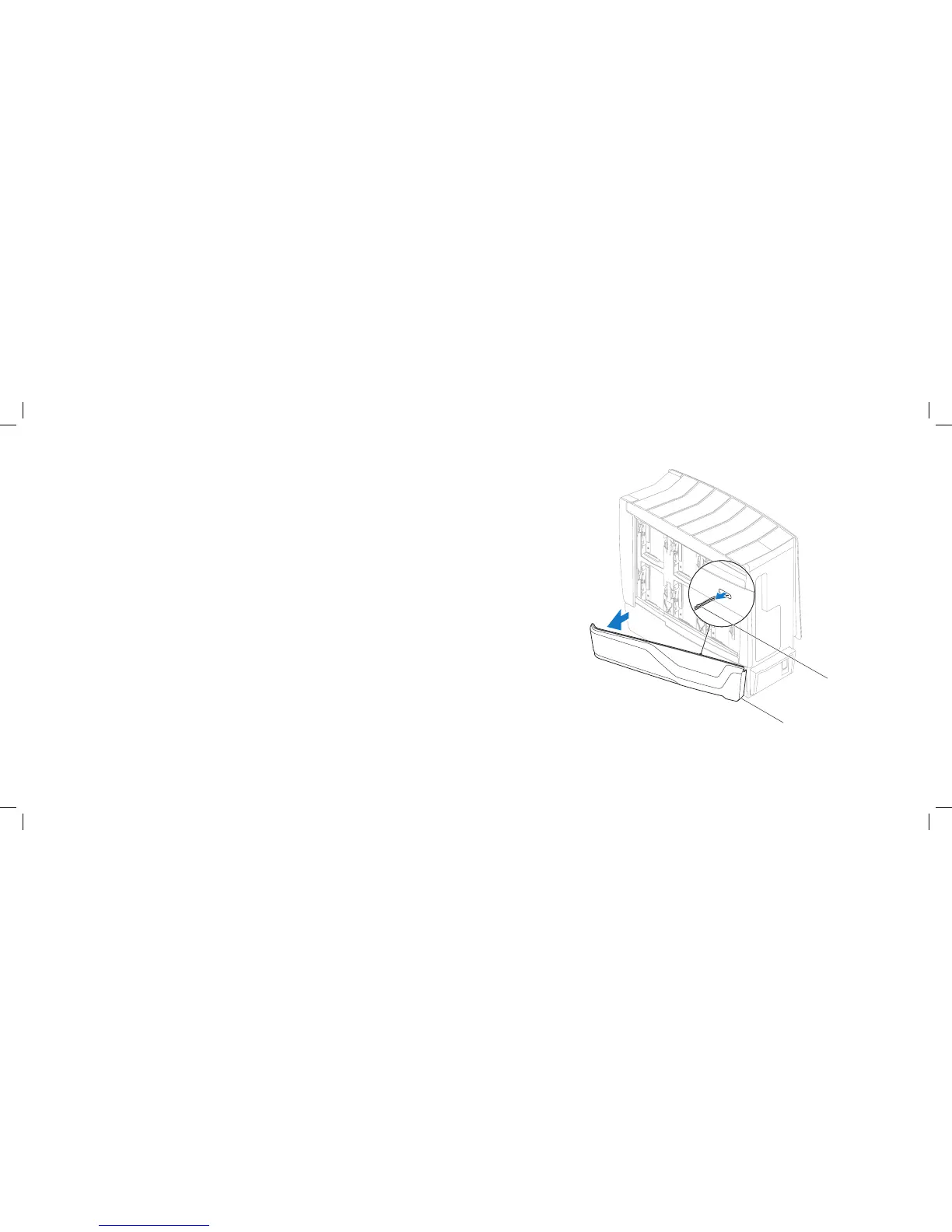
1 right bottom-panel 2 right bottom-panel cable
Removing the Right Bottom-Panel
Follow the instructions in “Before You Begin” on page 1. 6.
Remove the right side-panel (see “Removing the Right Side-Panel” on 2.
page 16).
Disconnect the right bottom-panel cable from the SIDE_RIGHT connector on 3.
the master I/O board.
Remove the hard-drive fans (see “Removing the Hard-Drive Fan(s)” on 4.
page 51).
Press out to release the right bottom-panel clamps that secure the right 5.
bottom-panel to the chassis.
Remove the right bottom-panel.6.
Replacing the Right Bottom-Panel
Follow the instructions in “Before You Begin” on page 1. 6.
Route the right bottom-panel cable through the chassis and connect it to 2.
the SIDE_RIGHT connector on the master I/O board.
Align the right bottom-panel clamps with the clamp inserts on the chassis.3.
Push the right bottom-panel towards the chassis until the right bottom-4.
panel clamps snap into place.
Replace the hard-drive fans (see “Replacing the Hard-Drive Fan(s)” on 5.
page 52).
Replace the right side-panel (see “Replacing the Right Side-Panel” on 6.
page 16).
Connect your computer and devices to electrical outlets, and then turn 7.
them on.











 To Next Page