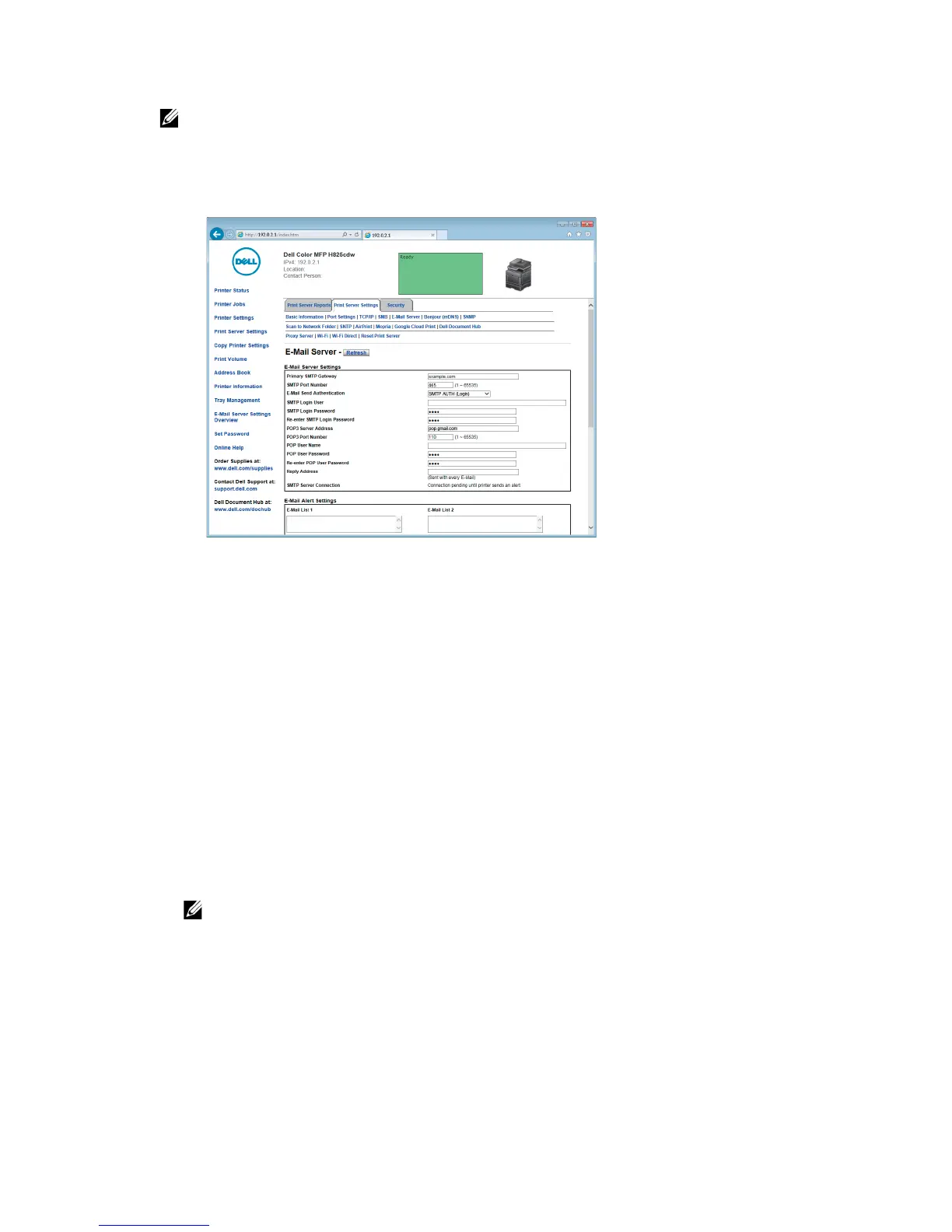
• In this procedure, the server settings for a Gmail account are used as an example. The server
settings differ for each e-mail service.
• Information about the Gmail account is based on the information as of June 2015. For the
latest information, visit the homepage of Gmail.
a In the Primary SMTP Gateway text box, set the primary SMTP gateway.
For example: smtp.gmail.com
b In the SMTP Port Number text box, enter the SMTP port number.
This must be 25, 465, 587 or between 5000 and 65535.
For example: 465
c In the E-Mail Send Authentication drop-down list box, specify the authentication
method for outgoing e-mail.
For example: SMTP AUTH (Login)
d In the SMTP Login User text box, set the SMTP login user.
Up to 63 alphanumeric characters, periods, hyphens, underscores, and at
symbols (@) can be used. If specifying more than one address, separate them
using commas.
For example: abc@gmail.com
• It is not recommended to share a personal e-mail account with the Scan to Email function
of the printer. Instead, use an e-mail account dedicated to Scan to Email function.
e In the SMTP Login Password text box, set the SMTP account password.
Up to 31 alphanumeric characters can be used.
f In the Re-enter SMTP Login Password text box, enter the login password again
to check it.
g Perform either of the following:



 To Next Page