Connecting Your Printer to Mobile Devices |
61
Selecting the Version of the Google Cloud Print Service
Select the version of the Google Cloud Print service from either version 1.1 or version
2.0.
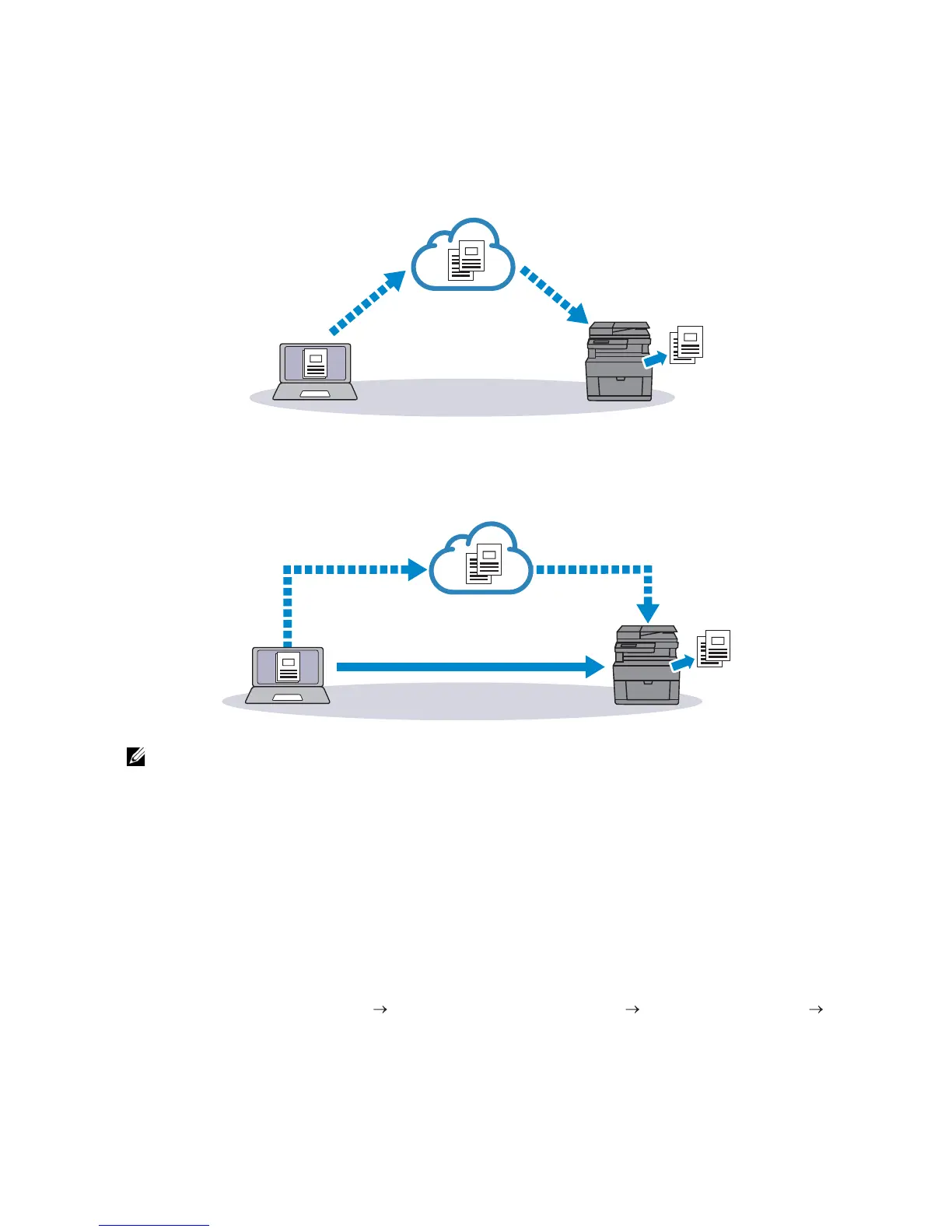
Google Cloud Print version 1.1 sends the print data to the printer via Internet. For this
version, the printer needs to be connected to the Internet.
Google Cloud Print version 2.0 sends the print data to the printer either via Internet or via
local network. This version is recommended for the environment where the Internet
connection cannot be used.
• Available options for printing may vary according to your device or the version of the Google
Cloud Print service.
• You cannot simultaneously use both version 1.1 and version 2.0 of the Google Cloud Print service
on a printer.
Registering the Printer to Your Google Account
For Google Cloud Print Version 1.1
1 Start Dell Printer Configuration Web Tool.
See "Starting Dell Printer Configuration Web Tool."
2 Click Print Server Settings the Print Server Settings tab Google Cloud Print
Register This Device to Google Cloud Print.
A sheet with a URL for the Google Cloud Print printer registration web site is printed.
3 From the web browser of your computer, visit the Google web site and sign in with
your Google account.



 To Next Page