2. For M.2 2230 SSD:
a. Place the M.2 SSD into the SSD holder.
b. Replace the (M2x2) screw to secure the M.2 SSD to the holder.
c. Place the M.2 SSD module onto its slot on the computer.
d. Replace the (M2x3) screw to secure the M.2 SSD module to the computer.
3. Place the thermal plate above the M.2 SSD module.
4. Replace the (M2x3) screw to secure the SSD thermal plate to the M.2 SSD.
5. Repeat the above steps to install the other SSD modules in the computer.
Next steps
1. Install the base cover.
2. Install the SD card.
3. Follow the procedure in after working inside your computer.
Secondary memory module
Removing the secondary memory module
Prerequisites
1. Follow the procedure in before working inside your computer.
2. Remove the SD card.
3. Remove the base cover.
About this task
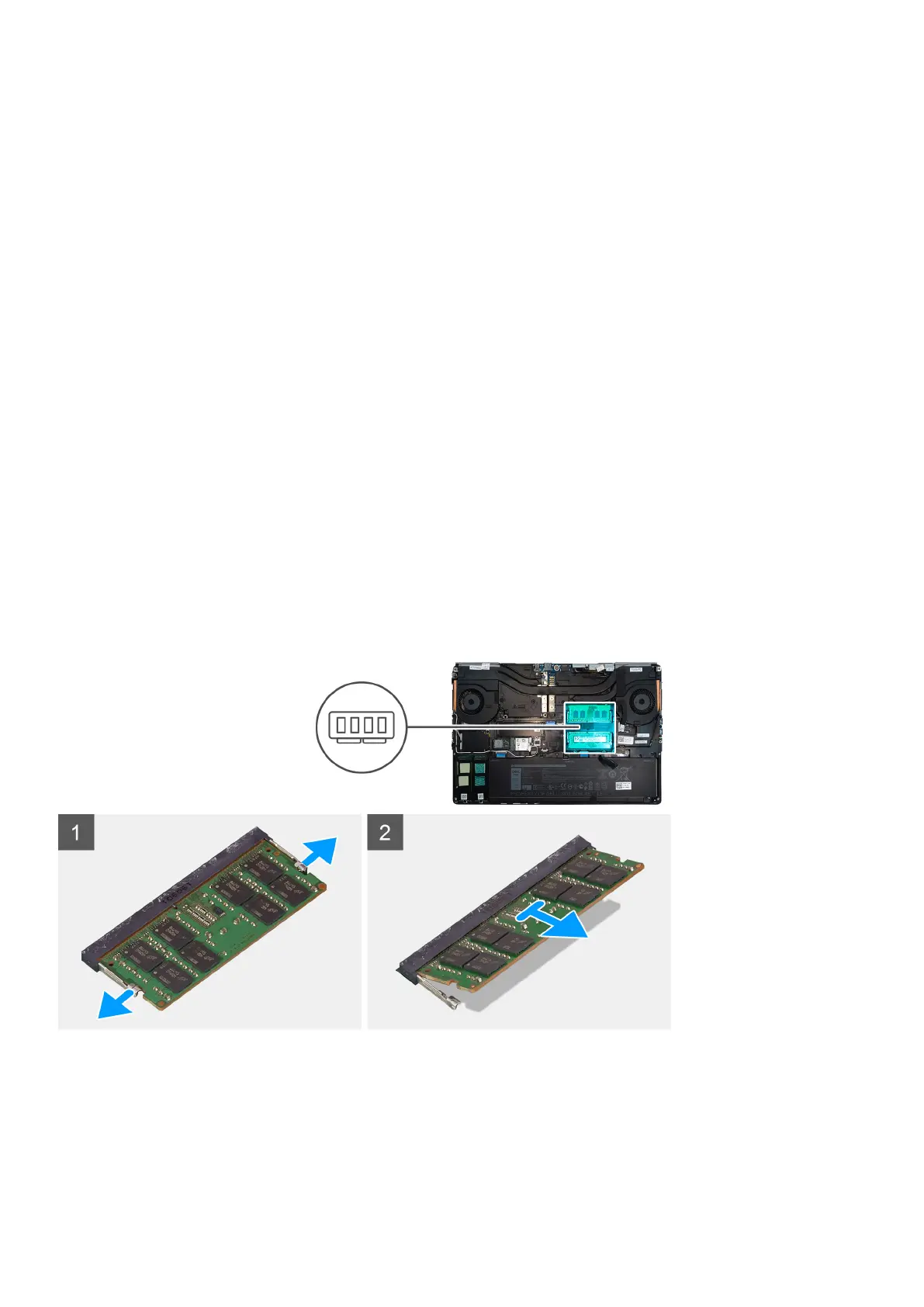
The figure indicates the location of the secondary memory module and provides a visual representation of the removal procedure.
Steps
1. Pry the securing clips from both side of the memory module until the memory module pops up.
2. Remove the memory module from the memory-module slot.
Disassembly and reassembly
31















 To Next Page