EasyManua.ls Logo

Delta 32-100 - Replacing Cutter.13; Some Typical Operations.13; Edge Joining.13

Delta 32-100
20 pages
Print Icon
To Next Page IconTo Next Page
To Previous Page IconTo Previous Page
Loading...
REPLACING
CUTTER
When
it
becomes
necessary
to
replace
the
cutter
on
your
plate
joiner,
proceed
as
follows:
1.
MAKE
CERTAIN
THE
MACHINE
IS
DISCON¬
NECTED
FROM
THE
POWER
SOURCE.
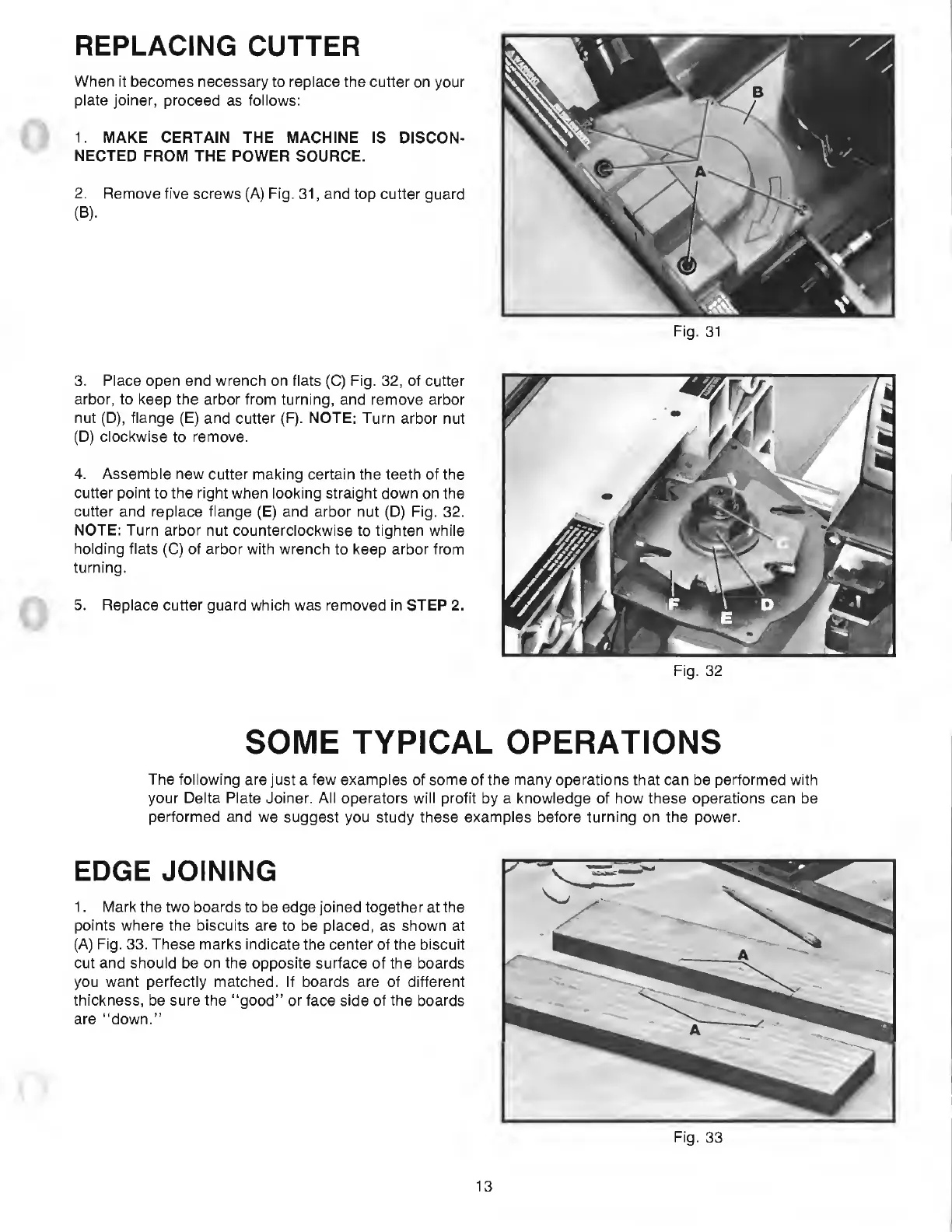
2.
Remove
five
screws
(A)
Fig.
31,
and
top
cutter
guard
(B).
3.
Place
open
end
wrench
on
flats
(C)
Fig.
32,
of
cutter
arbor,
to
keep
the
arbor
from
turning,
and
remove
arbor
nut
(D),
flange
(E)
and
cutter
(F).
NOTE:
Turn
arbor
nut
(D)
clockwise
to
remove.
4.
Assemble
new
cutter
making
certain
the
teeth
of
the
cutter
point
to
the
right
when
looking
straight
down
on
the
cutter
and
replace
flange
(E)
and
arbor
nut
(D)
Fig.
32.
NOTE:
Turn
arbor
nut
counterclockwise
to
tighten
while
holding
flats
(C)
of
arbor
with
wrench
to
keep
arbor
from
turning.
5.
Replace
cutter
guard
which
was
removed
in
STEP
2.
Fig.
32
SOME
TYPICAL
OPERATIONS
The
following
are
just
a
few
examples
of
some
of
the
many
operations
that
can
be
performed
with
your
Delta
Plate
Joiner.
All
operators
will
profit
by
a
knowledge
of
how
these
operations
can
be
performed
and
we
suggest
you
study
these
examples
before
turning
on
the
power.
EDGE
JOINING
1.
Mark
the
two
boards
to
be
edge
joined
together
at
the
points
where
the
biscuits
are
to
be
placed,
as
shown
at
(A)
Fig.
33.
These
marks
indicate
the
center
of
the
biscuit
cut
and
should
be
on
the
opposite
surface
of
the
boards
you
want
perfectly
matched.
If
boards
are
of
different
thickness,
be
sure
the
“good”
or
face
side
of
the
boards
are
“down.”
Fig.
33
13

Related product manuals