Ultron DPS Series
122
No. Icon/ Text
Button
Function
(Yes or
No)
Text/
Digital
Display
(Yes or
No)
Symbol
Display
(Yes or
No)
Description
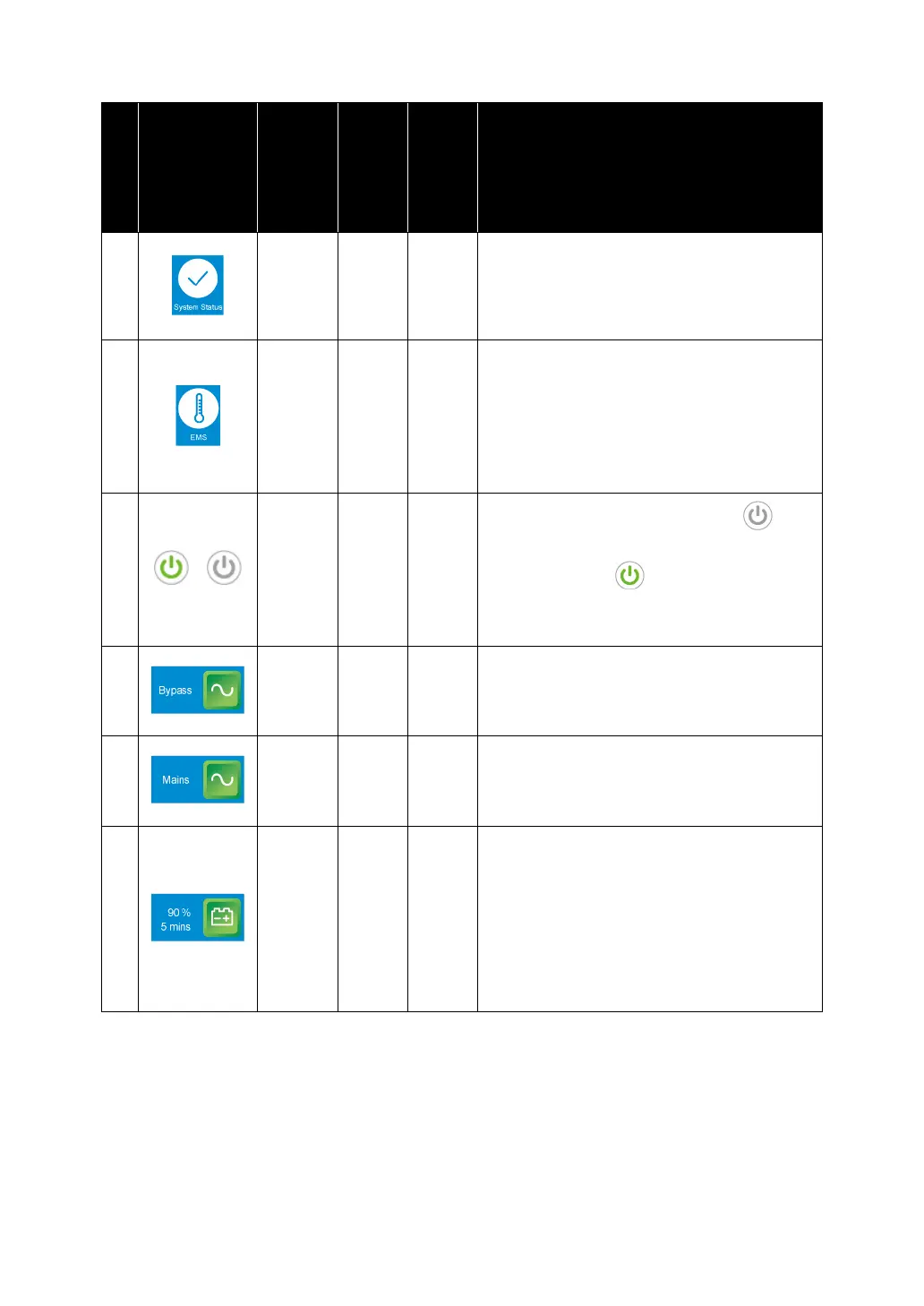
11
Tap the button to check the system
status, including auxiliary power card
status, system control card status and
parallel communication card status.
12
Tap the button to check the EMS status.
To enable the function, you have to
connect an optional EMS 1000
(EnviroProbe) to the UPS and complete
relevant settings. For details, refer to
8.
Optional Accessories
.
13
/
ON/ OFF Button. The gray icon ( )
indicates that the inverter is OFF.
The green icon ( ) indicates that the
power-on process is completed and the
inverter is ON.
14
1. Indicates bypass input status (Green:
Normal/ Red: Abnormal or OFF).
2. Bypass input screen shortcut button.
15
1. Indicates main input status (Green:
Normal/ Red: Abnormal or OFF).
2. Main input screen shortcut button.
16
1. Indicates battery status (Green:
Normal/ Flashing Green & Gray:
Battery Mode/ Flashing Red & Gray:
Battery Not Connected).
2. Shows battery remaining capacity (%)
and battery remaining time (minutes).
3. Battery status screen shortcut button.











 To Next Page