11 G-code Application
DVP-PM Application Manual
11-12
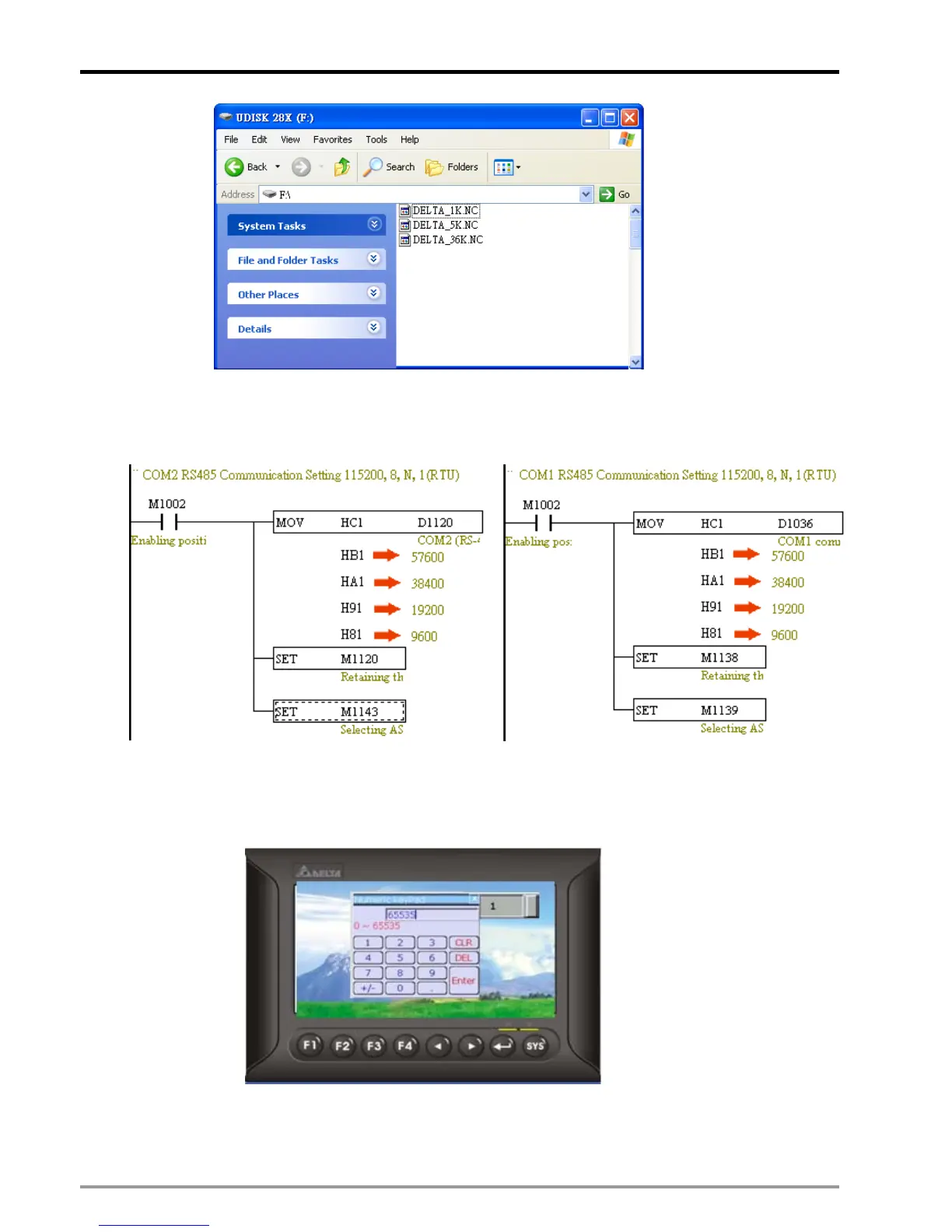
Step 3: Edit O100 main program. M-code (G-code) processing and COM port (COM1/COM2) should be set
up in O100 to communicate with HMI. Communication format: 115200(57600/38400/19200/9600), 8, N,
1(RTU). The communication format here should match the format set up in HMI.
(A) Program for set up COM1
(B) Program for set up COM2
Step 4: Use PMSoft to enable PEP protection on O100 or other constant programs nad download the
program to DVP-PM. The set up steps are the same as Step 2 of PMGDL download method.
Step 5: connect DVP-20PM00M with B type HMI by communication cable.
(a) Enter 65535 in the value input object on the screen of HMI.
(b) Press ENTER on the screen to enter the G-code download window.


 To Next Page
 Loading...