1) Set up a Wi-Fi logger for connection to a wireless network first. Connect the USB cable to a USB port
on your computer, inserting the other end in the USB port on the ELITEpro XC (Hint: look for this
USB symbol: ). If a USB cable is used inside an electrical panel, it must be rated to the
appropriate voltage or wrapped in an appropriately rated insulating sleeve. The DENT-supplied cable
does not meet this requirement without an insulating sleeve.
2) If it does not launch automatically, start ELOG 15 and connect to the logger.
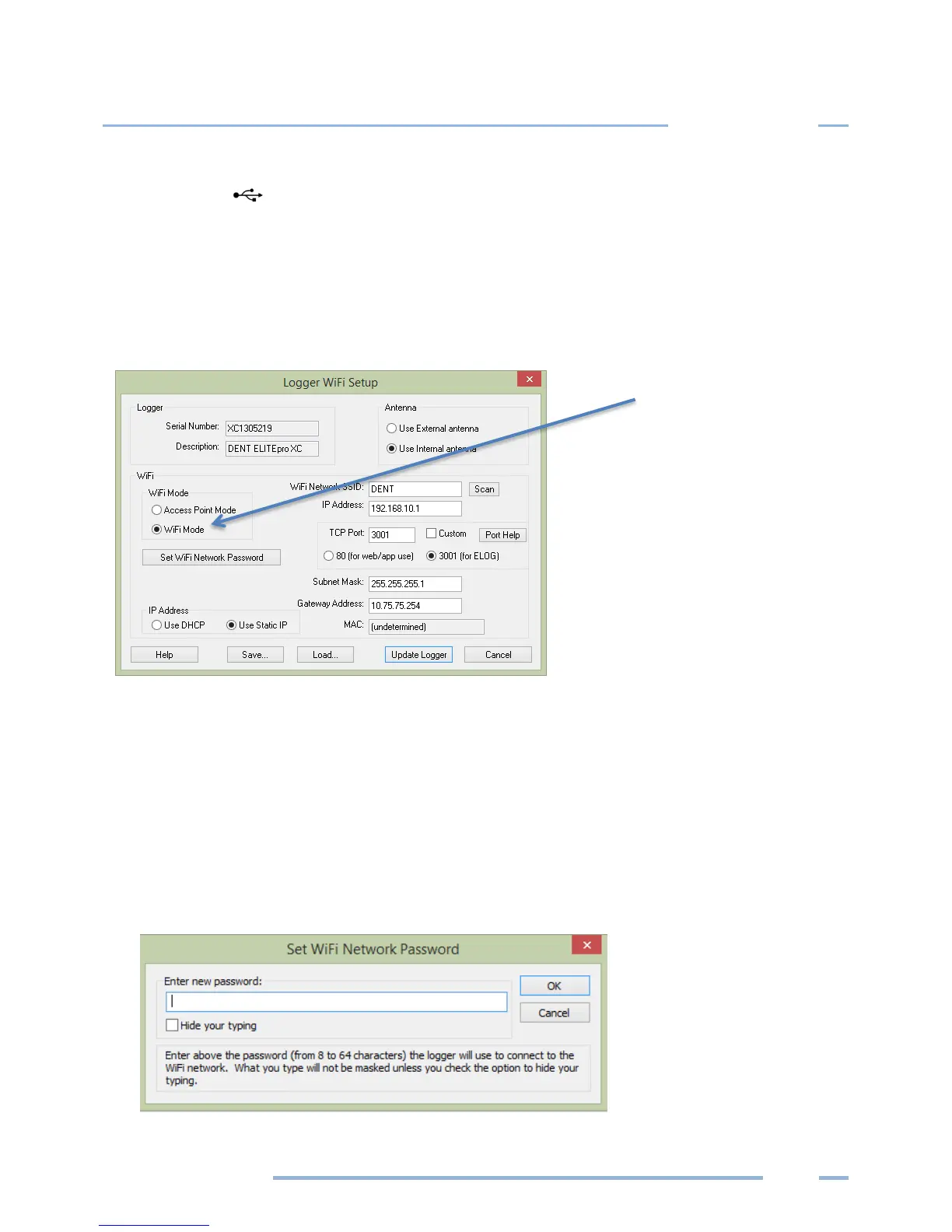
3) From the ELOG menu, select Logger > Communication > Logger Wi-Fi Setup…. The Logger Wi-Fi
Setup dialog box appears.
Note: All ELITEpro XC loggers that are equipped with a Wi-Fi package contain an internal antenna. An
external antenna is optional. You may toggle between using the internal and external antenna (if it is
available on your logger) by selecting the appropriate radio button.
4) Select the Wi-Fi Mode radio button in the Wi-Fi Mode section of the dialog box.
A network administrator may be needed for the next three steps.
5) Enter the name of the wireless network in the Wi-Fi Network SSID field.
6) Click Set Wi-Fi Network Password and enter the network’s password in the dialog box.



 To Next Page